Caimera AI Review: Professional AI Fashion Photography at Scale
Overview & Purpose
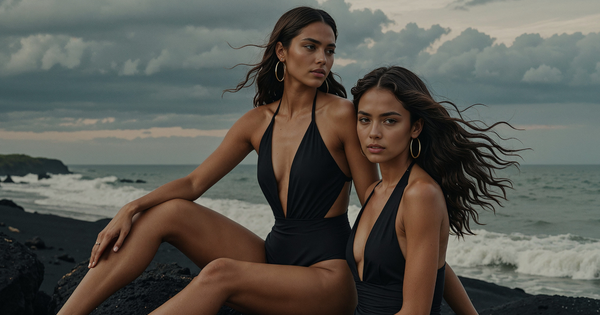
Caimera AI is an AI-powered fashion photography platform designed to generate studio-quality on-model catalog images, videos, and marketing visuals for e-commerce brands. It allows users to upload flat-lay product photos or sketches and instantly transform them into realistic, on-model shots featuring AI-generated models, custom backgrounds, and professional styling—eliminating the need for expensive physical photoshoots, models, studios, or retouching teams. Primary use cases include bulk catalog production, campaign creation, ad visuals, lookbooks, social media content, and rapid prototyping (e.g., sketch-to-image or product placement on any scene). It is specifically built for fashion e-commerce, handling garment details, fabric textures, lighting, and consistency at scale. The target audience includes e-commerce businesses, global fashion brands, marketers, catalog teams, and creative directors at mid-to-large brands who need high-volume, rights-free visuals without technical or design expertise. Over 1,000 brands reportedly use it for faster content creation and improved sales metrics.

Key Features & Capabilities
Core functionality revolves around AI model generation and product integration: upload a flat-lay or product image, select or customize AI models (across sizes 0–28), apply creative templates, and generate studio-quality outputs in minutes. Standout features include best-in-class product accuracy and consistency (outperforming general tools like Midjourney or ChatGPT in garment rendering), custom exclusive AI models per brand (including digital twins), flat-lay to bulk catalog conversion, image-to-video (Move tool), parallel generations, 4K upscaling, bulk resize/re-center/background swap, recolor, Photoshop-style post-processing, model/background swap, prompt-to-image, sketch-to-image, and team collaboration. Additional capabilities cover campaign idea generation, moodboard integration, and seamless workflows for editorial (Fluid) and catalog (Click) shots. Enterprise extras include full-service support, legal indemnification, creative consulting, and integrations with DAM, Shopify, WooCommerce, and design tools. It differentiates through fashion-specific AI that understands construction, folds, lighting, and skin realism “as a camera does,” plus rights-free assets and enterprise-grade security. Limitations include a credit-based system (potentially costly for very high volumes without enterprise), less robust video generation compared to some competitors, and no native mobile app. General AI tools lack its specialized consistency for product-on-model accuracy.

User Experience
The platform emphasizes simplicity with “in just a few clicks” workflows, making it accessible to non-technical users—no design or coding skills required. Interface quality appears intuitive and template-driven, supporting creative direction, bulk actions, and collaboration without overwhelming complexity. Learning curve is low; users report quick onboarding via personalized training (enterprise) or self-serve resources. Documentation and support include an extensive resources section with blogs, case studies, glossaries, templates, showcases, changelog, testimonials, and YouTube tutorials. Enterprise plans add live human support, workshops, and custom onboarding. FAQ covers common queries like integration, rights ownership, and speed. Public feedback on ease is positive via social channels, though independent help-center access appears limited (site resources serve as primary hub).

Performance & Reliability
Generation is fast—catalog images in minutes, videos in seconds-to-minutes—with parallel processing for bulk jobs and high-res outputs up to 4K suitable for billboards. Performance claims include consistent model/product rendering, accurate shadows/lighting, and real-world ROI like 7x click increases and 50% higher ROAS for users. Over 650k images generated to date demonstrate reliability at scale. No widespread known issues or common complaints appear in public reviews; fashion-specific training minimizes common AI artifacts like distorted fabrics or inconsistent poses seen in general tools. Minor limitations during high-demand periods (usage caps) are noted in terms, and video length/quality may vary. Overall reliability is strong for its niche, with enterprise-grade privacy and content ownership ensuring dependable professional use.
Pricing & Value
Caimera offers a free trial (no credit card required) for testing. Paid access uses a credit system that refreshes monthly and rolls over: actions like catalog generations cost 10 credits each (Click), editorial/product placements 40 credits (Fluid), videos 10 credits per 5 seconds (Move), with edits/upscales often free or low-cost (1–30 credits). Additional credits available at $75 per pack. Standard plans start affordably with credit allocations (e.g., enough for 100+ images monthly), while Enterprise begins at $1,500/month (or yearly with 20% savings) for bespoke AI models, full-service studio support, unlimited high-volume workflows, and extras like legal protections. No per-image penalties for iterations within plans. Value proposition is exceptional versus traditional photoshoots (thousands per session) or generic AI tools—delivering professional results at fraction of cost with proven sales lifts. Compared to alternatives, it excels in fashion accuracy and bulk efficiency but may require enterprise for largest teams; ideal ROI for brands producing hundreds of visuals monthly.
Practical Tutorial
A common task is converting a flat-lay product photo into a full on-model catalog image (e.g., for Shopify listings). Here is a step-by-step walkthrough based on official workflows and tutorials:
- Sign up for the free trial at caimera.ai and log in (no skills needed).
- Navigate to the dashboard and upload your flat-lay product image (or sketch) via the upload tool—automasking detects the garment automatically.
- Select a workflow: Choose “Click” for quick catalog (background/model replace) or “Fluid” for editorial styling. Pick from 30+ AI models (or create a custom one via the model field) and apply a template or prompt for pose, lighting, and background.
- Click “Generate”—the system handles product placement, accurate rendering, and consistency. For multiple products or variations, use bulk mode or parallel generations.
- Edit the output: Use built-in tools for resize/re-center, recolor, background swap, add/edit/expand, or Photoshop-style post-processing. For video, switch to “Move” and add motion/sound.
- Review, upscale to 4K if needed (free in many cases), and export high-res images/videos with rights ownership. Integrate directly with your e-commerce platform.
Real example: Upload a flat-lay hoodie, apply to a custom model in a lifestyle scene, generate 10 variations in minutes for a campaign. For detailed visuals, watch the official full-length tutorial “Caimera Full-Length Tutorial: Mastering AI Photography” on YouTube (demonstrating a Hugo Boss-style outfit) or “How to Apply Your Product to an AI Image on Caimera.” Additional guides are available in the site’s templates and resources sections.
Final Verdict
Overall rating: 4.5/5. Fashion e-commerce brands, marketers, and catalog teams should use this tool for its unmatched speed, product accuracy, cost savings, and sales-proven visuals that replace traditional photoshoots entirely. Avoid it if you primarily need advanced video production, have very low-volume needs better suited to free general AI tools, or require extensive independent long-term user data (reviews are mostly brand-driven). Highly recommended for any fashion brand seeking professional on-model content at scale—try the free tier today and transform your workflow.