Capgo AI Review: Automate SEO and Content with Spreadsheets

Overview & Purpose
CapGo.AI is an AI-powered spreadsheet automation tool, available as a Google Sheets add-on (Sheet2Pages Programmatic SEO AI Sheets™) and web app, that transforms ordinary spreadsheets into intelligent workflows for large-scale content creation, market research, lead generation, data extraction, and multi-channel marketing. It enables users to define actions in columns (e.g., research, generate, publish) and scale them across thousands of rows, automating repetitive tasks like web scraping for insights, PDF analysis, programmatic SEO page generation, and content syndication. Primary use cases include building thousands of SEO-optimized landing pages, conducting bulk market research, enriching leads, extracting data from financial reports or resumes, and scheduling social/email campaigns for organic traffic growth from Google, Bing, and AI engines like ChatGPT or Perplexity.
The tool targets marketers, SEO professionals, sales teams, operations managers, and businesses (especially e-commerce or local service providers) seeking to scale content and research without coding or large teams. It appeals to those already comfortable with Google Sheets or Excel who want to automate tedious processes for competitive advantage. Trusted by companies like Math-GPT Pro, BlueFocus, and Final Round AI, with over 50,000 users reported, it positions itself as a "content factory" for both traditional SEO and emerging Generative Engine Optimization (GEO/AEO).
Research conducted as of March 11, 2026.

Key Features & Capabilities
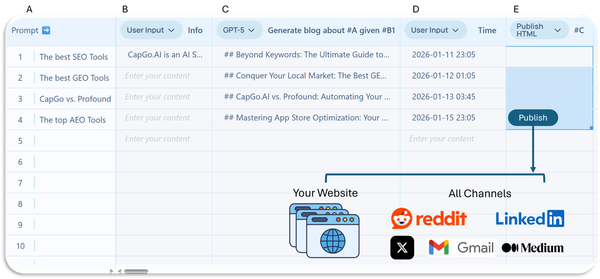
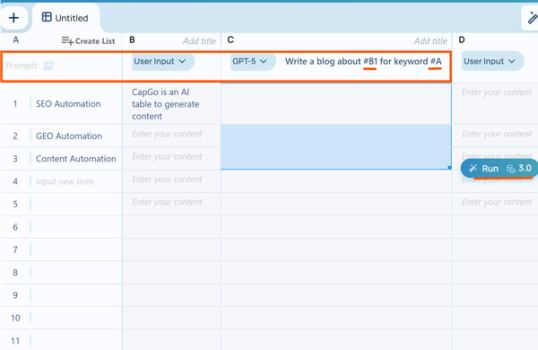
Core functionality revolves around an agentic spreadsheet interface where each column acts as a step in a repeatable workflow: AI performs web research, generates unique content, analyzes documents, enriches data, or publishes directly. Standout features include:
- Programmatic SEO/GEO page generation with automated metadata, internal linking, and variations for long-tail keywords.
- Bulk PDF data extraction via natural-language formulas in Sheets (e.g., querying hundreds of documents at once).
- Market research and lead generation agents that scrape and enrich data with one click.
- Multi-channel automation: Generate and schedule posts/emails for Reddit, X (Twitter), LinkedIn, Medium; export CSV/HTML for CMS platforms like WordPress, Shopify, Webflow, Framer, Wix, and more.
- Parallel AI processing for speed and cost savings.
These differentiate CapGo.AI from generic AI writers (like ChatGPT) or basic research tools by combining familiar spreadsheet scalability with autonomous agents and direct publishing—benchmarked to outperform alternatives by 17% in SEO/GEO performance per NTU labs tests. It also supports email content automation within multi-channel campaigns.
Limitations include a credit-based system (no unlimited free usage), reliance on AI accuracy (outputs may need human review for hallucinations or brand voice), and dependence on Google Sheets (no fully standalone desktop app). Missing advanced native analytics dashboards or built-in A/B testing for published content; advanced users may still need external tools for complex integrations.
User Experience
CapGo.AI boasts an exceptionally low learning curve for anyone familiar with Google Sheets—simply install the free add-on from the Google Workspace Marketplace, activate it, and build workflows row-by-row. The interface feels intuitive and "incredibly user-friendly," blending spreadsheet familiarity with AI actions; web uploads handle PDFs or bulk inputs seamlessly. No steep technical barriers, making it accessible for non-developers.
Documentation includes helpful blog guides, FAQs covering SEO/GEO workflows and supported platforms, plus quick video overviews. Support resources are primarily self-serve (email implied via testimonials), with responsive community sentiment on Product Hunt. Users praise the clarity and speed, though some may want more in-depth video libraries or live chat for enterprise setups.
Performance & Reliability
The tool excels in speed and efficiency, with claims of generating hundreds of optimized pages or analyzing thousands of PDFs in minutes—up to 10x faster than manual processes. Parallel processing handles scale without slowdowns, and testimonials consistently highlight "incredibly fast and accurate" results for research and content. No widespread outages or major reliability complaints appear in public forums as of March 2026.
Common feedback notes occasional need for prompt refinement to avoid generic outputs, but overall stability is high for its use cases. Independent reviews remain limited due to the tool's relatively recent prominence, but Product Hunt ratings sit at 5.0/5 and site-reported user satisfaction at 4.9/5.
Pricing & Value
CapGo.AI uses a credit-based subscription model with three paid plans (no clear free tier beyond possible trial credits or add-on installation):
- Premium: $24/month – 1,200 credits
- Pro: $58/month – 3,600 credits
- Max: $114/month – 9,000 credits
Credits fuel AI actions (research, generation, extraction); higher tiers unlock more volume and PDF conversions. Enterprise options exist via custom programmatic SEO services ($1,500–$4,600/month for done-for-you campaigns). No annual discounts detailed publicly.
Value shines for teams generating high-volume content or research—far cheaper than hiring writers or agencies while delivering measurable traffic gains. Compared to alternatives like Jasper or manual tools, it offers superior scalability and spreadsheet integration at a competitive price point, though heavy users may find credits add up quickly. Ideal ROI for SEO-focused businesses scaling programmatically.
Practical Tutorial
CapGo.AI provides official blog guides; below is a step-by-step walkthrough for a common task—bulk PDF data extraction (e.g., analyzing financial filings or resumes)—based on the tool's documented PDF AI Sheet functionality. This matches real use cases for market research or due diligence.
-
Upload PDFs: Log into the CapGo.AI web app at capgo.ai and bulk-upload your PDF files (resumes, SEC filings, contracts). Note each file's PDF_ID (auto-assigned or visible in the dashboard).
-
Open Google Sheets and Activate Add-on: Create or open a Google Sheet. Go to Extensions > Add-ons > Get add-ons, search/install "Sheet2Pages Programmatic SEO AI Sheets™ - CapGo.AI" (free), then activate "PDF AI Sheet" from the Extensions menu.
-
Set Up Your Sheet: In column A, list PDF_IDs. In column B (or any), enter your natural-language prompt formula.
-
Run Queries: Use the formula
=ai_pdf("Extract all key financial metrics and risks mentioned", A2)in an adjacent cell. For source verification, append1:=ai_pdf("Summarize executive compensation details", A2, 1). Drag down to process hundreds of rows in parallel. -
Review & Export: Results populate instantly. Add columns for follow-up actions (e.g., "Generate summary email"). Export or publish as needed.
Example: For 50 SEC filings, one prompt like "Compare revenue growth across all documents" returns a consolidated table with page references. Full process takes under 2 minutes for initial setup per official demos. Watch the quick tutorial video referenced on the CapGo.AI site for visuals, or see the full guide at https://capgo.ai/use-case/en/bulk-pdf-data-extraction. For SEO content, adapt via the "A Simple Guide to SEO & GEO with AI" at https://capgo.ai/blogs/guide-seo-geo-with-ai/.
Final Verdict
Overall rating: 4.6/5. CapGo.AI is best for marketers, SEO specialists, and sales professionals who already use spreadsheets and need to scale research, content, or data tasks affordably—delivering real time savings and competitive edges in programmatic SEO/GEO. Avoid it if you prefer fully no-code visual builders, have very low volume needs (credits may feel restrictive), or require extensive custom coding integrations without Sheets. One-sentence recommendation: If you're scaling content or research operations in 2026, CapGo.AI's spreadsheet-powered AI agents make it a must-try automation powerhouse.