Cassette AI Review: Create High-Quality AI Music and Beats Fast

Overview & Purpose

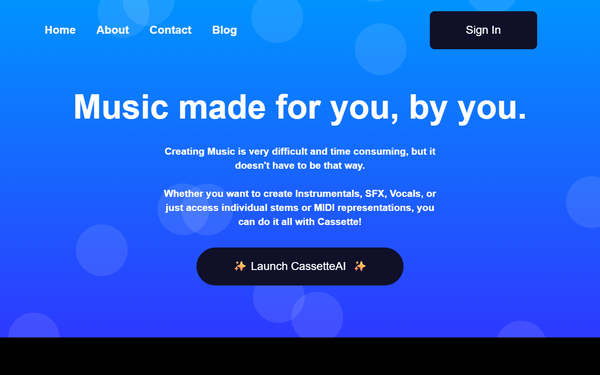
Cassette AI is an artificial intelligence-powered music creation platform that allows users to generate high-quality, royalty-free music tracks, instrumentals, sound effects (SFX), vocals, individual stems, and MIDI files directly from text descriptions. It leverages a custom machine learning model based on latent diffusion models (LDMs) to interpret user prompts and produce complete tracks from scratch in real time. The tool emphasizes simplicity, enabling anyone to create music without traditional production skills, instruments, or studio time.
Primary use cases include generating background music for videos, YouTube content, podcasts, or social media; creating loops and beats for producers and beatmakers (especially in hip-hop, lo-fi, chillhop, and electronic genres); producing SFX for games or multimedia; and exporting stems/MIDI for further editing in digital audio workstations (DAWs). It also supports quick prototyping of instrumental ideas for musicians.
The target audience spans beginners and hobbyists seeking an accessible entry into music creation, content creators and video editors needing affordable royalty-free audio, independent producers looking for starting points or loops, and even professionals who want fast, customizable instrumentals. It democratizes music production for non-musicians while offering advanced export options for more experienced users. Research conducted as of April 2026.
Key Features & Capabilities
Core functionality revolves around text-to-music generation: users input a detailed prompt specifying genre, mood, length (e.g., BPM, duration), instrumentation, and style, and the AI produces a full track. Additional capabilities include SFX generation, vocal creation, stem separation (isolating drums, bass, melody, etc.), MIDI conversion, and an AI editing studio for post-generation tweaks. The model is trained on a large library of licensed and public music files, supporting thousands of instruments and effects for precise customization.
Standout features that differentiate Cassette AI from competitors include its extreme affordability combined with real-time speed (tracks under 30 seconds generate in seconds), full user ownership with no royalties claimed by the platform, and a focused emphasis on high-fidelity instrumentals rather than competing directly in full vocal songs. The suite of supporting tools (stem separation, MIDI export, SFX) makes it particularly useful as a "copilot" for beatmakers and editors who integrate outputs into larger projects. It also offers secure private storage of generations until export.
Limitations include variable audio fidelity depending on genre—strongest in electronic, hip-hop, and chill styles but prone to artifacts in complex acoustic or live-instrument tracks. It is less suited for generating complete songs with coherent lyrics and vocals compared to tools like Suno or Udio. Prompt dependency means results can sometimes feel generic without highly specific descriptions, and advanced editing is still best paired with external DAW software. No offline capability exists, requiring a stable internet connection.
User Experience
Cassette AI boasts an intuitive, minimal interface with a simple text prompt field, parameter sliders or selectors for genre/mood/length, and instant playback/preview options. The learning curve is very low—even complete beginners can generate usable tracks in minutes after signing up. The web-based dashboard (with mentions of iOS app support) keeps everything streamlined, with generated tracks stored privately in the user's account.
Interface quality is clean and modern, prioritizing speed over complex menus. Documentation is basic, relying on in-app examples, prompt tips, and the website's descriptive sections rather than extensive guides. Support resources include a contact form and community examples showcasing beta user generations (e.g., melodic hip-hop with piano/strings or chillwave tracks). User reviews highlight the ease for quick ideation, though some note frustration with free-tier limits prompting quick upgrades.
Performance & Reliability
Generation is notably fast and efficient, with short tracks completing in under 2–10 seconds and longer ones still feeling near-instantaneous, thanks to optimized LDMs. Quality is generally high for instrumental output, with consistent rhythm, structure, and coherence in supported styles. Reliability is strong for repeated use, with private account storage preventing loss of creations.
Known issues are relatively minor and typical of current AI music tools: occasional audio artifacts (e.g., unnatural transitions or muddiness in dense mixes), prompt sensitivity leading to inconsistent results across genres, and limited real-world user complaints centered on occasional subscription management hiccups rather than core functionality. Broader searches reveal sparse but mostly positive feedback, with no widespread outages or major reliability problems reported as of April 2026.
Pricing & Value
Cassette AI follows a freemium model with a functional free tier that allows limited generations (typically short tracks with basic exports). The Pro plan starts at approximately $3.99–$4 per month, unlocking higher limits (e.g., 500 creations/month), longer tracks, full stem/MIDI exports, advanced editing tools, and priority generation. Higher tiers may reach $10/month for heavier users, with flexible monthly billing. No enterprise options are prominently advertised.
Value is exceptional for its niche—offering one of the lowest entry prices among AI music generators while delivering royalty-free, user-owned outputs. Compared to alternatives like Suno (stronger on vocals but more expensive for heavy use) or other instrumental tools, Cassette AI provides strong bang-for-buck for content creators and beatmakers who need quick, customizable loops without breaking the bank. The free tier alone makes experimentation risk-free.
Practical Tutorial
A step-by-step tutorial for generating a custom hip-hop instrumental (a common task) is provided below, based on the official workflow and publicly available examples/demos. No official video tutorial is hosted directly on the site, but numerous YouTube walkthroughs (such as "Is Cassette AI the BEST FREE AI Music Generator?") demonstrate the process in real time.
- Visit https://cassetteai.com/ and click "Launch CassetteAI" or navigate directly to the dashboard after creating a free account (email signup or social login).
- In the prompt input area, describe your track clearly: e.g., "Melodic emotional hip-hop instrumental with piano and strings in D Minor, 90 BPM, relaxed mood, 2 minutes long, chill atmosphere."
- (Optional) Adjust any visible sliders or dropdowns for length, intensity, or key if available in the interface.
- Click "Generate" and wait a few seconds for the track to process and play automatically.
- Preview the full track. On the Pro plan, access options to separate stems (drums, melody, etc.), convert to MIDI, or enter the AI editing studio for refinements.
- Download the audio (WAV/MP3), stems, or MIDI file. All generations remain royalty-free and fully owned by you for personal or commercial use.
- For iteration: Refine your prompt (e.g., add "add subtle vinyl crackle" or "more upbeat drums") and regenerate.
Example output from official samples includes high-quality, unedited tracks matching similar prompts, available for listening on the homepage. Experimentation with specific parameters yields the best results.
Final Verdict
Overall rating: 4.3/5. Cassette AI excels as an affordable, fast, and user-friendly tool for instrumental music creation, making professional-sounding beats accessible to everyone.
Who should use this tool: Content creators, YouTube/video editors, beginner beatmakers, and producers needing quick royalty-free instrumentals, loops, SFX, or stems for projects—especially those working in hip-hop, lo-fi, or electronic styles who value speed and low cost over vocal features.
Who should avoid this tool: Users requiring full songs with polished vocals/lyrics, complex acoustic ensembles, or offline/advanced DAW-native production; those frustrated by occasional prompt variability may prefer more mature competitors like Suno for songwriting.
One-sentence recommendation: If you want an incredibly cheap and effortless way to generate high-quality, ownable instrumental tracks and beats without any learning curve, Cassette AI is an outstanding choice worth trying immediately.