Certping Review: Automate SSL Management and Brand Security
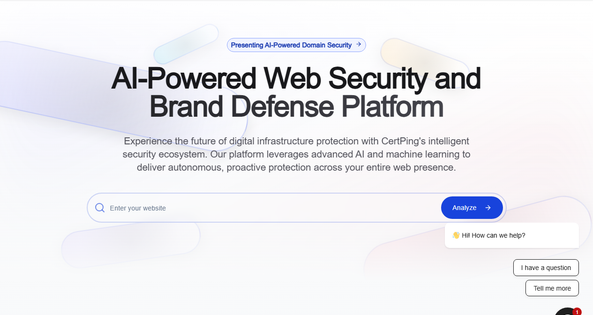
Overview & Purpose
CertPing is an AI-powered platform that automates SSL/TLS certificate lifecycles, monitors uptime and TLS health, and uses machine learning for real-time anomaly detection and anti-impersonation (phishing, typosquatting and trademark infringement) scanning, while providing performance recommendations, alerts, and integrations with AWS ACM, Azure Key Vault, Kubernetes and registrars for zero‑touch rotations and deployments. Teams use it to consolidate web and brand security, prevent downtime from expired certificates, stop impersonation early, and streamline trademark workflows with partnered attorneys to save ops time and reduce risk.
The primary use cases include preventing production outages caused by certificate expiry, centralizing multi-cloud monitoring dashboards, proactively identifying domain abuse threats, and automating brand protection processes that traditionally require separate legal tools or manual searches. Research conducted as of March 2026.
Target audience primarily includes developers, DevOps and SRE teams responsible for infrastructure reliability, security professionals managing TLS posture and threat detection, and brand or marketing teams handling online reputation and trademark enforcement. It suits mid-sized SaaS companies, e-commerce operations, and enterprises with distributed web properties who want to reduce tool sprawl.
Key Features & Capabilities
Core functionality covers full SSL/TLS lifecycle management (issuance, monitoring, renewal, automated rotation with rollback), continuous uptime and TLS configuration checks (including status pages), customizable alerts, and AI-powered performance optimization suggestions.
Standout features that differentiate it from competitors—such as basic uptime tools (UptimeRobot) or standalone certificate managers (cert-manager)—include the neural-network-driven anti-impersonation engine that scans the web in real time for phishing sites, typosquatting domains, and trademark infringements, plus seamless integration of trademark defense workflows with partnered attorneys for automated scanning of global registries and direct legal resolution support. Zero-touch deployments across heterogeneous environments (AWS ACM, Azure Key Vault, Kubernetes, Cloudflare, Route 53) and 90-day automated rotations with zero-downtime guarantees further set it apart.
Limitations include its early-stage maturity (launched late 2025), which may result in evolving feature depth for advanced compliance reporting or on-premises legacy support. AI false-positive rates for transient issues and breadth of global domain scanning coverage have not yet undergone extensive independent validation.
User Experience
Setup is designed for speed—most users report spinning up monitoring in minutes through a guided onboarding flow and modern, insight-focused dashboard. The learning curve is minimal for core monitoring and alerts but moderate when configuring complex integrations or brand-protection policies, assuming basic familiarity with cloud IAM or API keys.
Interface quality feels clean and AI-native, prioritizing actionable dashboards over raw logs, with real-time visualizations for threats and certificate health. Documentation remains basic (in-app guides and support tickets), typical for a new product, though founder responsiveness in early community channels is frequently praised. Enterprise plans add dedicated support and SLAs. Early feedback notes minor mobile navigation quirks but overall praises the intuitive flow.
Performance & Reliability
Checks run as frequently as every 30 seconds with real-time ML analysis for anomalies and impersonation threats, delivering efficient automation that eliminates manual renewal cycles and enables zero-downtime rotations. Performance recommendations help optimize TLS configurations without added overhead.
Known issues are minimal given the product’s youth; beta users have reported occasional alert noise from transient network events, but no widespread outages, scalability problems, or reliability complaints appear in public forums as of March 2026. Testimonials highlight successful prevention of expiry-related downtime, though large-scale independent benchmarks remain limited.
Pricing & Value
CertPing uses a freemium model: a free tier for basic SSL monitoring and uptime checks lets teams start immediately, while paid plans follow usage-based (“pay for what you use”) billing with no hard limits on critical features. Enterprise options are custom-priced and include SLAs, dedicated support, advanced trademark scanning, and priority rotations.
Value is compelling for organizations juggling separate tools for certificates, uptime, security scanning, and brand protection—the consolidated AI approach can dramatically reduce operational overhead and risk exposure compared to manual processes or fragmented alternatives. Free entry lowers the barrier for evaluation, with strong ROI emerging for teams managing multiple domains or facing brand-impersonation risks. Detailed tier breakdowns require signup for full transparency, but the structure positions it competitively against specialized services.
Practical Tutorial
Detailed official tutorials are limited due to the product’s early stage, but in-app guidance is available post-signup. Here is a synthesized step-by-step walkthrough for a common task—setting up automated SSL monitoring and zero-touch rotation for a domain (e.g., example.com)—based on documented capabilities and standard platform flows. Always verify steps in the current dashboard.
-
Visit https://certping.com/ and click “Start for Free” (or navigate directly to app.certping.com/signup). Create an account with email or SSO; the free tier activates instantly.
-
Complete the short onboarding survey about your stack (AWS, Azure, Kubernetes usage) to pre-populate integration options.
-
In the dashboard, select “Add Monitor” or “New Domain,” enter your URL (https://example.com), and choose monitoring types: uptime checks, TLS health analysis, performance insights, and AI brand protection.
-
Connect integrations for automation: follow the wizard to authorize AWS ACM (via IAM role), Azure Key Vault, or Kubernetes (API token or kubeconfig). Add DNS provider credentials (Cloudflare or Route 53) for validation.
-
Set policies: configure auto-renewal to trigger 30–45 days before expiry, enable 90-day rotations, and select deployment targets. Turn on real-time anomaly detection and impersonation scanning.
-
Configure alerts: integrate Slack, email, Microsoft Teams, or webhooks; define thresholds (e.g., expiry warning, phishing match, TLS misconfiguration).
-
Activate trademark protection: input registered marks or primary domains; the AI begins scanning global registries and flags potential infringements for attorney-assisted workflows.
-
Review and test: check the live dashboard for initial results, uptime history, and recommendations. Trigger a non-production rotation test if desired, then publish a public status page link for stakeholders.
Setup typically completes in under 10 minutes. For support or updates, use in-app chat or reference launch materials.
Final Verdict
Overall rating: 4/5. CertPing delivers an innovative, consolidated solution that combines certificate automation, real-time AI security, and brand-protection workflows in a single affordable platform.
It is ideal for developers, DevOps, security, and brand teams at growing organizations that want to eliminate certificate-related outages and catch impersonation threats early while saving time on fragmented tools and legal processes.
Teams should avoid it if they need highly mature enterprise-grade compliance reporting, proven large-scale deployments with extensive third-party audits, or prefer fully open-source self-hosted alternatives without usage-based costs.
One-sentence recommendation: If you manage multiple web properties and value proactive AI-driven security alongside effortless SSL automation, CertPing is worth starting with its free tier today.