CF Spark Review: The Best AI Tool for POD and Crafters?
Overview & Purpose

CF Spark is Creative Fabrica’s family of AI-powered creative tools (now integrated into the broader Creative Fabrica Studio platform) designed to democratize digital design for non-professionals. It transforms simple text prompts into original artwork, seamless patterns, sketches, and marketing copy, while offering image remixing and prompt-building capabilities. Primary use cases include generating unique graphics for print-on-demand (POD) products like T-shirts and mugs, creating custom patterns for crafts (Cricut/Silhouette), designing book covers or journal kits, producing social media visuals, and crafting promotional copy. It targets crafters, POD sellers on Etsy or Shopify, small business owners, marketers, low-content book creators, and hobbyist designers who want professional-looking results without advanced software skills or artistic training.
Key Features & Capabilities
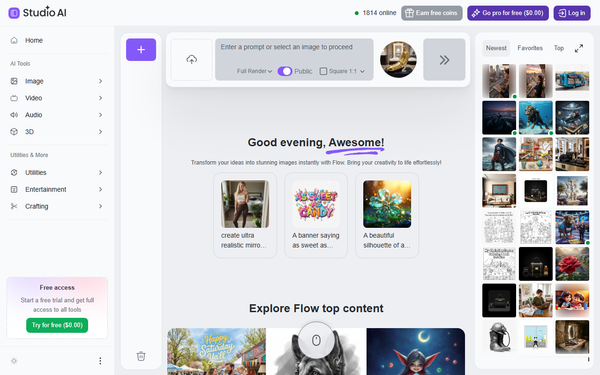
Core functionality revolves around text-to-image generation via Spark Art (produces four variations per prompt with selectable aspect ratios like 1:1, 2:3, or 3:2), Spark Patterns for seamless repeating designs, Spark Writer with 30+ templates for books, ads, emails, and more, plus tools for image remixing (upload to generate variations), prompt building, and basic sketching. Additional Studio AI utilities include background removal, image upscaling, vectorization, mockup generation, and even video or music creation in expanded offerings. Standout features include the permissive Spark License, which grants full commercial and POD rights to user-generated creations (sellable without restrictions on your own AI output), seamless integration with Creative Fabrica’s millions of fonts and graphics, and community browsing for inspiration. These differentiate it from general-purpose tools like Midjourney or DALL-E by focusing on sellable, licensable assets tailored for the craft and POD ecosystem.
Limitations include occasional inconsistent output quality (e.g., anatomy issues or less artistic refinement compared to premium competitors), a credit/queue system that slows free users, and a more basic prompting interface without the advanced controls found in specialized AI art platforms. It lacks some high-end features like precise inpainting or extensive style libraries in the base toolset.
User Experience
CF Spark is highly beginner-friendly with a low learning curve—most users can generate usable results in minutes via a clean, web-based interface. The left-hand menu guides prompt entry, ratio selection, and the prominent “Ignite” button; generated images appear instantly (or in queue) with hover options for preview, edit, and publish. Interface quality is straightforward and intuitive, though some note naming overlaps between Spark, Studio, and CF Studio can cause minor confusion. Documentation shines with extensive official blog tutorials, prompt guides, and community examples; support resources include responsive customer service (noted positively in many reviews) and a help center. No steep technical barriers exist beyond a free Creative Fabrica account.
Performance & Reliability
Generation speed is efficient for subscribed users (priority with speed credits), producing four variations quickly, while free users may encounter queues. Reliability is solid for basic needs, with consistent licensing enforcement and no major downtime reported. Common complaints from users center on variable image quality—some outputs are “awful” or unusable for commercial purposes—and credit consumption on complex prompts. Occasional Reddit feedback highlights frustration with hit-or-miss results versus expectations, though many praise it for quick POD prototypes. As of April 2026, no widespread outages or critical bugs were noted in recent sources.
Pricing & Value
CF Spark operates on a freemium model: a free account allows prompt-based generation and browsing, but downloads, priority speed, prompt privacy, and full Studio access require an All Access subscription. Current structure includes a promotional yearly plan at approximately $3.99/month (billed $47/year) or higher monthly options around $9.99–$29 depending on promotions; this unlocks unlimited asset downloads from the full library plus AI tools. Enterprise or higher tiers are not prominently featured. Value is exceptional for its target users—commercial licensing, integration with a massive creative marketplace, and multiple AI utilities often outperform standalone AI subscriptions costing $10–$30/month elsewhere. It’s especially cost-effective for POD sellers who can recoup fees through a single product launch. Compared to competitors, the bundled assets and sellable rights provide superior ROI for crafters and small creators.
Practical Tutorial
A step-by-step tutorial for a common task—creating custom AI artwork for a POD design—is available directly from Creative Fabrica’s official guide. Here’s a real-world walkthrough for generating a “cute watercolor fox in a spacesuit” suitable for T-shirt printing (tested conceptually from official steps):
- Log in to your free Creative Fabrica account and navigate to CF Spark / Studio AI (via the Spark section or studio.creativefabrica.com).
- On the Create page, locate the text-to-image generator in the left menu.
- Type a detailed prompt: “cute fox wearing a spacesuit, watercolor style, soft pastel colors, whimsical illustration, transparent background optional.”
- Select an image ratio (e.g., 1:1 for square social/POD previews or 2:3 for portrait apparel mockups).
- Click “Ignite” to generate four variations.
- Hover over results, click the pencil icon to enlarge, and choose your favorite.
- Click “Publish” (optionally hide the prompt for privacy via the dropdown).
- Open the published image page to download (requires All Access) or share the link.
For best results, use simple, descriptive prompts with style references (watercolor, vector) and avoid complex scenes. Official full guide and more examples: https://www.creativefabrica.com/the-ultimate-ai-guide/how-to-create-ai-art-using-cf-spark-step-by-step-guide/. Additional tutorials cover patterns, journal kits, and bookmarks on the Creative Fabrica blog.
Final Verdict
Overall rating: 4.2/5. CF Spark (and its Studio evolution) excels as an accessible, commercially focused AI suite ideal for POD sellers, crafters, and small-business creators who value quick, licensable designs and ecosystem integration over cutting-edge artistic precision. It shines for users already in the Creative Fabrica ecosystem or those needing sellable graphics without hiring designers. Avoid it if you require photorealistic quality, advanced editing controls, or professional-grade consistency—opt instead for dedicated tools like Midjourney. One-sentence recommendation: If you sell on Etsy or craft digitally and want affordable, rights-ready AI creativity bundled with a huge asset library, CF Spark is a smart, value-packed starting point.