ChatGPT Mail Responder Review: Boost Your Gmail Productivity

Overview & Purpose
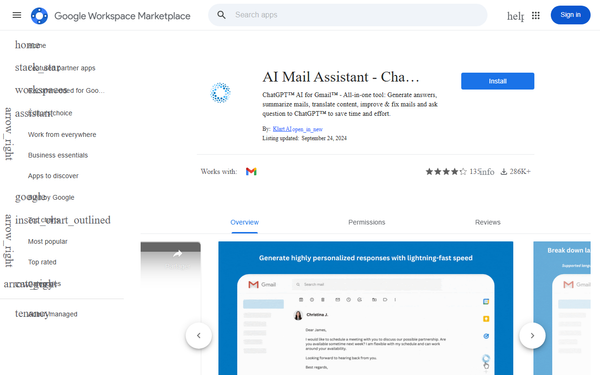
ChatGPT Mail Responder, officially listed as AI Mail Assistant - ChatGPT™ for Gmail™ by Klart AI on the Google Workspace Marketplace, is a lightweight Gmail add-on that leverages OpenAI’s GPT-4o (with occasional Mistral model fallback) to handle everyday email tasks directly inside Gmail. It generates intelligent replies, summarizes long threads, translates messages, improves drafts, analyzes text for tone/ethics/sarcasm/discrimination issues, and even lets users ask ChatGPT questions without a separate OpenAI account. Primary use cases include quick reply drafting for busy inboxes, condensing lengthy email chains, handling international correspondence, and polishing professional tone on the fly.
The tool targets Gmail power users such as freelancers, small-business owners, customer-support teams, marketers, executives, and non-native English speakers who spend significant time on email but don’t need enterprise-scale automation or deep CRM integration. It is not aimed at developers or designers seeking code assistance or creative workflows.
Key Features & Capabilities
Core functionality lives in a right-sidebar panel inside Gmail:
- Generate Response – one-click AI reply based on the current email/thread.
- Summarize – bullet-point condensation of long conversations.
- Improve Draft – grammar, clarity, tone, and professionalism fixes.
- Translate – instant conversion to/from 13 languages (English, French, Spanish, Italian, German, Portuguese, Japanese, Arabic, Hindi, Turkish, Russian, Chinese, Korean).
- Analyze – scans for sarcasm, discrimination, ethical issues, or inappropriate tone.
- Ask ChatGPT – direct natural-language querying inside Gmail.
Standout differentiators include zero need for an OpenAI account (Klart AI proxies everything), minimal Google permissions (only two scopes versus the average of ten), mobile compatibility, and an ultra-affordable entry point. Unlike heavier tools that require complex setup or full inbox scanning, this add-on works on a per-email basis and feels lightweight.
Limitations are notable: the free tier is strictly capped (typically 5 requests), responses often require manual editing because they lack deep personalization or style-learning from your past emails, subject-line formatting can be inconsistent, and the workflow demands several clicks per action rather than true one-click automation. No auto-reply rules, no bulk processing, and no integration with calendars or tasks beyond basic Gmail.
User Experience
Installation is straightforward: install from the Marketplace, grant minimal permissions, then create a free account at chatgptservices.app to link your Gmail. The interface appears as a clean right sidebar once an email is open; buttons for each feature are clearly labeled. Learning curve is minimal for anyone familiar with Gmail add-ons.
Interface quality is functional but basic—some users report it feels “clunky” with multiple clicks required and occasional difficulty locating the panel. Mobile Gmail support is a plus. Documentation is sparse (mostly setup instructions on the marketplace page and a short blog post); support is handled via [email protected]. Community feedback is mixed: many praise the simplicity and time saved, while others note the UI feels dated compared to more polished competitors.
Performance & Reliability
Response generation is fast thanks to GPT-4o, typically delivering usable drafts within seconds. Reliability is high for basic tasks; privacy is stronger than average because of limited scopes and a DPA with OpenAI. As of April 2026, no widespread outages or major security incidents have been reported.
Common complaints center on the free-tier limit quickly exhausting during testing, generic-sounding replies that still need human review, and occasional subject-line glitches. Heavy users quickly outgrow the free plan and move to paid. No advanced context retention across sessions or inbox-wide learning exists, so results remain consistent but not adaptive.
Pricing & Value
The tool follows a freemium model. A free plan provides a very limited number of requests (commonly cited as 5 during trial periods). Premium starts at approximately €4.99 per month or €45 yearly for higher/unlimited usage. Separate plans exist for the companion AI Label Assistant, and enterprise quotes are available for teams. No per-user enterprise pricing is required for solo use.
Value is excellent for light-to-moderate users who want GPT-4o power inside Gmail without paying $20+/month for fuller-featured email AI platforms. It undercuts many competitors on price while delivering core functionality. For high-volume users needing personalization, style matching, or automation rules, dedicated tools (e.g., Superhuman AI, Gmelius, or full Klart AI workspace suite) offer better long-term value.
Practical Tutorial
Step-by-step: Generate a professional reply to a client inquiry (common task)
- Install “AI Mail Assistant - ChatGPT™ for Gmail™” from the Google Workspace Marketplace and complete the one-time account link at chatgptservices.app.
- Open Gmail and click on the email you want to reply to.
- In the right sidebar, locate the AI Mail Assistant panel (pin it if it collapses).
- Click the Generate Response button. The AI instantly creates a draft based on the thread content.
- Review the suggested reply in the compose window. Use Improve Draft if you want tone adjustments, grammar fixes, or greater professionalism.
- (Optional) Click Translate if you need the reply in another language, or Analyze to check for tone issues.
- Edit as needed, then send.
For summarization: open a long thread → click Summarize → receive a concise bullet-point overview. All actions are per-email and respect Gmail’s native compose flow. Official guidance is limited, but the marketplace listing and Klart AI blog provide the basics.
Final Verdict
Rating: 3.8/5 – Solid, affordable Gmail companion for occasional AI assistance, but not a full inbox automation solution.
Who should use it: Light Gmail users, freelancers, and small teams who want quick GPT-4o replies, summaries, and translations without complexity or high cost. It shines for non-native speakers and anyone drowning in straightforward correspondence.
Who should avoid it: Power users needing seamless one-click automation, style learning, bulk processing, or deep personalization—better options exist that justify the extra spend.
One-sentence recommendation: If you’re looking for an inexpensive, no-frills way to supercharge Gmail replies and summaries without leaving your inbox, ChatGPT Mail Responder (AI Mail Assistant) delivers real time savings; just be ready to upgrade quickly once the free requests run out.