ChatHub Review: The Best All-in-One AI Multi-Model Aggregator

Overview & Purpose
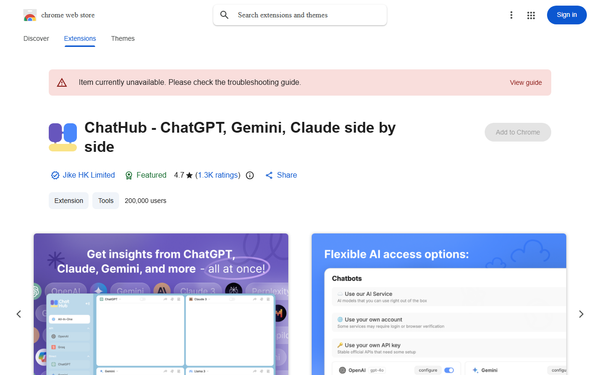
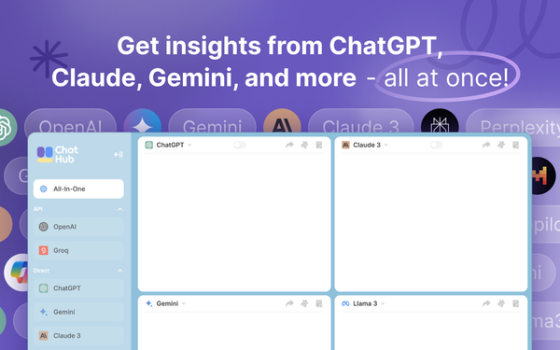
ChatHub is a versatile all-in-one AI chatbot client available as a Chrome (and Edge/Firefox) browser extension, web app, and native applications for iOS, Android, Windows, and macOS. It enables users to interact with multiple large language models (LLMs) simultaneously—such as GPT-5, Claude 4.5, Gemini 3, Llama 3.3, and over 20 others—within a single interface, displaying responses side-by-side for easy comparison.
Primary use cases include researching topics from diverse AI perspectives to reduce hallucinations, brainstorming ideas, coding assistance, content creation, document analysis, image generation, and general productivity tasks where comparing outputs helps users make better-informed decisions. Users can access models via their own accounts (e.g., ChatGPT Plus), personal API keys (pay-as-you-go), or ChatHub’s hosted AI service subscription. As of April 2026, with over 300,000 users and roots in an open-source project, it has evolved into a comprehensive cross-platform tool.
The target audience includes developers, content creators, researchers, marketers, writers, students, and AI power users who regularly work with multiple LLMs and value efficiency over switching between tabs or apps. It appeals particularly to those who want to avoid vendor lock-in and gain broader insights without managing separate subscriptions or interfaces.
Key Features & Capabilities
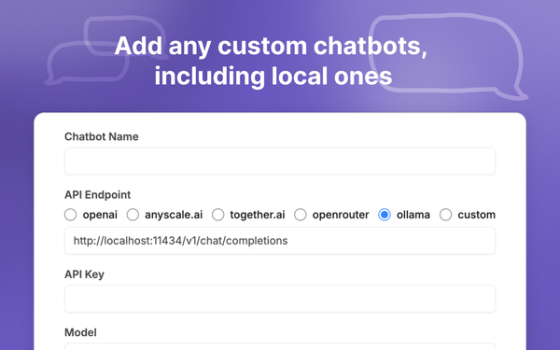
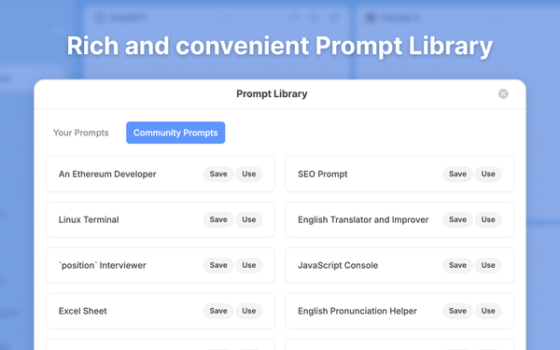
Core functionality revolves around multi-model chatting: users can open up to six chat windows at once, send the same prompt to all selected models, and view responses in a unified sidebar or full view. It supports markdown rendering, code highlighting and preview, dark mode, full-text searchable local chat history, a built-in prompt library for saving and reusing effective prompts, custom instructions, file/document uploads (PDFs, spreadsheets, images), real-time web access for up-to-date information, AI image generation (via models like FLUX.2 and Stable Diffusion), and custom chatbots using any OpenAI-compatible API.
Standout features that differentiate it from competitors include seamless side-by-side comparison (a core strength praised in reviews), one-click access to cutting-edge models without individual logins, cross-platform synchronization (now available across browser extensions and native apps), keyboard shortcuts for quick activation, and the ability to summarize multiple chats or analyze uploaded files. The Chrome side panel integration makes it lightweight and always accessible without leaving your current tab.
Limitations and missing features: The free tier is quite restricted (limited simultaneous chats—often just two—capped queries, and no access to premium features like advanced web search or unlimited image generation), making full evaluation challenging without upgrading. Some advanced customization (e.g., fine-grained temperature or system prompt controls) is less flexible than direct API tools. It relies on external providers, so occasional rate limits or service outages can affect performance. Document upload and full premium features (web access, chat summarization, code interpreter) are subscription-only. Compared to pure bring-your-own-key alternatives like TypingMind, it may feel less cost-effective for light users.
User Experience
ChatHub boasts a clean, minimalist interface that feels intuitive even for first-time users. The side-by-side layout is well-organized with clear model selectors, response panels, and a persistent prompt input. The learning curve is low—most users can start chatting within minutes after installation, thanks to straightforward setup for accounts or API keys. Dark mode and responsive design enhance usability across devices.
Interface quality receives consistent praise for its speed and lack of clutter, with the browser side panel being especially convenient for quick queries without disrupting workflow. Cross-platform apps maintain a consistent experience, though some older user feedback noted limited Android features (improvements appear ongoing).
Documentation is available via the official learning center (doc.chathub.gg), covering core features, custom chatbots, and membership details, though it is relatively concise rather than exhaustive. Support resources include email ([email protected]), a Discord community, and in-app help. User reviews highlight responsive developer updates, but some note occasional gaps in advanced troubleshooting.
Performance & Reliability
Performance is generally strong: responses load quickly in parallel, with efficient handling of markdown, code, and web-enhanced queries. Side-by-side comparisons feel responsive even with multiple premium models. The extension is lightweight (under 4MB) and has been updated as recently as February 25, 2026.
Known issues include dependency on underlying model providers (e.g., occasional slower responses from high-demand models like GPT-5 or Claude during peak times) and quota-based throttling on paid plans. Common complaints from reviews involve free-tier restrictions feeling too limiting, occasional history sync hiccups across devices (though native apps have improved this), and variable quality of real-time web access depending on the model. Some users report inconsistencies in image generation or file analysis under heavy load. Overall reliability scores high (4.7/5 on Chrome Web Store), with minimal reports of crashes or major bugs in 2025–2026 feedback.
Pricing & Value
ChatHub offers a freemium model. The free tier provides basic access for testing with limited queries and simultaneous chats (typically two models). Two paid subscription tiers are available (billed monthly or annually with discounts):
- ChatHub Pro: $19/month or $14.99/month (billed annually) — includes 10,000 basic model queries, 1,500 advanced model queries, 300 image generations, 300 document uploads, full premium features, and access to iOS/Android apps.
- ChatHub Unlimited: $39/month or $24.99/month (billed annually) — removes all query caps, provides 1,000 image generations, unlimited document uploads, and full access to all models.
No lifetime options are prominently advertised currently. Value is excellent for heavy users who want unified access to 20+ frontier models without managing multiple subscriptions (cheaper than separate ChatGPT Plus + Claude Pro + Gemini Advanced in many cases). It shines for comparison workflows. However, bring-your-own-key users or light users may prefer cheaper one-time alternatives like TypingMind. The unified subscription plus cross-platform apps delivers strong ROI for productivity-focused professionals.
Practical Tutorial
Step-by-step: Comparing responses to a research prompt using ChatHub (common task for writers/researchers)
- Install the Chrome extension from the Web Store (or open the web app at app.chathub.gg) and pin it to your toolbar or enable the side panel via Chrome settings > Extensions > ChatHub.
- Click the ChatHub icon (or use the default shortcut Ctrl/Cmd + Shift + K) to open the interface. Sign in with your ChatGPT/Claude account, add API keys under Settings > AI Services, or subscribe for hosted access.
- In the model selector (top of the sidebar), choose up to 6 models—e.g., GPT-5, Claude 4.5 Sonnet, Gemini 3, and Llama 3.3—for comparison. Enable “Web Access” (premium) if you want real-time internet data.
- Type your prompt in the input box at the bottom. Example: “Compare the pros and cons of remote work vs. office work for software developers, including recent 2026 trends.”
- Press Enter or click Send. Responses will populate side-by-side in real time. Use the prompt library (star icon) to save this prompt for reuse.
- Interact further: Upload a supporting PDF or image via the attachment icon for analysis, regenerate individual responses, or click “Summarize chats” (premium) for a consolidated overview.
- Export the conversation via the menu (top-right) as Markdown/JSON for your notes, or copy individual model outputs.
- For repeated use, enable keyboard shortcuts or add to your browser side panel for one-click access while browsing research sites.
This workflow takes under 30 seconds once set up and is ideal for fact-checking or idea validation. Official tutorials and video guides are linked on chathub.gg and YouTube (search “ChatHub tutorial”).
Final Verdict
Overall rating: 4.5/5 — Excellent for its core strength of multi-model comparison and convenience, with minor deductions for free-tier restrictions and occasional quota frustrations.
Who should use this tool: Developers, researchers, content creators, and productivity enthusiasts who frequently compare AI outputs or want a single subscription for 20+ models across devices.
Who should avoid this tool: Casual users who only need one or two models occasionally (free tier feels too limited), or those prioritizing maximum customization and privacy via direct API access without any hosted quotas.
One-sentence recommendation: ChatHub stands out as the most polished side-by-side AI aggregator for anyone serious about leveraging multiple LLMs efficiently—worth the upgrade if comparison and convenience are daily priorities.