Chatmind Review: Turn Any Content Into Mind Maps Instantly
Overview & Purpose

Chatmind, accessible at https://chatmind.tech/ (which seamlessly redirects to and powers the platform now branded as Mapify at mapify.so), is an AI-powered mind mapping and summarization tool created by the Xmind team. It instantly converts diverse inputs—such as YouTube videos, PDFs/documents, URLs/webpages, podcasts, meeting recordings, images, audio files, or simple text prompts—into clean, hierarchical mind maps using top large language models like GPT and Gemini. Users can refine maps through interactive AI chat, edit content, and generate visuals or presentations. Core purpose is to combat information overload by turning raw content or ideas into structured, visual diagrams that enhance understanding, retention, and sharing. Primary use cases include academic note-taking from lectures or textbooks, summarizing business meetings or reports, creative brainstorming for projects, research synthesis, and preparing presentations. The target audience spans students and educators for efficient studying, professionals like marketers, designers, developers, and researchers who need quick visual organization, as well as remote teams handling complex information. Trusted by over 5 million users worldwide, it positions itself as a productivity booster for visual thinkers in learning, work, and ideation scenarios.

Key Features & Capabilities
Core functionality revolves around one-click AI generation: paste a URL, upload a file, or type a prompt, and the tool produces a fully branched mind map complete with key points, subtopics, and connections. Standout features include multi-format support (video/audio transcription and summarization, OCR for images/scans, long-text pasting), real-time AI chat/refinement (right-click nodes to generate more ideas or expand branches), built-in image generation for visual enrichment, one-click conversion of maps into polished presentation slides, ready-made AI templates for brainstorming or analysis, automatic saving with full history, easy text editing/rearranging, theme customization, and cross-platform syncing across web, mobile apps (iOS/Android), browser extension, and desktop. Exports cover common formats for sharing or integration. These differentiate Chatmind/Mapify from traditional tools like Xmind or Miro by emphasizing seamless “anything-to-mind-map” summarization powered by advanced LLMs rather than purely manual drawing or infinite canvases. Limitations include credit-based usage (AI generations consume credits quickly on free tier), occasional generic AI outputs requiring manual tweaks, file size restrictions on audio (e.g., around 15 MB in tested versions), no robust real-time collaboration (sharing via links only), and fewer advanced formatting options (icons, detailed notes) compared to desktop-native mind mappers. Upcoming or recently added capabilities focus on enhanced LLM options and presentation polish.
User Experience
Ease of use is a major strength: the interface is clean and web-first with a simple upload/paste field and prominent “Mapify” button, resulting in a shallow learning curve—even beginners can generate their first map in under 30 seconds. Drag-and-drop editing, collapsible toolbars, and intuitive right-click AI prompts make modifications feel natural. Interface quality is modern and distraction-free, with responsive design across devices and auto-sync. Documentation is light on the main site but supplemented by user-friendly blog posts, FAQ sections, and numerous community/YouTube walkthroughs; support includes email ([email protected]) and responsive responses noted in reviews. Minor drawbacks include rare post-signup UI glitches (e.g., blank screens) and a lack of in-app guided tours for advanced features like image generation or slide exports, though these are quickly resolved via support. Overall, the experience prioritizes speed and simplicity over deep customization menus.
Performance & Reliability
Generation is impressively fast—most YouTube videos or PDFs convert to usable mind maps in seconds with accurate hierarchical structuring and intelligent summarization. Reliability is high for text, video, and webpage inputs, with strong transcription and OCR handling; cross-device syncing works seamlessly. Known issues include occasional delays or unresponsiveness during large audio uploads without progress indicators, failures on low-quality or oversized files, and credit exhaustion limiting heavy testing on free accounts. User complaints on platforms like Trustpilot and forums occasionally mention inconsistent AI adherence to custom instructions or minor export glitches, but these are outweighed by praise for productivity gains (many report 10× faster information processing). As of March 2026 research, the tool has improved significantly since early versions, with positive App Store ratings around 4.8/5 and strong performance in real-world summarization tasks.
Pricing & Value
Chatmind/Mapify follows a freemium model with a generous entry point and scalable paid tiers. The Free plan offers 30 AI credits (one-time), limited conversions (e.g., 5 PDFs/docs and 5 YouTube videos), prompt-based mapping, basic editing, and core summarization—no credit card required. Paid plans start at approximately $5.99/month (billed annually) for Basic (1,000 credits/month, expanded inputs, full exports), rising to Pro (~$11.99/month) and Unlimited tiers with priority support, higher credit allowances, and advanced features; yearly billing unlocks ~40% savings. A 30% education discount is available for students/faculty, and enterprise/custom options exist via contact sales. Value is excellent for moderate users: the low entry price and instant ROI in time saved outperform manual tools or generic ChatGPT workflows, though heavy users may find free-tier credits restrictive and need to upgrade quickly. Compared to alternatives like Miro or NotebookLM, it delivers superior mind-map-specific summarization at a more accessible cost.
Practical Tutorial
A step-by-step walkthrough for a common task—summarizing a YouTube video into an editable mind map (e.g., “Key principles of agile project management from a 10-minute tutorial video”)—demonstrates the tool’s simplicity. No official in-app tutorial is required, but the process mirrors community guides and YouTube demos.
- Visit https://chatmind.tech/ or https://mapify.so/ and click “Start for free” to sign up with email/Google (instant, no card needed).
- On the dashboard, select “YouTube” input or paste the video URL directly into the main field.
- Click the prominent “Mapify” button—AI processes the transcript and generates a complete mind map with central topic, main branches (e.g., “Core Principles”), and sub-branches in seconds.
- Review the map: click any node to edit text, drag to rearrange, or right-click a branch and select “Generate more ideas” via AI chat to expand (e.g., “Add real-world examples”).
- Enhance further: use the image generator on any topic for visuals, apply a theme from the toolbar, or click “Present as Slides” for instant export-ready decks.
- Auto-save occurs continuously; access history from the sidebar. Export as image, Markdown, SVG, or share via link.
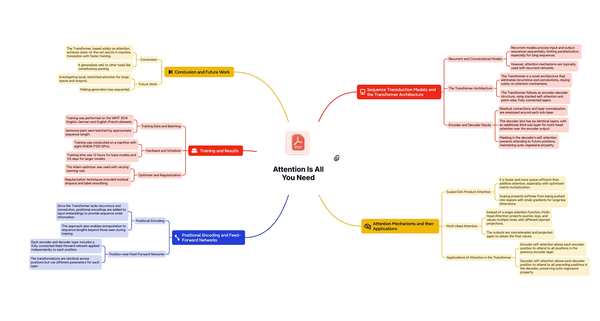
Example outcome: The resulting map clearly hierarchies “Sprints,” “Daily Standups,” and “Retrospectives” with bullet points pulled directly from the video. For text/PDF alternatives, simply paste content or upload instead of a URL. Official resources and video tutorials are available via search or the platform’s blog for variations.
Final Verdict
Overall rating: 4.3/5. Students, educators, researchers, and time-strapped professionals should use this tool for its unmatched speed in turning overwhelming content into clear, shareable visual summaries that genuinely improve retention and workflow. Avoid it if you require unlimited free usage, deep real-time team collaboration, or highly customized traditional mind-mapping formatting without credit constraints. In one sentence: Chatmind (Mapify) is an essential AI companion for anyone who wants to summarize, organize, and present ideas visually faster than ever before.