ChatSlide AI Review: Turn Documents into Pro Presentations Fast
Overview & Purpose
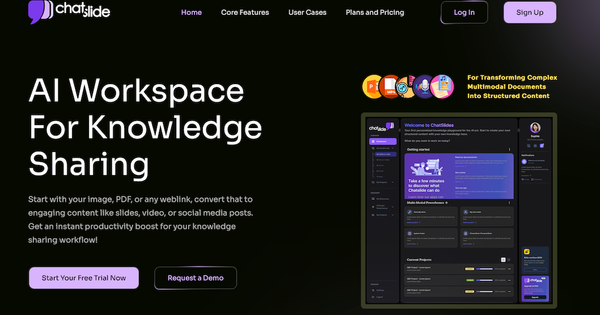
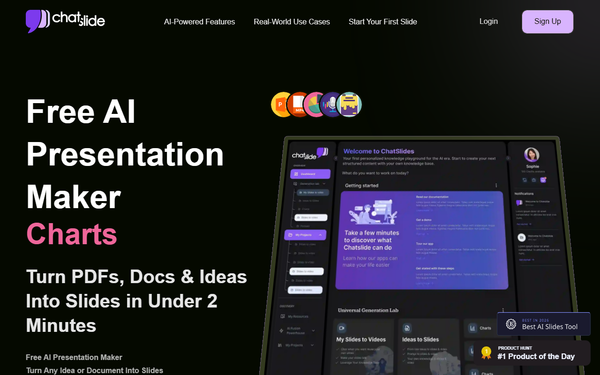
ChatSlide AI is an AI-powered platform that transforms uploaded documents (PDFs, images, screenshots), web links/URLs (including YouTube videos), social media posts, or simple text ideas into fully polished presentations, videos with AI avatars and voiceovers, podcasts, posters, and dynamic charts. It automates the entire workflow—from generating structured outlines and scripts with domain-specific insights to applying professional designs, interactive elements, and custom voice/avatar cloning—allowing users to produce ready-to-share content in minutes. Primary use cases include creating marketing decks, educational materials, client pitches, staff training videos, patient explanations (especially in healthcare), conference presentations, and repurposed social or podcast content. The tool targets coaches, marketers, educators, business professionals, and healthcare providers who regularly need engaging multi-format content but lack design expertise or time. It emphasizes 24-150× faster creation while maintaining professional quality, making knowledge sharing effortless without requiring graphic design skills.
Key Features & Capabilities
Core functionality revolves around a three-step process: upload or describe content to auto-generate an outline with AI insights, tailor themes and visuals (including charts and data visualizations), and refine in real time via the proprietary ChatSlide Bot. Standout features include voice cloning and 100+ AI voices (supporting 100+ languages), customizable AI avatars for video outputs (up to 30 minutes/month on higher plans), seamless conversion of slides into videos or podcasts, multi-source input processing (PDFs, URLs, videos, social posts), export options in PDF, PPTX, Keynote, video, and podcast formats, and private projects with custom branding on paid plans. The platform acts as a "structured content AI agent" that learns from user inputs and expands knowledge intelligently. Differentiators from competitors like Gamma, Tome, or Beautiful.AI include integrated video/avatar production, conversational real-time editing bot, and strong document intelligence for direct URL or video uploads—features not as deeply combined elsewhere. Limitations include a credit-based system (videos and avatars consume significantly more credits than basic slides), maximum slides per project (e.g., 40 on Pro plans), file size cap of 100MB, occasional need for manual fact-checking or design tweaks on complex content, and limited advanced collaboration tools in lower tiers. No offline mode or ultra-deep graphic customization is available.
User Experience
ChatSlide AI boasts an intuitive, modern web interface with a low learning curve—most users can generate their first presentation in under two minutes simply by uploading a file or typing an idea. The conversational ChatSlide Bot feels natural, like chatting with an assistant for edits, avoiding complex menus. Navigation is straightforward, with quick previews and one-click exports. Documentation includes helpful blog articles and guides on the site covering workflows, plus numerous YouTube tutorials demonstrating real-world use. Support escalates from in-app help to direct customer assistance on paid plans. Minor drawbacks noted in user feedback include occasional dashboard clutter for managing multiple projects and the need to monitor credit usage closely, but overall, it earns praise for simplicity and speed on platforms like G2.
Performance & Reliability
Generation is impressively fast, with high-quality slides often ready in about two minutes and full video outputs scaling efficiently based on plan limits. The AI handles multimodal inputs reliably, producing coherent scripts, accurate charts, and natural-sounding voiceovers. Users report consistent results for standard content like PDFs or URLs, with strong performance in professional scenarios such as medical explanations or marketing videos. Known issues are minor: credit consumption can feel high for video/avatar features, some outputs may require light polishing for branding precision or edge-case accuracy, and complex data-heavy projects occasionally need Bot-assisted refinements. No widespread reliability complaints appear in reviews; the platform is described as stable and efficient, with positive mentions of quick iterations and professional-grade outputs.
Pricing & Value
ChatSlide AI offers a generous free tier with 100 credits (enough for several basic slides/projects, up to 20 slides max, no credit card required) for testing. Paid plans start with Plus/Pro individual options around $14.90–$19.90 per month (or weekly billing from ~$8–$15), providing 2,500+ credits, higher slide limits (up to 40 per project), private projects, custom branding, and video capabilities. The Ultimate plan (~$59.90/month) unlocks advanced features like unlimited custom voiceovers, more avatars, and expanded limits (e.g., 60 slides/project). Team plans begin higher (from ~$24/week for 3+ members) with per-user add-ons. Annual billing includes discounts, and all paid plans come with a 14-day money-back guarantee. Compared to alternatives like Gamma or Beautiful.AI, the value stands out for users needing integrated video/podcast outputs and document-to-multi-format conversion at competitive pricing—especially for frequent creators who save hours weekly. The credit system ensures flexibility but can add up for heavy video users.
Practical Tutorial
A common task is converting a PDF (e.g., a marketing strategy document) into a professional video presentation with AI avatar and voiceover. Here is a step-by-step walkthrough based on the platform’s documented flow (as of March 2026):
- Sign up for free at https://www.chatslide.ai/ (takes under 1 minute; start with the free 100 credits).
- Click “New Project” and either upload your PDF (up to 100MB) or paste a web link/URL.
- AI instantly generates a structured outline with key insights, sections, and suggested tags/styles—review and edit via simple prompts.
- Use the ChatSlide Bot (chat interface) to refine: type instructions like “Add a data chart here” or “Make the tone more engaging for coaches.”
- Select a design theme; the AI applies matching visuals, colors, and interactive elements automatically.
- Choose output format: generate slides first, then convert to video—pick an AI avatar (100+ options) or clone your own voice (Ultimate plan), and select from 100+ system voices.
- Preview the full video or podcast, make final Bot adjustments, then export as PPTX (for editing in PowerPoint), MP4 video, or audio podcast.
- Download and share instantly.
For a real example, users commonly upload a 10-page PDF product guide and end up with a 5-minute narrated video ready for LinkedIn or email campaigns. Official YouTube tutorials provide visual demos—search “How to use ChatSlide AI to easily create powerpoint presentations with PDF” for the latest walkthroughs.
Final Verdict
Overall rating: 4.5 out of 5. This tool shines for busy professionals who want to repurpose existing materials into multiple polished formats quickly, making it ideal for coaches, marketers, educators, and healthcare pros seeking productivity gains without design headaches. Avoid it if you require pixel-perfect custom graphics, have very high-volume video needs without budgeting for credits, or prefer fully offline tools. In one sentence: ChatSlide AI is a versatile, time-saving powerhouse that turns raw content into professional presentations and videos with minimal effort—highly recommended for anyone creating content regularly.