Chopdi AI Review: The Ultimate AI-Powered Second Brain for Notes
Overview & Purpose

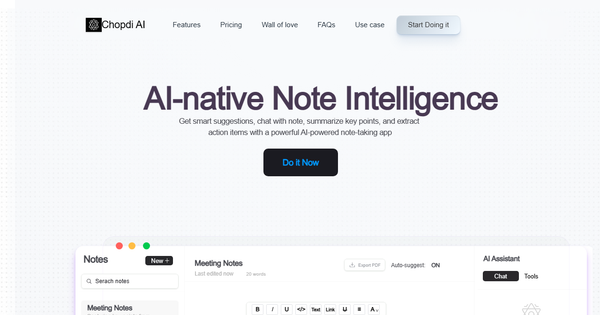
Chopdi AI is an AI-native note-taking workspace that serves as an intelligent "second brain" for capturing, organizing, and retrieving information with minimal effort. It leverages advanced AI to understand the meaning behind your words rather than just keywords, enabling context-aware autocomplete, intelligent tagging, instant summaries, action item extraction, and conversational querying of your notes. Primary use cases include documenting meetings and turning raw discussion notes into structured action items, polishing rough ideas into professional content, managing personal projects or study materials, and quickly searching or summarizing large collections of notes for decision-making. It transforms static notes into dynamic, queryable knowledge bases, making it ideal for zero-effort organization and smarter retrieval.
The tool primarily targets makers, students, professionals (such as writers, project managers, and consultants), and small-to-medium teams who need an efficient alternative to traditional apps like Notion or Evernote. It appeals to anyone overwhelmed by messy information who wants AI to handle organization automatically rather than relying on manual tagging or folders.
Key Features & Capabilities
Core functionality revolves around a powerful rich-text editor enhanced with real-time AI assistance: as you type, context-aware autocomplete suggests names, tasks, recurring phrases, and completions that "feel like you." Intelligent tagging and search allow instant retrieval, while built-in AI chat lets users query notes directly (e.g., "What were the key decisions?" or "Summarize action items"). Additional capabilities include automatic summarization, grammar fixes, translation, lengthening/shortening text via the AI assistant panel, and one-click PDF export for sharing polished notes or reports.
Standout features that differentiate Chopdi AI from competitors include its deeply integrated, always-on AI that learns from your personal note history for hyper-relevant suggestions (unlike add-on AI in tools like Notion), seamless meeting-note workflows that auto-extract action items, and the ability to "chat with your notes" like a teammate without switching apps. Auto-export to PDF and deriving insights from messy inputs further set it apart by turning unstructured data into actionable content.
Limitations include a lack of mentioned deep third-party integrations (e.g., calendar sync or Slack/Teams bots, which may be enterprise-only), no explicit offline mode details, and potential absence of robust real-time collaboration for large teams. Advanced features like custom AI training or extensive API access are not highlighted, which could limit power users.
User Experience
Chopdi AI offers a clean, intuitive interface with a familiar rich-text editor (bold, italics, headings, lists, links) plus a sidebar for AI suggestions and chat—making onboarding straightforward even for non-technical users. The learning curve is minimal; AI autocomplete and suggestions guide you from the first keystroke, reducing the need for tutorials. Navigation is simple via tabs for Notes, Chat, AI Assistant, and Meeting Notes, with real-time feedback that feels responsive and helpful rather than intrusive.
Interface quality is modern and distraction-free, with professional PDF outputs and contextual panels that appear only when needed. Documentation is basic—limited to an on-site FAQ covering core questions and a comparison to Notion—but support resources appear responsive via the app (no extensive knowledge base or video library noted). Overall, it prioritizes speed and simplicity over feature bloat.
Performance & Reliability
Real-time AI features like autocomplete and summarization perform efficiently according to site demonstrations, with instant responses and no noticeable lag in typing assistance or chat queries. The tool handles context understanding well, learning from your notes to deliver relevant insights without manual prompting.
As of March 2026, no widespread known issues or common complaints appear in public forums, review aggregators, or social discussions—likely due to its emerging status. Early promotional mentions praise its speed for daily tasks, though potential AI inaccuracies (e.g., hallucinations in summaries) remain a general risk for any similar tool. Reliability seems solid for individual and small-team use, with professional PDF exports and stable note organization.
Pricing & Value
Chopdi AI offers a generous free tier with core features (no credit card required to start), a Pro plan at $9.99 per month for unlimited usage and advanced capabilities, and custom Enterprise pricing for teams needing scaled features or support. There are no long-term contracts or hidden fees.
The value proposition is strong for individuals and small teams: at roughly the cost of a coffee subscription, it delivers productivity gains far beyond basic note apps by automating organization and retrieval—potentially saving hours weekly compared to manual tools or pricier alternatives like Notion AI add-ons. It provides excellent ROI for heavy note-takers, though enterprise users may find value in custom options once integrations expand.
Practical Tutorial
Official tutorials are not extensively available beyond basic site demos and FAQs, so the following step-by-step walkthrough is based directly on the documented features for a common task: processing raw meeting notes into actionable insights and a shareable PDF (ideal for professionals or teams).
-
Sign up and create a note: Visit chopdi.ai, start free, and click "New" to open a blank note. Title it (e.g., "Q1 Project Kickoff Meeting – March 2026").
-
Input raw notes with AI assistance: Paste or type meeting transcript/details (e.g., "Team meeting focused on goals... deadlines... challenges..."). As you type, context-aware autocomplete will suggest completions for recurring terms like project names or assignee tasks—accept with Tab or click suggestions.
-
Trigger AI summaries and action items: Highlight sections or use the AI Assistant panel (icons for "Improve writing," "Ask AI," etc.). Select "Summarize key points" or simply ask in the chat sidebar: "Extract 3 action items with owners and deadlines." The AI will automatically pull items like "Follow up with client – Alex by Friday."
-
Chat with your notes for deeper insights: In the chat interface, query specifics (e.g., "What decisions were made on budget?" or "Summarize challenges discussed"). Refine with follow-ups like "Make this longer for the report."
-
Organize and tag: Apply intelligent tags (auto-suggested or manual, e.g., #meeting #q1 #action) via the toolbar. Search or filter your workspace to link related notes.
-
Export and share: Click the PDF export button for a clean, professional document. Review AI-polished content first if needed.
This process typically takes under 5 minutes end-to-end and demonstrates the tool's core strength in turning chaos into clarity. For updates, check the official site or in-app help.
Final Verdict
Overall rating: 4.2/5 (strong AI innovation but limited independent validation and ecosystem maturity as of March 2026 research).
This tool is best for individuals, students, makers, and small teams seeking an effortless, intelligent note-taking experience that feels proactive rather than passive—especially those frustrated with manual organization in apps like Notion or Google Docs.
Avoid it if you require extensive third-party integrations, heavy real-time team collaboration at scale, or proven enterprise-grade security/compliance documentation, as these areas are not yet prominently featured.
Chopdi AI is a promising AI-first workspace that genuinely reduces note-taking friction—highly recommended for anyone ready to upgrade from static tools to a true second brain.