Cicube Review: The AI DevOps Agent for GitHub Actions Optimization

Overview & Purpose
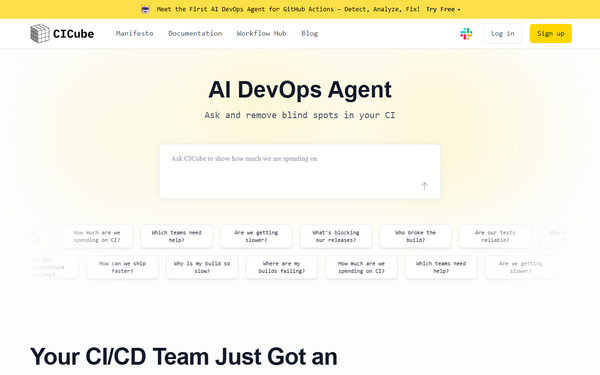
CICube is an AI-driven observability and optimization platform specifically built for GitHub Actions workflows. It functions as the “first AI DevOps Agent for GitHub Actions,” automatically detecting anomalies, performing root-cause analysis, suggesting intelligent fixes, and delivering conversational insights so teams can ask natural-language questions such as “Why are my builds so slow?” or “What’s blocking our releases?” The tool tracks North Star DORA-style metrics (Duration, Success Rate, Throughput, MTTR) via its proprietary CubeScore™ benchmark, surfaces hidden costs including developer context-switching, provides real-time alerts, weekly summary reports, and proactive pipeline health monitoring. Primary use cases include reducing CI failure debugging time, cutting infrastructure and productivity costs (the site highlights potential savings of up to $132K per month from context-switching alone), identifying bottlenecks, and enabling data-driven workflow improvements. It currently supports only GitHub Actions, with additional CI providers (Jenkins, GitLab, Azure Pipelines) planned for the near future. The target audience is DevOps engineers, platform teams, and software developers who rely heavily on GitHub Actions and want to move beyond GitHub’s native, limited insights into a transparent, AI-augmented monitoring experience.
Key Features & Capabilities
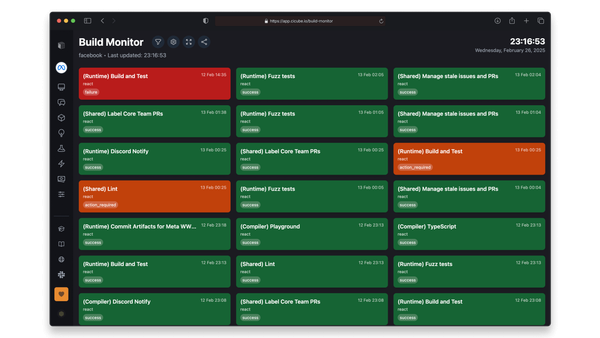
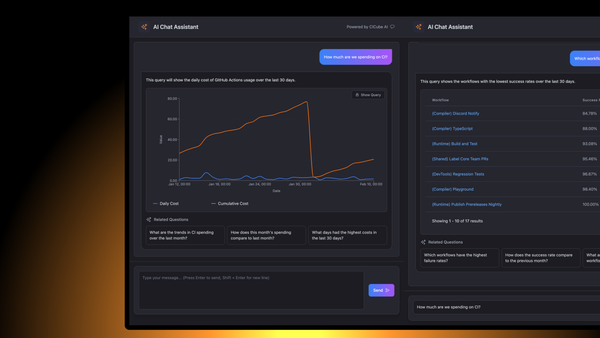
Core functionality revolves around four pillars: real-time monitoring, AI-powered analysis and fixes, cost & performance optimization, and automated reporting. The dashboard shows pipeline lists with execution counts, failure rates, and statuses; drill-down views reveal job-level metrics, historical trends, and bottlenecks; an AI chat interface answers ad-hoc questions; and an AI root-cause engine learns from past failures to recommend fixes. Standout differentiators include CubeScore™ (a single health grade benchmarked against “elite” DevOps standards), explicit tracking of context-switching costs (not offered by native GitHub tools), proactive anomaly prediction before failures escalate, and weekly insight emails that reach both technical and managerial stakeholders. Integration is dead-simple via a read-only GitHub App that requires zero code changes. Compared with competitors, CICube is the only tool positioning itself as a full “AI DevOps Agent” rather than a passive dashboard, and its focus on hidden productivity costs sets it apart from pure metric aggregators.
Limitations include GitHub Actions exclusivity (other CI platforms are on the roadmap), logs retention capped at 6 months, and only high-level reporting—job-level error details and deep log analysis are lighter than some dedicated observability suites. No native support for custom webhooks or advanced alerting channels (Slack/Teams integrations are not mentioned) and the AI suggestions remain general LLM-based rather than executing fixes automatically.
User Experience
Setup is intentionally frictionless: a one-click GitHub App installation grants read-only metadata access, after which repositories are selected and monitoring begins instantly. Non-DevOps users can immediately gain value through the conversational AI chat and clean, visual dashboards. The interface earns praise for its simplicity and clarity—reviewers highlight a “clean dashboard” and “simple setup.” Learning curve is minimal; the documentation states “you don’t need to be a DevOps expert to start gaining insights right away.” Official documentation at cicube.io/github-actions-monitoring-docs/ covers CubeScore metrics and feature overviews but is still relatively concise. Support resources include in-app chat, email ([email protected]), and the GitHub Marketplace listing; no extensive video library or community forum exists yet. Overall, the product feels polished for an early-stage tool.
Performance & Reliability
The platform delivers real-time visibility and near-instant AI responses, with weekly email summaries arriving consistently. No widespread outages or performance complaints appear in public forums or reviews as of March 2026. The single independent third-party assessment (balena.io, May 2025) notes reliable high-level tracking but flags the lack of granular job-level error capture. Because CICube pulls data via GitHub’s API rather than injecting agents, there is zero runtime overhead on pipelines themselves. Common user feedback (primarily from the team’s own Reddit and DEV.to posts) centers on delight with the speed of insights rather than any reliability issues.
Pricing & Value
CICube offers a generous 14-day unlimited trial with no credit card required. The Essential plan is priced at $8 per committer per month (billed annually) or $12 on-demand; a “committer” is defined as any Git author with at least three commits in the billing month. Enterprise tier is custom-priced and adds SSO/SAML, on-premises deployment, dedicated support, customizable data retention, and volume discounts. Compared with native GitHub insights (free but shallow) or broader observability platforms (often $20–50+ per user), CICube’s per-committer model is cost-effective for teams with moderate GitHub usage and delivers outsized value through AI recommendations and context-switching cost visibility—many organizations report ROI within the first month via reduced debugging time and optimized runner usage. For small teams or solo developers, the trial plus low entry price makes experimentation risk-free; larger enterprises benefit from the customizable tier and potential six-figure annual savings.
Practical Tutorial
Official documentation provides high-level overviews rather than exhaustive step-by-step tutorials, but the process is straightforward and well-documented across the GitHub Marketplace listing and docs site. Here is a complete walkthrough for the most common task—onboarding a repository and generating your first AI-powered insights (tested conceptually against the live React.js demo repository referenced on cicube.io).
- Visit https://app.cicube.io/login and sign up using your GitHub account (or use the “Start free” button on cicube.io).
- Authorize the CICube GitHub App during the OAuth flow—it requests only read-only metadata permissions.
- Select the organization or personal repositories you want to monitor (you can choose all or specific ones; the React.js demo repo is publicly showcased at s.cicube.io/demo).
- Once connected (usually <30 seconds), the dashboard loads automatically. Navigate to the Build Monitor tab to see a table of all workflows with execution count, success rate, average duration, and CubeScore™ grade.
- Click any workflow for job-level breakdown, historical trends, and bottleneck highlights (e.g., “slowest job: npm install – 42 s average”).
- Open the AI Insights chat (prominent top-right) and type a question such as “Why are my builds slower this week?” or “Show me the most expensive workflows.” The LLM returns an instant, context-aware answer with suggested fixes.
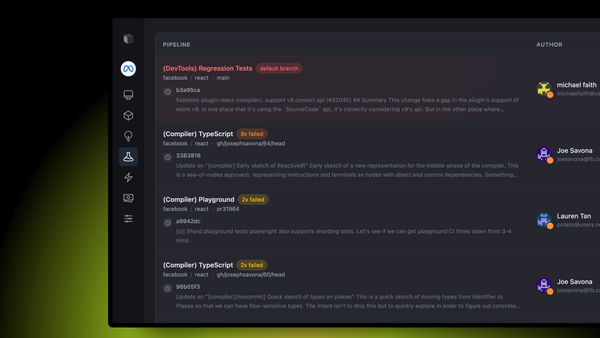
- Go to the Pipeline Failures tab to review recent failures; click any entry for AI root-cause analysis and recommended remediation steps.
- (Optional) Enable weekly summary emails and anomaly alerts from the settings menu.
For deeper metric explanations, refer to the official CubeScore documentation at https://cicube.io/github-actions-monitoring-docs/cube-score/. The entire onboarding typically takes under five minutes.
Final Verdict
Overall rating: 8.5/10. CICube excels as an accessible, AI-first observability layer for GitHub Actions that genuinely reduces toil and uncovers hidden costs—teams already invested in the GitHub ecosystem will see immediate productivity gains. It is especially recommended for mid-sized DevOps or engineering organizations (10–200 developers) seeking to optimize CI spend and MTTR without adopting a full observability suite. Avoid it if you require deep job-level log analysis, multi-CI-provider support today, or fully automated self-healing pipelines—more mature enterprise tools may still be better suited. One-sentence recommendation: If your team lives in GitHub Actions and wants an intelligent co-pilot that turns pipeline data into actionable savings and faster releases, CICube is one of the smartest investments you can make right now.