Clearword Review: The AI Meeting Assistant That Is Now Discontinued
Overview & Purpose
Clearword was a real-time AI meeting assistant that joined video calls to handle note-taking, summarization, and follow-up tasks automatically. It transcribed conversations live, generated productivity notes, identified action items, drafted follow-up emails, and updated CRMs without user intervention. The tool also built a centralized, searchable knowledge base of transcripts, recordings, and summaries, with simple link-sharing for collaboration.
Primary use cases included sales discovery calls, product team syncs, client reviews, and agency meetings where teams needed to convert discussions into immediate action and long-term knowledge retention. It targeted hybrid or remote professionals—particularly sales reps, product managers, marketers, and agency teams—who spend significant time in Zoom or Google Meet and rely on tools like Salesforce, HubSpot, Notion, or Jira.
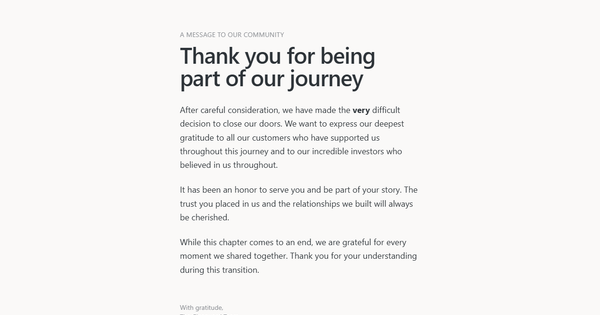
Important note on current status (research conducted March 2026): Clearword has discontinued operations. The primary website https://clearword.com/ now displays a “Goodbye and Farewell” message, and the service is no longer available for new or existing users. Archival descriptions remain accessible on the subdomain ai.clearword.com, but active functionality has ended.
Key Features & Capabilities
Core functionality centered on an AI “generative meeting partner” that actively participated in calls:
- Auto-joined Zoom, Google Meet (and Teams in some references).
- Real-time transcription, live notes, and instant summaries.
- Automatic action-item detection and export.
- Drafted follow-up emails and auto-filled CRM records.
- Created shareable “Summary Meeting Pages” with agendas, notes, comments, video recordings, and transcripts.
- Built a searchable team knowledge base for past meetings.
Standout differentiators included true live assistance during the call (not just post-meeting processing like many competitors) and deep workflow automation—e.g., turning a spoken task into a CRM update or email draft in real time. Google Calendar integration pre-populated meeting pages with smart agendas and file uploads, enabling strong async collaboration.
Limitations and missing features: Primarily video-call focused with limited mobile or in-person support; English-primary language handling; no advanced sales coaching or call analytics found in competitors like Gong. Privacy controls were strong (user-managed data and recordings), but the now-defunct status is the most significant current limitation. Integrations were solid for common CRMs but not as extensive as enterprise leaders.
User Experience
Setup was straightforward: connect your calendar and video platforms once, and the bot handled joining automatically. The interface revolved around clean Summary Meeting Pages and a central searchable library, making review, editing, and sharing intuitive even for non-technical users. Learning curve was minimal—most teams were productive within one or two meetings.
Interface quality emphasized collaboration over complexity, with comment threads and easy link-sharing. Documentation was basic (in-app guidance and online support); no extensive public help center or video library existed. Support was responsive via email or chat while the service operated, but resources are now inaccessible. User feedback was limited but generally positive where available—one verified G2 review awarded full marks for ease and impact.
Performance & Reliability
Transcription and summary generation were fast and reliable for clear English video calls, with independent 2025–2026 comparisons rating it 83/100 overall and 92% on action-item accuracy—particularly strong for internal product-team discussions. Real-time processing kept pace with conversations without noticeable lag.
Known issues were typical of AI meeting tools: occasional transcription hiccups with strong accents, background noise, or poor audio. No widespread reliability complaints emerged, likely due to its niche adoption. Privacy features allowed full user control over recordings and data. Post-shutdown, any previously stored meetings are presumably inaccessible or exported by former users.
Pricing & Value
Clearword used a freemium structure:
- Free tier: Limited (typically ~10 meetings or 300 minutes per month) for testing core transcription and summaries.
- Paid plans: Starting at $27 per user per month (billed annually; slightly higher monthly), including unlimited meetings, full automations, advanced integrations, and team sharing.
- Enterprise options available for custom volume and support.
Value was compelling for teams already paying for CRMs and video tools—the automation saved hours weekly on notes, emails, and data entry. However, the per-user pricing felt expensive compared to individual-friendly alternatives with generous free tiers. When active, the deep live integrations delivered strong ROI for high-volume meeting organizations; today, the discontinued status eliminates any ongoing value.
Practical Tutorial
No official tutorials remain available due to discontinuation. Below is a recreated step-by-step walkthrough for a common task—processing a sales discovery call—based on the platform’s documented “how it works” flow and user descriptions while the service operated.
-
Sign up and connect integrations (one-time setup): Create a free account at the (now archival) ai.clearword.com sign-up page. Authorize Google Calendar, Zoom/Google Meet, your CRM (Salesforce/HubSpot), and Gmail.
-
Prepare the meeting: Schedule the call in Google Calendar. Clearword automatically detected it and created a pre-meeting page with suggested agenda items and file-upload slots. Add the bot email if required for joining.
-
Run the live call: Start your Zoom or Google Meet session as usual. Clearword joined automatically as a participant (visible to all). Speak naturally—the AI listened in real time, generated live notes, and flagged action items (e.g., “Follow up with demo link by Friday”).
-
Review the Summary Meeting Page (immediately after hang-up): Access the auto-generated page in your library. It contained an AI-written executive summary, full searchable transcript, video recording, highlighted action items, and a comment section. Edit or assign tasks directly.
-
Complete actions and share: Click “Draft Email” to generate and send a follow-up (e.g., “Hi Sarah, great discussing Q2 goals today—here’s the demo link and next steps”). Export action items to CRM or Notion with one click. Generate a shareable link for your team to review without accounts.
-
Leverage the knowledge base: Later, search the central library for “Sarah Q2 goals” to pull up the full context instantly.
This process typically took under 5 minutes of active user time per meeting versus 30+ minutes of manual work.
Final Verdict
Overall rating: 3.8/5 (strong innovation and automation when active; heavily penalized for discontinuation).
Clearword was ideal for sales, product, and agency teams craving end-to-end meeting automation and a true collaborative knowledge base—especially those tired of copy-pasting notes into CRMs. Teams already deep in Google Workspace + CRM workflows benefited most.
Avoid it entirely today: the service is shut down, so no new sign-ups, support, or data access are possible. Solo users or mobile-first teams were never the best fit even when active.
One-sentence recommendation: Clearword delivered groundbreaking live AI assistance that turned meetings into automated workflows, but with its 2026 closure, choose active alternatives like Fireflies.ai, Otter.ai, or Fathom for comparable (and still-supported) results.