Master Reverse Prompting with Clip Interrogator Google Colab

Overview & Purpose
Clip Interrogator is an open-source prompt engineering tool that analyzes an input image and generates optimized text prompts suitable for text-to-image generative AI models like Stable Diffusion. It combines Salesforce’s BLIP model for initial image captioning with OpenAI’s CLIP (via OpenCLIP) to rank and select the most relevant descriptive terms, artists, mediums, styles, and flavors that best match the visual content.
The primary use case is reverse prompt engineering: given an existing image (photo, AI-generated artwork, or painting), the tool helps users discover effective prompts to recreate similar results or create variations. It is particularly valuable for understanding stylistic elements that are hard to describe manually. Target audience includes AI artists and hobbyists using Stable Diffusion, digital designers seeking style references, prompt engineers experimenting with generative workflows, and developers integrating image-to-prompt functionality into custom pipelines. It is not aimed at general image captioning for accessibility or search but at creative AI image generation workflows.
Key Features & Capabilities
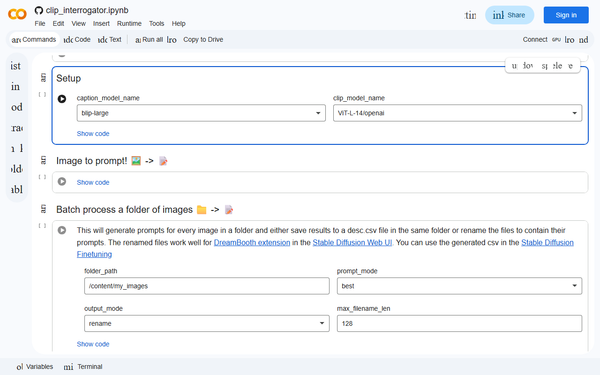
Core functionality revolves around uploading an image and receiving a concatenated prompt consisting of a BLIP-generated caption plus CLIP-ranked descriptors. Users can select from multiple pretrained CLIP models tailored to different Stable Diffusion versions (e.g., ViT-L-14/openai for SD 1.x or ViT-H-14/laion2b_s32b_b79k for SD 2.x). Additional options include interrogation modes: “best” (most detailed but slowest), “classic,” and “fast” (quickest with fewer flavors). Version 0.6+ supports ranking against custom term lists and multiple caption models including BLIP2 variants.
Standout features include low-VRAM mode (reducing usage from ~6.3 GB to ~2.7 GB), precomputed text embedding caching for faster repeats, Python library/CLI/Gradio support, and seamless integration as a Stable Diffusion WebUI (Automatic1111) extension. It differentiates itself from generic captioners by focusing on generative-AI-compatible prompts with artist names, artistic mediums, and quality boosters that directly influence models like Stable Diffusion. It also runs on Colab, Hugging Face Spaces, and Replicate for zero-setup access.
Limitations include no native support for newer architectures like Stable Diffusion XL or Flux in the core library (though forks and community nodes exist), occasional generic or hallucinated descriptors on complex or abstract images, and dependence on the chosen CLIP model’s training data. It does not perform object detection or segmentation and can produce overly long prompts that require manual trimming.
User Experience
Ease of use is high for the target audience. The official Colab notebook and Hugging Face demo require only image upload and a few dropdown selections before clicking “Interrogate,” making the learning curve minimal for beginners. The Automatic1111 WebUI extension integrates directly into the familiar generation interface, allowing one-click analysis alongside image generation. Developers appreciate the clean Python API for programmatic use.
Interface quality varies by platform: Colab and HF Spaces are straightforward but basic web forms; the WebUI extension feels native and polished within the Stable Diffusion ecosystem. Documentation is solid in the GitHub README, covering installation, configuration options, and examples, with the notebook itself serving as a live tutorial. Community support thrives on Reddit’s r/StableDiffusion and GitHub discussions, though official support is limited since the project’s last major update. Overall, the tool feels accessible yet powerful for both casual and advanced users.
Performance & Reliability
On GPU-equipped systems or Colab, interrogation typically completes in 10–60 seconds depending on mode and image complexity, with “fast” mode being near-instantaneous. Precomputed embeddings and caching improve repeat runs significantly. Low-VRAM mode trades some speed and quality for broader hardware compatibility (tested successfully on 8 GB GPUs).
Known issues include VRAM out-of-memory errors on lower-end GPUs without low-VRAM settings, slower performance on shared Colab instances, and occasional inconsistent results across runs due to model choices. Community feedback from 2023–2026 notes that while reliable for inspiration, prompts often need refinement for production use. The core project has seen limited development since 2023, leading some users to explore forks or newer vision-language models for improved accuracy on modern architectures. No major reliability complaints beyond hardware constraints were widespread as of April 2026.
Pricing & Value
Clip Interrogator is completely free and open-source under the MIT license. The Colab notebook, Hugging Face Space, and Replicate demo are available at no cost (subject to platform usage quotas), and local installation or WebUI extension requires only a compatible GPU or sufficient RAM. There are no paid tiers, enterprise options, or hidden fees.
Value proposition is excellent for its niche: it provides professional-grade reverse prompting capabilities at zero monetary cost, saving hours of manual prompt crafting. Compared to alternatives like built-in WebUI interrogators (simpler but less feature-rich), Midjourney’s /describe (paid and closed), or newer commercial tools, it remains one of the most accessible and customizable options. Its integration with the dominant Stable Diffusion ecosystem further enhances long-term utility for the AI art community.
Practical Tutorial
A common task is generating a reusable prompt from an existing AI-generated or photographic image to create variations in Stable Diffusion. The easiest way is via the official Colab notebook (linked in the query) or the Hugging Face Space.
Step-by-step walkthrough (Colab version, as of 2026):
- Open the Colab notebook and run the first few setup cells to install dependencies and download models (first run may take 2–5 minutes).
- In the configuration section, select your preferred CLIP model (recommend ViT-L-14/openai for most SD 1.5 workflows or ViT-H-14/laion2b_s32b_b79k for SD 2.x) and set mode to “best” for maximum detail or “fast” for quick testing.
- Upload your reference image using the file uploader or provide a URL.
- (Optional) Enable low-VRAM mode if your runtime has limited resources by calling
config.apply_low_vram_defaults(). - Click the “Interrogate” button. The tool outputs a full prompt including caption, top artists, mediums, styles, and flavor terms.
- Copy the generated prompt into your Stable Diffusion interface (e.g., Automatic1111 WebUI). Add weights, negative prompts, or refinements as needed, then generate new images.
Real example: Uploading a cyberpunk cityscape photo might yield: “cyberpunk neon city at night, rainy streets, flying cars, detailed architecture, in the style of syd mead, blade runner, cinematic lighting, highly detailed, 8k”. Users can then tweak artist references or add parameters like “--ar 16:9” for new variations. For WebUI extension users, the process is even simpler: install via the Extensions tab, restart, and use the dedicated tab to interrogate any generated image instantly. Official resources and community tutorials on GitHub and Reddit provide additional advanced configuration examples.
Final Verdict
Overall rating: 4.5/5 – an outstanding free tool that punches above its weight for Stable Diffusion users but shows its age compared to newer vision-language models.
Who should use this tool: AI artists, Stable Diffusion enthusiasts, prompt engineers, and designers who want fast, targeted prompt ideas from reference images without cost or complex setup. It excels when you need style-aware descriptors that directly improve generative output.
Who should avoid this tool: Users working exclusively with SDXL/Flux or requiring pixel-perfect captioning, those without any GPU access (performance suffers on CPU), or anyone seeking fully automated, hands-off results without prompt refinement.
One-sentence recommendation: If you generate images with Stable Diffusion and ever need to reverse-engineer a great-looking reference, install Clip Interrogator today—it’s the quickest way to turn “I like this picture” into a working prompt.