ClipBuddy Review: Turn Long Videos Into Viral Shorts with AI

Overview & Purpose

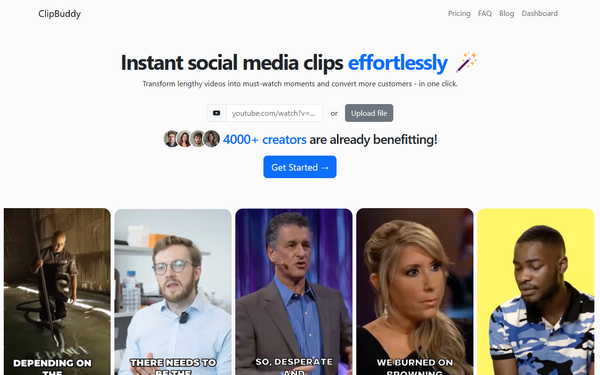
ClipBuddy is an AI-powered video editing tool that automatically transforms long-form videos into engaging short clips optimized for social media platforms like TikTok, Instagram Reels, Facebook, and YouTube Shorts. By analyzing footage for key moments, it handles the entire editing process—including curation, captioning, and formatting—allowing users to repurpose content such as podcasts, interviews, webinars, or vlogs without manual effort. Primary use cases include boosting digital engagement through viral-ready shorts, saving time on content repurposing, and enabling creators to produce multiple clips from a single source video for cross-platform distribution.
The target audience consists primarily of content creators, podcasters, interviewers, marketers, and small businesses who generate long-form video but lack editing skills or dedicated teams. It appeals especially to beginners or time-strapped professionals seeking a cost-effective alternative to hiring editors, with the official site emphasizing its accessibility for non-experts. Research conducted as of March 15, 2026.
Key Features & Capabilities
Core functionality revolves around fully automated clip generation: users upload a video, and the AI processes it to produce multiple optimized shorts. Standout features include:
- Auto Face Detection and Cropping: Identifies speakers and dynamically centers them in the frame for professional focus.
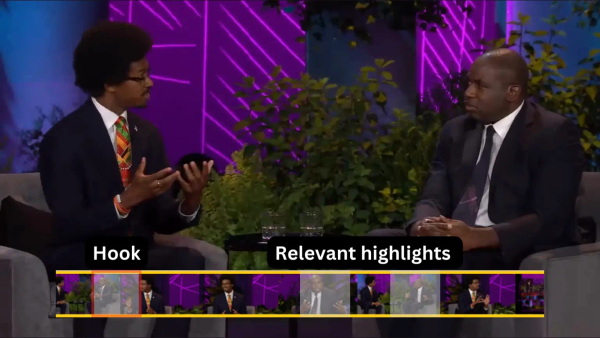
- AI Curation: Detects the most engaging moments to create hooks that retain viewer attention.
- Auto Captioning: Generates dynamic, keyword-based captions to boost engagement (especially for silent viewing).
- Resizing and Transitioning: Automatically converts to 9:16 vertical format and adds smooth audio-visual transitions.
- Multi-Language Support: Handles English, French, German, Spanish, Italian, Japanese, Chinese, Dutch, Ukrainian, and Portuguese.
Differentiators from competitors include its speaker-centric cropping and emphasis on simplicity—no manual timeline scrubbing required—plus privacy assurances that content is never shared or sold. Upcoming features (marked “coming soon” on the site) include Auto Emoji for emotional emphasis and Branding for logos/watermarks.
Limitations include strict monthly upload quotas tied to plans (e.g., no unlimited processing), lack of advanced manual customization or editing tools, and the fact that some marketing materials reference emoji/branding features not yet confirmed as live. No integrations with external platforms (e.g., direct scheduling to TikTok) are mentioned.

User Experience
ClipBuddy boasts an intuitive, upload-and-go interface requiring no prior editing experience, making it accessible via a clean web-based dashboard. Users simply log in, start a project, and let the AI handle the rest, resulting in a minimal learning curve—ideal for novices. The design prioritizes speed and simplicity over complex controls.
Documentation is basic, consisting mainly of blog posts on the official site rather than comprehensive guides or video tutorials. Support is provided via priority email (higher tiers) or standard channels; no live chat or extensive knowledge base was evident. Overall, the experience feels streamlined and beginner-friendly, though advanced users may find it too hands-off.
Performance & Reliability
Processing is cloud-based with no hardware requirements, delivering results up to 20 times faster than manual editing according to site claims. Clips are generated efficiently—often producing up to 10 unique shorts from one upload—with consistent quality in curation, captions, and formatting. Reliability appears solid for core tasks, with privacy-focused infrastructure ensuring content security.
Known issues or complaints are minimal due to limited public feedback (the tool appears relatively new). Aggregated user ratings average around 4.8/5 on one review aggregator (based on 12 users) and 3.0/5 on another (2 users), with praise for time savings and consistency but no widespread reports of crashes, inaccurate curation, or slow processing. No major Reddit or forum complaints surfaced in searches as of March 2026.

Pricing & Value
ClipBuddy operates on a subscription model with no apparent free tier:
- Standard: $9/month – 60 minutes upload, basic email support.
- Creator (most popular): $12/month – 120 minutes upload, priority support.
- Pro: $60/month – 600 minutes upload, priority support.
Plans allow cancellation anytime and scale with usage. Value is strong for budget-conscious users: the site positions it as up to 30 times more cost-effective than hiring a professional editor, delivering professional results at a fraction of the price. Compared to alternatives (e.g., more feature-heavy tools like Opus Clip), ClipBuddy offers a simpler, lower-entry-cost option ideal for light-to-moderate needs. Limitations include quota restrictions that may require upgrading for heavy users.
Practical Tutorial
Official detailed tutorials are limited to high-level blog overviews, but the process is straightforward and consistent across site descriptions. Here is a step-by-step walkthrough for a common task—creating engaging YouTube Shorts from a podcast episode (based on official functionality as of March 2026). For further reading, see the site’s blog posts such as “Transforming Lengthy Videos into Viral Clips.”
- Sign Up and Log In: Visit https://clipbuddy.io/ and create an account (or log in). Select a plan to activate upload credits.
- Start a New Project: In the dashboard, click “New Project” to begin.
- Upload Your Video: Select and upload your full-length file (e.g., a 45-minute podcast episode). Ensure it fits your plan’s monthly limit; supported formats are standard video files.
- Let AI Process: The system automatically runs face detection, AI curation (identifying 5–10 key moments), auto-captioning, cropping to speakers, resizing to 9:16, and transitions. This typically completes in minutes depending on video length.
- Review and Customize (Lightly): Preview the generated clips. Add minor adjustments if available (e.g., select favorites); note that advanced edits like manual trimming are not supported.
- Export and Share: Download the clips or export directly for platforms like YouTube Shorts. Example outcome: From one podcast, you might get a 30-second hook clip with captions reading key quotes, speaker-focused framing, and smooth fades—ready to post and drive engagement.
Real example: Uploading an interview video often yields clips highlighting emotional peaks with auto-generated captions like “The surprising truth about X…” plus optimized vertical format for mobile viewing. Test with a short sample video first to gauge results.
Final Verdict
Overall rating: 4.2/5. ClipBuddy excels as a simple, affordable AI assistant for repurposing long-form content into platform-ready shorts, particularly for users prioritizing speed over fine control. It shines for podcasters, interviewers, and marketers who want professional-looking clips without learning complex software or spending hours editing.
Who should use this tool: Busy content creators, small teams, or beginners with existing long videos who need quick, consistent output on a budget—especially those targeting TikTok, Instagram, or YouTube Shorts and valuing automation plus speaker focus.
Who should avoid this tool: Advanced video editors seeking granular control, heavy users exceeding low-tier quotas, or anyone requiring a free tier or fully live advanced features like branding/emoji (still rolling out). Those needing extensive customization or proven enterprise-scale reliability may prefer more mature competitors.
One-sentence recommendation: ClipBuddy is a worthwhile investment for anyone tired of tedious clipping—upload once and watch AI turn your long videos into engaging shorts that skyrocket engagement.