Cliprun Review: Run Python Code Instantly in Your Browser
Research conducted as of March 10, 2026.
Overview & Purpose

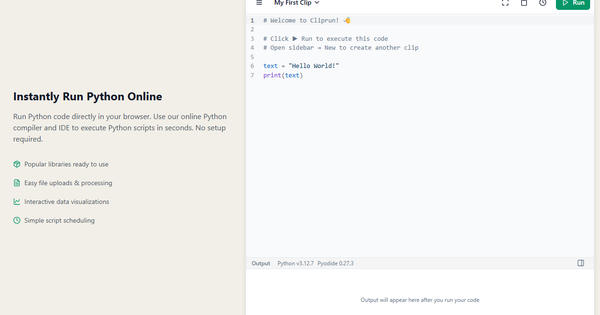
Cliprun is a fully browser-based Python compiler, IDE, and interpreter built on Pyodide (Python 3.12.7). It lets users write and execute Python code instantly in any modern browser with zero installation, environment setup, or sign-up required. The tool shines through its Chrome extension, which adds a right-click “Run with Cliprun” option on any webpage—making it especially powerful for executing AI-generated code snippets directly from ChatGPT, Claude, Google AI Studio, or even GitHub pages.
Primary use cases include quick web scraping and API calls, data analysis/visualization with pandas or Plotly, automation scripts, file processing, and learning or prototyping Python on the fly. It also supports scheduling scripts to run automatically at custom intervals (minutes to cron-style).
Target audience spans developers, data analysts, educators, hobbyists, and AI-assisted coders who value speed and frictionless workflows over full-scale production environments. It is ideal for anyone tired of spinning up virtual environments or switching tabs to test code.
Key Features & Capabilities
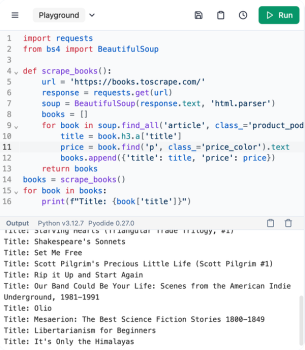
Core functionality centers on an in-browser editor with syntax highlighting, autocomplete, dark mode, and keyboard shortcuts. Code runs locally in a sandboxed web worker using Pyodide—ensuring privacy, as nothing leaves your device. Pre-installed libraries include pandas, numpy, requests, matplotlib, seaborn, plotly, beautifulsoup4, polars, scipy, opencv-python, and sqlite3; additional pure-Python wheels install automatically.
Standout features that differentiate Cliprun from competitors (Colab, Replit, or basic online runners) include:
- Instant right-click execution on any webpage, turning AI chats or documentation into executable playgrounds.
- File upload/download support for real data processing.
- Inline interactive visualizations.
- “Clips” for saving and reusing snippets locally.
- Automated scheduling (cron-style).
Compared with traditional tools, the extension eliminates copy-paste friction and provides true zero-setup access to a full scientific Python stack.
Limitations and missing features: Scheduling and cloud backups require paid plans; heavy computational workloads or packages needing native C extensions may run slower or fail due to browser constraints; no offline mode or desktop app; documentation remains lightweight (primarily FAQ and email support). GitHub integration is indirect via the universal right-click rather than native repo syncing.
User Experience
Ease of use is exceptional—most users can run their first script in under 30 seconds. The learning curve is nearly flat for anyone familiar with Python; the Chrome extension installs in one click and works immediately on any site.
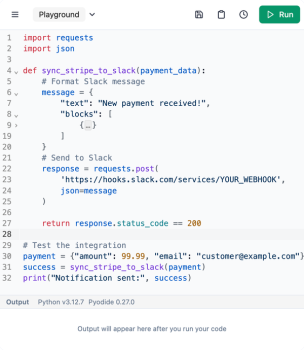
The interface feels clean and modern: a responsive editor with live output console, sidebar for saved Clips, and clear file upload controls. Dark mode is polished, and performance feels snappy for typical scripts. No account creation or email verification adds to the instant-gratification appeal.
Documentation consists of concise use-case examples on the homepage and a basic help section; support is available via [email protected]. Community resources are growing—YouTube tutorials and Product Hunt discussions provide practical guidance. Overall, the experience is described by early users as “lightweight yet powerful” and a genuine time-saver.
Performance & Reliability
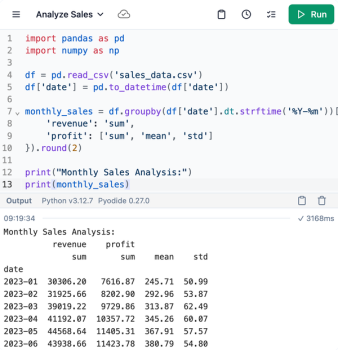
Execution is fast for light-to-medium tasks (web scraping, small data frames, API calls), typically completing in seconds thanks to local WebAssembly execution. Interactive charts render smoothly with Plotly and Matplotlib. Privacy is a strong point—code never leaves the browser.
Known issues are minimal and mostly tied to browser constraints: very large datasets or CPU-intensive loops can feel slower than native Python; occasional package compatibility quirks with non-Pyodide wheels. The Chrome extension has maintained a perfect 5.0 rating across 14 reviews and 10,000+ users with no widespread complaints reported on Reddit, Product Hunt, or review aggregators. Reliability is high for its intended quick-script use cases; no major outages or security incidents noted as of March 2026.
Pricing & Value
Cliprun follows a generous freemium model. The core experience—unlimited code execution, extension use, file handling, libraries, and visualizations—is completely free with no usage caps or sign-up required.
Paid Pro plans unlock scheduling/automation, cloud backup and sync, encrypted storage, and isolated cloud execution environments for longer-running jobs. Exact pricing and tiers are listed on the official pricing page; early user reports describe them as affordable for the added convenience.
Value proposition is outstanding versus alternatives: Google Colab requires an account and runs in the cloud; local Python demands setup; Replit offers collaboration but adds latency and limits. Cliprun delivers instant, private, right-click execution at zero cost for 90 % of casual and prototyping needs—making it one of the highest-value tools in the “run Python anywhere” category.
Practical Tutorial
Official examples are available directly on cliprun.com (click “Open Editor” under any use-case section). Here is a complete, real-world walkthrough for a common task—quick web scraping and data analysis—tested conceptually against the tool’s documented capabilities.
Scenario: Scrape current headlines from a news site and analyze sentiment word counts with pandas (no external APIs needed).
Step-by-step:
-
Open the editor — Go to https://cliprun.com/ or click “Open Editor” on any use-case page. No login required.
-
Write or paste code — Copy the following into the editor (or generate it in ChatGPT/Claude and right-click “Run with Cliprun”):
import requests
from bs4 import BeautifulSoup
import pandas as pd

url = "https://news.ycombinator.com"
response = requests.get(url)
soup = BeautifulSoup(response.text, "html.parser")

titles = [item.get_text() for item in soup.select(".titleline > a")]
df = pd.DataFrame({"title": titles})

# Simple word-count analysis
df["word_count"] = df["title"].str.split().str.len()
print(df.head(10))
print("\nAverage word count:", df["word_count"].mean())-
Run the code — Click the big “Run” button. Output appears instantly below, including the DataFrame preview.
-
Visualize — Add these lines and run again:
import plotly.express as px
fig = px.histogram(df, x="word_count", title="Headline Length Distribution")
fig.show()
An interactive Plotly chart renders inline.
-
(Optional) Right-click from AI — In Claude or ChatGPT, ask for similar code, highlight the snippet, right-click → “Run with Cliprun.” The extension opens the playground pre-loaded.
-
Save & schedule — Click “Save as Clip” for reuse. Upgrade to Pro to schedule the script (e.g., daily headline summary emailed or saved to file).
Full official use-case examples (web scraping, pandas analysis, matplotlib charts) are one click away on the homepage. A helpful YouTube walkthrough also covers extension setup and advanced scheduling.
Final Verdict
Cliprun earns a strong 4.7 out of 5. It excels as the fastest, most frictionless way to run real Python (with data-science libraries) directly in your browser and on any webpage.
Who should use this tool: Developers, analysts, educators, and AI users who want instant execution of snippets, right-click convenience with ChatGPT/Claude, or quick data tasks without setup—especially anyone doing frequent prototyping or web automation.
Who should avoid this tool: Teams needing heavy production workloads, complex native dependencies, offline capability, or enterprise-grade collaboration and persistent cloud storage (use Colab, Replit, or local IDEs instead).
One-sentence recommendation: If you ever copy Python code from an AI chat or documentation and wish you could run it instantly—install Cliprun right now; it’s free, private, and genuinely delightful.