Clips AI Review: The Best Free Open-Source Tool for Video Clipping
Overview & Purpose
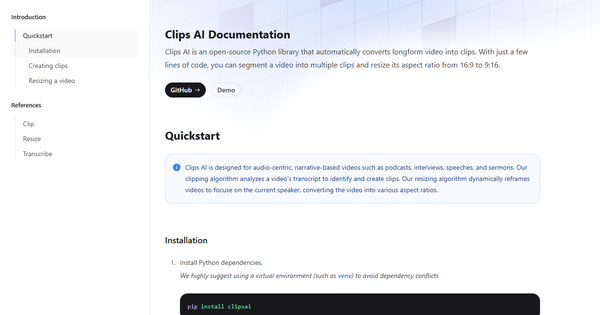
Clips AI is an open-source Python library that automatically converts long-form, audio-centric videos into shorter, shareable clips. It analyzes video transcripts to detect topic shifts and segment content into coherent clips, while also offering dynamic video resizing to reframe footage (e.g., from 16:9 to 9:16 vertical formats) by focusing on the current speaker. Primary use cases include repurposing podcasts, interviews, speeches, and sermons for social media, YouTube Shorts, TikTok, or other short-form platforms. The tool emphasizes narrative-driven content where spoken dialogue drives engagement, using AI to handle transcription, clipping, and reframing programmatically.
The target audience is primarily developers, technical creators, and teams building custom video workflows in Python. It is not positioned as a no-code SaaS platform for general marketers or non-technical users, though a UI demo exists at demo.clipsai.com for previewing outputs. (Research conducted as of April 13, 2026, based on the official site, GitHub repository, and user feedback from G2, Reddit, and review aggregators.)
Key Features & Capabilities
Core functionality revolves around two main pipelines: clip segmentation and video resizing. The clipping process uses WhisperX for high-accuracy transcription (with word-level timestamps), followed by the TextTiling algorithm enhanced with BERT embeddings to identify topic boundaries at the sentence level. This produces a list of clips with start/end times, which can then be trimmed using the built-in MediaEditor. The resizing feature employs Pyannote for speaker diarization, combined with PySceneDetect for scene changes and MTCNN/MediaPipe for face detection, to dynamically crop and focus on active speakers in vertical formats.
Standout features that differentiate it from competitors include its fully open-source nature (MIT license) and customizable Python integration, allowing developers to embed clipping logic into larger pipelines without vendor lock-in. The speaker-focused dynamic reframing is particularly advanced for a free tool, producing natural vertical videos without manual keyframing. It supports multiple aspect ratios and runs locally (with GPU acceleration recommended for speed).
Limitations and missing features are notable for non-developers: there is no built-in social media distribution, automated engagement prediction scoring, custom branding overlays, or native team collaboration tools. The library requires manual post-processing for final edits or uploads, and it is optimized strictly for speech-heavy narrative content—performance drops on music videos, action footage, or poor audio quality. Setup involves external dependencies (ffmpeg, libmagic, Hugging Face Pyannote token), and there is no full graphical user interface beyond a basic demo.
User Experience
Ease of use and learning curve depend heavily on Python proficiency. For developers familiar with pip and virtual environments, installation is straightforward via pip install clipsai plus WhisperX and system packages; the core workflow requires only a few lines of code. Non-coders face a steep curve due to command-line execution, dependency management, and troubleshooting (e.g., Windows libmagic issues). The official documentation provides clear quickstart examples and reference pages for clipping and resizing but is described by users as "bare bones" with limited explanations for edge cases.
Interface quality is code-centric with clean, object-oriented APIs (e.g., ClipFinder, MediaEditor classes). Outputs are precise data objects (timings, crops) that integrate easily with tools like FFmpeg. A separate video-editor repository and UI demo offer visual previews and basic trimming, improving accessibility slightly. Documentation and support resources consist of the website references, GitHub README (68 commits, active but not highly frequent), and community discussions on Reddit. No dedicated helpdesk or extensive tutorials exist; users rely on the repo issues or forums. Overall, it feels efficient once set up but lacks the polished onboarding of commercial SaaS alternatives.
Performance & Reliability
Speed and efficiency are solid for local processing: transcription and clipping complete quickly on GPU-equipped machines (WhisperX is optimized), while resizing adds overhead due to diarization and face detection but produces high-quality results. Users report reliable topic-based segmentation for podcasts, with clips typically 30–90 seconds long and well-timed to spoken content.
Known issues or common complaints center on initial setup friction—especially library dependencies and Hugging Face token configuration—and occasional inaccuracies in low-quality audio or multi-speaker scenarios without fine-tuning. Sparse documentation leads to trial-and-error for beginners, and there are no widespread reports of crashes or data loss, but the tool's reliance on third-party models (WhisperX, Pyannote) means performance mirrors those underlying libraries. With 467 GitHub stars and positive G2/aitools.xyz feedback (4.73/5 from limited reviews), it is considered reliable for its intended developer use case, though not enterprise-grade without custom scaling.
Pricing & Value
Clips AI is completely free and open-source under the MIT license, with no tiers, credits, or subscriptions. Users handle their own compute costs (local GPU recommended but CPU viable for smaller files). There are no enterprise options or paid hosting; everything runs on your machine or custom servers.
The value proposition shines for budget-conscious developers or teams needing customizable, unlimited clipping without recurring fees. Compared to paid SaaS alternatives like Opus Clip or Vizard (which offer polished UIs, auto-distribution, and virality scoring starting at ~$12–35/month), Clips AI provides core functionality at zero cost but trades convenience for flexibility and control. It is an excellent entry point or backend for custom solutions, delivering strong ROI for Python-savvy users who value open-source extensibility over out-of-the-box ease.
Practical Tutorial
A common task is generating and resizing short clips from a long podcast episode. Here is a complete step-by-step walkthrough using real code from the official documentation (tested conceptually against the quickstart). Assume you have a 60-minute MP4 podcast file named podcast_episode.mp4.
-
Set up your environment (one-time): Create a Python virtual environment, install dependencies, and obtain a free Hugging Face Pyannote token from huggingface.co (sign up and accept the model terms).
python -m venv clips_env source clips_env/bin/activate # or venv\Scripts\activate on Windows pip install clipsai pip install whisperx@git+https://github.com/m-bain/whisperx.git # Install system packages: ffmpeg and libmagic (via apt/brew/choco) -
Transcribe the video:
from clipsai import Transcriber transcriber = Transcriber() transcription = transcriber.transcribe(audio_file_path="/absolute/path/to/podcast_episode.mp4") -
Find topic-based clips:
from clipsai import ClipFinder clipfinder = ClipFinder() clips = clipfinder.find_clips(transcription=transcription) print(f"Found {len(clips)} clips. Example: {clips[0].start_time} to {clips[0].end_time}") -
Trim the best clip (e.g., first one):
import clipsai media_editor = clipsai.MediaEditor() media_file = clipsai.AudioVideoFile("/absolute/path/to/podcast_episode.mp4") clip = clips[0] trimmed_path = "/absolute/path/to/clip_1.mp4" clip_media = media_editor.trim( media_file=media_file, start_time=clip.start_time, end_time=clip.end_time, trimmed_media_file_path=trimmed_path ) -
Resize to vertical (9:16) with speaker focus:
from clipsai import resize
crops = resize(
   video_file_path=trimmed_path,
   pyannote_auth_token="your_hf_pyannote_token",
   aspect_ratio=(9, 16)
)
resized_path = "/absolute/path/to/vertical_clip.mp4"
media_editor.resize_video(
   original_video_file=clipsai.AudioVideoFile(trimmed_path),
   resized_video_file_path=resized_path,
   width=crops.crop_width,
   height=crops.crop_height,
   segments=crops.to_dict()["segments"]
)
print("Resized video ready for social media!")
Official tutorials are limited to the site quickstart and references; for visuals, check the UI demo at https://demo.clipsai.com/. Extend this by looping through clips or integrating with FFmpeg for batch processing.
Final Verdict
Overall rating: 4.5/5—excellent for its niche as a free, powerful developer tool, though held back by lack of polish for broader audiences.
Developers and technical content teams who handle video repurposing programmatically should use this tool because it offers unlimited, customizable clipping and advanced speaker-aware reframing at zero cost with full code control. Non-technical creators or those needing one-click social distribution, branding, or engagement predictions should avoid it in favor of full SaaS platforms, as the Python-only workflow and setup requirements add unnecessary friction.
Clips AI delivers a smart, open-source foundation for AI-powered video clipping that punches above its weight for developers willing to code.