Clockwise Review: The AI Calendar Assistant for Deep Work
Overview & Purpose

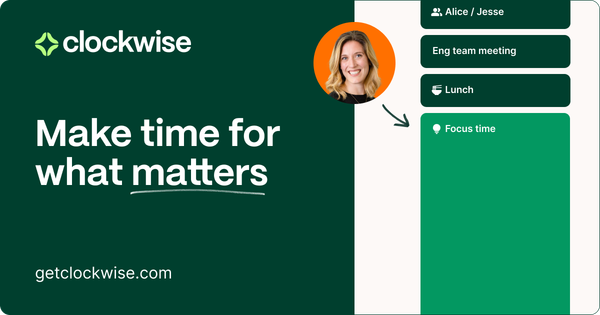
Clockwise is an AI-powered calendar assistant that proactively optimizes individual and team schedules to create more deep work time while minimizing conflicts and context switching. It analyzes calendars, learns user and team preferences, automatically rearranges flexible meetings, protects focus blocks and personal time (such as lunch or travel), and coordinates complex scheduling across time zones and teammates. Primary use cases include protecting uninterrupted deep work for individuals, streamlining internal team meeting coordination, resolving scheduling conflicts in real time, and scaling productivity across organizations through shared optimization.
The tool targets busy knowledge workers and teams—particularly product managers, engineers, IT directors, founders, and entire tech or collaborative organizations—where internal meetings dominate calendars. It shines in environments with multiple colleagues (e.g., engineering or product teams) and has been adopted by over 40,000 organizations, including Atlassian and Intercom. It is less ideal for purely external-facing roles or solo users who primarily need booking links rather than team-wide optimization.
Key Features & Capabilities
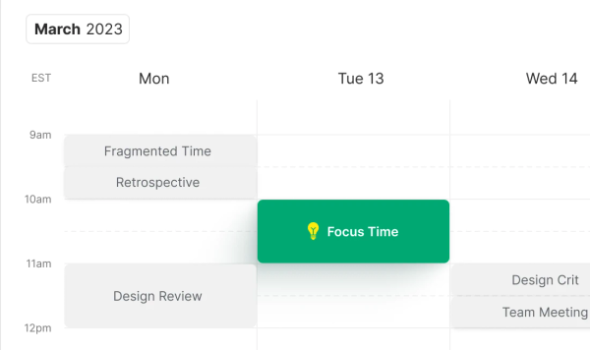
Core functionality revolves around an intelligent optimization engine that runs daily (and in real time for changes), testing millions of possible arrangements to balance individual focus needs with team collaboration. Key capabilities include auto-scheduled Focus Time holds, flexible meeting rearrangement, smart Scheduling Links (personal and group, with external invitees), lunch/travel protection, out-of-office calendar sync, and a conversational AI assistant (Clockwise Calendar/Prism) for natural-language scheduling commands.
Standout differentiating features include empathetic AI trained on 160 million+ meeting data points that learns work styles and priorities, team-wide simultaneous optimization (the more teammates using it, the better the results), and company-wide tools like no-meeting days and analytics for meeting load. Integrations cover Google Calendar, Microsoft Outlook, Slack, and Zoom, enabling status sync and scheduling from Slack. Unlike pure booking tools (e.g., Calendly), Clockwise actively moves existing meetings; unlike purely personal AI schedulers, it coordinates across teams in real time.
Limitations include a shorter optimization window on lower plans (2 weeks vs. 4 weeks), no deep task or project management integration (it focuses purely on calendar events), and the need for team adoption to unlock full value—solo users or small groups see limited gains. Some advanced analytics and admin controls are restricted to Business/Enterprise tiers. Occasional user-reported issues involve the AI occasionally requiring manual overrides for complex edge cases or personal vs. work event confusion.
User Experience
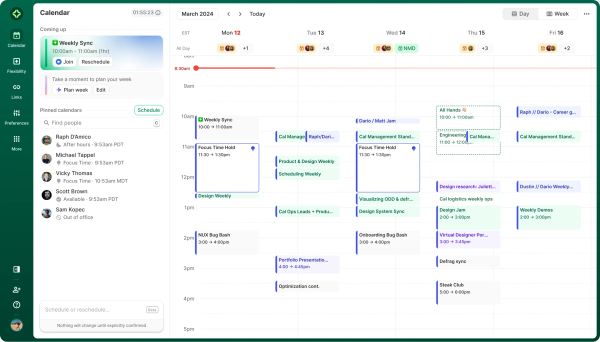
Setup is straightforward: connect your calendar (Google or Outlook extension), define working hours and focus goals, mark flexible meetings, and the AI begins optimizing within minutes. The learning curve is low for basic use; most users report productivity gains immediately after onboarding. The interface appears as a clean overlay or web app alongside your native calendar, with visual indicators for focus blocks and proposed changes—generally intuitive, though some users note occasional screen clutter when multiple optimizations appear.
Documentation is excellent via the comprehensive knowledge base at support.getclockwise.com, with clear how-to articles, FAQs, and release notes. Support includes priority options on higher plans and responsive customer service. Slack integration further enhances accessibility by allowing scheduling directly in chat.
Performance & Reliability
Optimizations are fast and efficient, with real-time adjustments for new events or changes and daily recalculations that users report create 10+ hours of deep work in the first month while reducing context switching by up to 60%. The engine reliably resolves conflicts and respects preferences across time zones, with strong performance in team environments.
Known issues are minor and infrequent: occasional over-aggressive rescheduling requiring confirmation, rare event duplication during initial setup, or less optimal results without full team participation. Reviews on G2 and Capterra (generally 4.5+ ratings) highlight high reliability for focus time creation, with no widespread reports of downtime or major bugs as of March 2026. Outlook integration works but may feel slightly less seamless than Google for some users.
Pricing & Value
Clockwise offers a clear tiered structure with annual billing discounts:
- Free: $0/user/month – basic intelligent management, unlimited personal Scheduling Links, lunch/travel protection.
- Teams (recommended): $6.75/user/month (annual) or $7.75 monthly – adds full Focus Time protection, team optimization, group links.
- Business: $11.50/user/month (annual only) – adds organization-wide analytics, admin controls, no-meeting days, custom branding.
- Enterprise: Custom pricing – adds SCIM provisioning, advanced security, priority support, and custom contracts.
Discounts are available for nonprofits and startups. Value is strong for growing teams: the ROI from reclaimed focus time and reduced scheduling friction typically pays for itself quickly, especially compared to manual coordination or less team-oriented alternatives like Calendly. The free tier serves as an effective trial, but teams quickly upgrade for meaningful collaboration features. Higher tiers provide excellent scalability for larger organizations.
Practical Tutorial
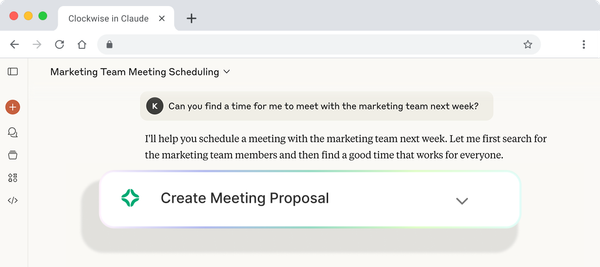
Clockwise provides official documentation with practical guides. Below is a step-by-step walkthrough for a common task—scheduling a team meeting using the conversational Clockwise Calendar AI assistant (available on all plans). This leverages natural language and automatic rearrangement of flexible meetings for optimal times. (Based on official support article; full details at https://support.getclockwise.com/article/206-clockwise-calendar.)
-
Access the AI Calendar: Log into the Clockwise web app (app.getclockwise.com) or use the Slack integration. In the web app, navigate to your calendar view; the AI chat box appears at the bottom left. In Slack, use the
/cwslash command or message the Clockwise bot. -
Describe your request naturally: Type something like “Schedule a 30-minute 1:1 with Alex tomorrow afternoon” or “Book a team sync with Sarah, Mike, and Priya next week for 45 minutes, preferring mornings.” Include constraints if needed (e.g., “after lunch, no Fridays”).
-
Review AI suggestions: The assistant analyzes everyone’s calendars, moves flexible meetings if possible, and presents 1–3 top options (with impact indicators like a clock emoji in Slack). A visual preview overlay shows proposed placements on your calendar.
-
Confirm or refine: Click Confirm (or Choose in Slack) to book—the AI instantly rearranges the calendar and sends invites. Select Cancel / Never mind if needed, or Continue in Clockwise for more details. Provide 👍/👎 feedback to improve future suggestions.
-
Follow up: Check your calendar for the update. The AI respects focus time and preferences automatically. For recurring changes or bulk adjustments, prompt again (e.g., “Move all my standups to Tuesdays”).
This process typically takes under a minute and surfaces times not visible in manual open slots. For Focus Time setup, see the official guide at https://support.getclockwise.com/article/189-focus-time. Video resources and additional prompts are covered in related support articles.
Final Verdict
Clockwise earns a strong 4.6/5 rating for its intelligent team optimization and focus-time creation, delivering measurable productivity gains with minimal effort once adopted.
It is ideal for teams and organizations (especially tech and knowledge-work groups) seeking to reclaim deep work hours and eliminate scheduling chaos through shared AI intelligence—particularly if most colleagues use Google Workspace or Outlook. Users who value automatic calendar harmony and measurable team impact will see the highest returns.
Avoid it if you are a solo user with minimal team meetings, rely heavily on Outlook without full team buy-in, prefer manual control over AI decisions, or need robust task/project integration beyond calendar events.
Clockwise is a must-try for any team tired of calendar Tetris—it genuinely makes time management feel effortless.