CloudAgent Review: Automate AWS Infrastructure with AI Agents

Overview & Purpose

CloudAgent is an AI-powered automation platform that deploys intelligent agents to serve as an "AI-powered cloud operations team." These expert agents autonomously handle end-to-end management of AWS cloud infrastructure, including provisioning, monitoring, incident response, cost optimization, security compliance, and automated workflows. By using natural language prompts directly from popular IDEs, organizations can provision resources, apply governance guardrails, remediate vulnerabilities, and optimize spending without manual scripting or console navigation. Primary use cases include rapid infrastructure deployment (e.g., serverless applications as CloudFormation stacks), proactive security enforcement, ongoing cost management with alerts and reports, and workflow automation for incident response.
The target audience is primarily IT, DevOps, and security teams managing AWS environments, as well as developers who prefer staying in their IDE (such as Cursor or VS Code) for infrastructure tasks. It is not aimed at marketers, designers, or non-technical users, nor at teams operating primarily on multi-cloud setups outside AWS.
Research for this review was conducted as of March 2026, drawing from the official website, documentation, and limited third-party sources.
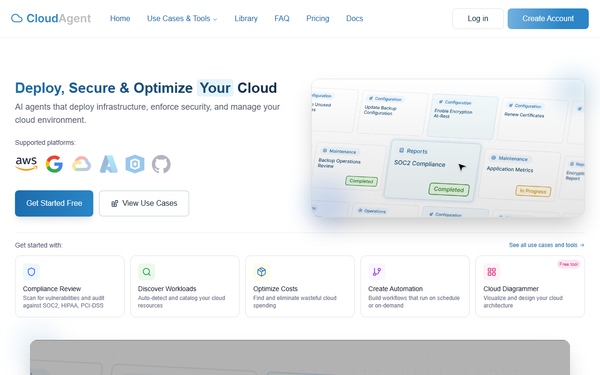
Key Features & Capabilities
Core functionality revolves around AI agents that interpret natural language instructions to generate, deploy, and manage AWS resources as grouped "workloads" (CloudFormation stacks). Users connect their AWS account, set security presets and governance rules, and interact via IDE chat or the web dashboard. Key capabilities include automated provisioning of services like S3, Lambda, API Gateway, and DynamoDB; continuous monitoring with recommendations; incident response workflows; cost optimization reports (e.g., unused resources, budget alerts); and security blueprints for compliance (e.g., enforcing IMDSv2, encryption at rest, public access blocking).
Standout features that differentiate it from competitors (such as traditional IaC tools like Terraform or AWS-native consoles) include seamless IDE integration via Model Context Protocol (MCP) for in-workflow commands, automatic application of security rule presets (e.g., 14 rules for development environments), and agentic remediation of vulnerabilities or misconfigurations without leaving the IDE. Governance guardrails, architecture diagrams on demand, and Git integration for versioned infrastructure further enhance it. The platform also supports outcome-focused automation, where agents handle full lifecycle tasks end-to-end.
Limitations include its AWS-only focus (no native support for Azure or GCP mentioned), reliance on AI which may require human review for complex or production-critical changes, and a credit-based usage model that could lead to variable costs. Missing features at this early stage include broad multi-cloud support, extensive third-party integrations beyond major IDEs, and mature enterprise SSO options beyond basic OAuth.
User Experience
CloudAgent offers a low learning curve for users familiar with AWS and modern IDEs. Setup involves account onboarding, AWS connection with guardrails, and MCP configuration in the IDE (typically 2-5 minutes for Cursor or VS Code). From there, natural language prompts like "Create a new workload called file-processor" enable instant progress, making it far more accessible than writing Terraform modules manually.
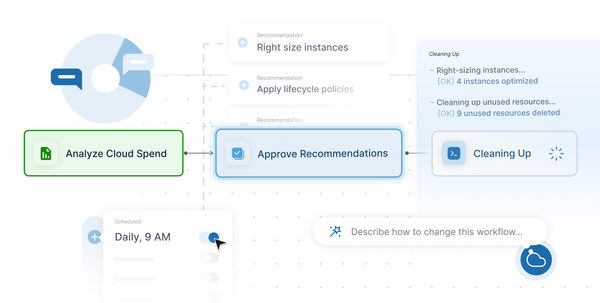
The interface combines a clean web dashboard for oversight (workloads, recommendations, workflows, security rules) with immersive IDE chat experiences. Documentation includes screenshot-driven user guides and is praised for clarity in available sources. Support resources consist of comprehensive official docs with cookbooks, though dedicated customer support details are limited given the product's emerging status—no extensive helpdesk or community forums noted beyond basic contact.
Overall, the experience feels modern and developer-centric, embedding AI directly into daily workflows for high productivity.
Performance & Reliability
Deployments are notably fast and efficient—complex workloads (e.g., full serverless stacks) can be provisioned in approximately 10 minutes with automatic security hardening. AI agents execute tasks reliably within AWS guardrails, generating preview CloudFormation templates for review before deployment. Monitoring and optimization run continuously in the background, with quick remediation via blueprints.
As an emerging platform (documentation updated February 2026), no widespread known issues or common user complaints appear in public searches; reliability aligns with AWS-native services since it orchestrates CloudFormation. Minor considerations include potential AI interpretation variances (mitigated by previews and confirmations) and the need for users to verify outputs in sensitive environments. Overall performance supports production use with appropriate oversight.
Pricing & Value
CloudAgent follows a simple, transparent freemium model. The free tier includes 3 credits for initial testing and small workloads. Paid plans (Pro and higher) scale with usage—credits or outcome-based billing cover operations, agents, and advanced features like full governance and remediation automation. Enterprise options are available via custom quotes for larger teams or compliance needs.
Value is strong compared to alternatives: it reduces manual DevOps effort and consultant costs, with reported potential savings of 15-40% on cloud spend through proactive optimization. Versus fixed SaaS tools or manual processes, the credit system ties cost directly to delivered automation. For teams already on AWS, the time savings from IDE-native natural language management deliver clear ROI, though opaque plan details beyond the free tier may require contacting sales for exact fit.
Practical Tutorial
Official cookbooks provide excellent guidance. Below is a real, adapted step-by-step walkthrough for a common task—deploying a secure file processing API workload (S3 + Lambda + API Gateway + DynamoDB) using the Cursor IDE integration, based directly on the official "Deploy AWS from Cursor" cookbook. This typically takes 10 minutes and demonstrates provisioning with automatic security. Full original tutorial (with visuals) is available at https://docs.cloudagent.io/cookbooks/deploy-aws-cursor.
Prerequisites:
- Cursor IDE with MCP configured (see docs.integrations).
- Active CloudAgent account with AWS account connected and security preset enabled.
Step 1: Create the workload
Open Cursor AI chat (Cmd/Ctrl + L) and prompt:
"You: Create a new workload called file-processor for a file upload API"
CloudAgent creates the workload entity (CloudFormation stack) in a sandbox environment with the Development security preset (14 rules applied automatically).
Step 2: Add S3 storage
Prompt: "Add an S3 bucket for storing uploaded files"
Review the generated YAML preview (encryption, public access blocked, versioning, logging).
Prompt: "Deploy it"
Result: Secure S3 bucket deployed.
Step 3: Add Lambda processing
Prompt: "Add a Lambda function that processes files when uploaded to the bucket"
Preview shows VPC-secured Lambda with S3 trigger and minimal IAM.
Prompt: "Yes, deploy"
Result: Trigger-ready Lambda function live.
Step 4: Add API Gateway endpoint
Prompt: "Add an API Gateway endpoint to trigger uploads via HTTP"
Preview includes REST API with proxy integration and throttling.
Prompt: "Deploy"
Result: Public HTTPS endpoint ready.
Step 5: Add DynamoDB metadata store
Prompt: "Add a DynamoDB table to store file metadata with fileId as the partition key"
Preview applies encryption and point-in-time recovery.
Prompt: "Deploy"
Result: Encrypted table online.
Step 6: Review and verify
Prompt: "Show me the architecture diagram for file-processor" or "What's the API endpoint URL?"
CloudAgent provides a visual diagram and live resource details. All resources are now secured per the preset.
Troubleshooting tips: If deployment fails, ask "Why did the deployment fail?" CloudAgent explains and suggests fixes. Post-deploy, use dashboard recommendations for optimization or remediation cookbooks for ongoing management.
This example highlights real-world usability for provisioning a production-ready, secure application.
Final Verdict
Overall rating: 4.3/5. CloudAgent excels in innovation and efficiency for AWS-centric teams but is held back by its early-stage scope and limited independent validation.
Teams that should use this tool are AWS-focused DevOps, developers, and security professionals seeking to slash manual infrastructure work, enforce compliance automatically, and achieve rapid iteration via natural language—especially those already using Cursor or VS Code.
Teams that should avoid it include organizations with heavy multi-cloud needs, strict requirements for fully transparent fixed pricing, or those uncomfortable relying on AI agents without close oversight in regulated environments.
CloudAgent represents a forward-looking solution that turns AI into a true cloud operations teammate—worth trying if AWS is your primary environment.