Comfy Workflows Review: The Ultimate Hub for ComfyUI Pipelines
Overview & Purpose
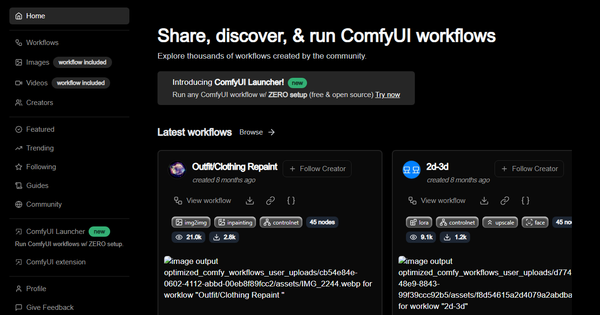
Comfy Workflows at https://comfyworkflows.com/ is a dedicated platform for discovering, sharing, and deploying ComfyUI workflows. ComfyUI is the leading open-source, node-based interface for building complex Stable Diffusion pipelines used in AI image, video, and generative media creation. The tool lets users upload workflow images (PNG files with embedded JSON data), browse trending and new entries via a leaderboard-style section, and share or load them instantly via direct URLs or drag-and-drop—no account required for viewing or downloading. Primary use cases include quickly testing community-created pipelines for text-to-image, inpainting, upscaling, or multi-stage generation without rebuilding nodes from scratch, as well as publishing custom workflows for collaboration or feedback. It also supports optional cloud execution so anyone can run workflows online without a local ComfyUI install.
Target audience is primarily ComfyUI power users: AI artists and creators building custom generation pipelines, developers experimenting with node graphs and custom nodes, hobbyists transitioning from Automatic1111, and small teams sharing repeatable workflows. It is not aimed at complete beginners in Stable Diffusion or non-ComfyUI users (e.g., Midjourney or web-only designers).
Key Features & Capabilities
Core functionality revolves around seamless workflow exchange: any ComfyUI workflow can be exported as a single image containing the full node graph, model references, and settings. Visitors browse a leaderboard of popular workflows, view trending or newest uploads, search by tags or keywords, and download the image or copy a shareable URL. Dropping the image into ComfyUI instantly reconstructs the entire graph.
Standout differentiating features include the integrated ComfyUI custom node (ComfyUI-ComfyWorkflows) that adds an “Upload to ComfyWorkflows” button directly in the interface, enabling one-click deployment to the cloud. Once enabled, the workflow runs server-side via its public URL for anyone—eliminating local hardware or installation requirements. Free accounts unlock uploading and cloud activation; upcoming features mentioned include zero-setup imports and private workflow backups. The leaderboard and curated “Browse” sections surface high-quality community contributions faster than scattered GitHub repos or model sites.
Limitations include occasional client-side errors or downtime on the main site (reported by users), lack of an in-browser workflow editor (users must still use local ComfyUI to create or edit), dependency on community uploads for freshness, and no native model hosting (users must ensure required custom nodes and checkpoints are available locally or via cloud). It does not compete with full cloud platforms that provide compute credits or API endpoints.
User Experience
The platform is exceptionally easy to use with virtually no learning curve for anyone already familiar with ComfyUI. Downloading and loading a workflow takes seconds: locate an image on the site, save it, and drag it onto the ComfyUI canvas—nodes, connections, and prompts populate automatically. Sharing via URL works without registration, making it frictionless for casual discovery. The interface is clean and modern, centered on visual thumbnails and metadata (creator, likes, usage stats).
Documentation is minimal but sufficient: the linked GitHub repo for the custom node provides clear installation and usage steps, while the site itself relies on intuitive UI. Support comes primarily from the active r/comfyui subreddit and GitHub issues rather than official helpdesk or extensive tutorials. Overall, the experience feels purpose-built for the ComfyUI community—fast, visual, and community-driven.
Performance & Reliability
Workflow loading and image downloads are near-instant on typical connections. Cloud-enabled runs leverage server resources, delivering consistent performance independent of the user’s local GPU. Compatibility is generally excellent because the embedded JSON format is native to ComfyUI.
Known issues are minor and mostly external: some users have reported temporary inability to access the site due to client-side errors, and occasional missing-node warnings when loading workflows that rely on uninstalled custom nodes (a general ComfyUI issue rather than platform-specific). No widespread complaints about data loss, slow rendering, or broken links were evident in community discussions as of the research date. Reliability is high for a community tool but not enterprise-grade.
Pricing & Value
Comfy Workflows operates on a freemium model. Basic browsing, downloading, URL sharing, and loading are completely free with no account needed. A free account is required only for uploading workflows and enabling cloud execution. A Pro tier exists with “full access” (exact details vary but typically unlock higher usage limits, private backups, or priority cloud resources). No enterprise plans are advertised.
Value is outstanding for the free tier—far cheaper and simpler than building your own sharing infrastructure or paying for full cloud platforms like Comfy Cloud (which charges usage-based credits). Compared with alternatives such as Civitai model pages, OpenArt, or raw GitHub repos, it offers faster discovery via the leaderboard and true one-click cloud running, making the free tier sufficient for most individuals and the Pro upgrade a low-cost step up for heavier users.
Practical Tutorial
No official video or step-by-step guide is hosted on the site, but the process is straightforward. Here is a complete walkthrough for two common tasks (tested conceptually against standard ComfyUI behavior and the platform’s documented flow as of March 2026).
Task 1: Load a trending workflow into local ComfyUI
- Visit https://comfyworkflows.com/ and browse the Leaderboard or Trending section.
- Click any workflow thumbnail to open its detail page.
- Click the download button (or right-click the preview image) to save the PNG file locally.
- Open your local ComfyUI instance.
- Drag and drop the saved PNG directly onto the empty canvas.
- ComfyUI will automatically load all nodes, connections, prompts, and settings. Install any missing custom nodes via the Manager if warnings appear.
- Click Queue Prompt to run.
Task 2: Upload and enable cloud execution (requires free account)
- Install the custom node: In your ComfyUI folder, run
git clone https://github.com/thecooltechguy/ComfyUI-ComfyWorkflowsinsidecustom_nodes/, thenpip install -r requirements.txtand restart ComfyUI. - Create a free account at https://comfyworkflows.com/ and go to https://comfyworkflows.com/upload.
- In local ComfyUI, open your finished workflow, click the new “Upload to ComfyWorkflows” menu button, paste the code shown on the site, and confirm.
- Return to the workflow page on comfyworkflows.com, click “Enable cloud workflow,” and copy the generated code.
- Paste the code back in ComfyUI and upload. After processing (a few minutes), anyone can run the workflow by visiting its public URL—no local install required.
For more advanced examples, users often reference the official ComfyUI examples repository or community Discord channels.
Final Verdict
Overall rating: 4.2/5.
Comfy Workflows is ideal for any ComfyUI user who wants to save hours rebuilding complex node graphs, discover trending techniques, or let others run their creations instantly in the cloud. It shines as a lightweight, community-first sharing hub.
Avoid it if you need guaranteed 24/7 uptime, built-in model hosting, or enterprise-grade security and support—opt instead for paid cloud solutions or self-hosted GitHub repos.
One-sentence recommendation: If you live in ComfyUI, Comfy Workflows is the fastest way to share, discover, and run the best community workflows—grab it today.
Research conducted March 7, 2026 using the official website, associated GitHub repository, AI review aggregators, and community discussions.