Commabot Review: The AI-Powered CSV Editor That Saves Hours
Overview & Purpose
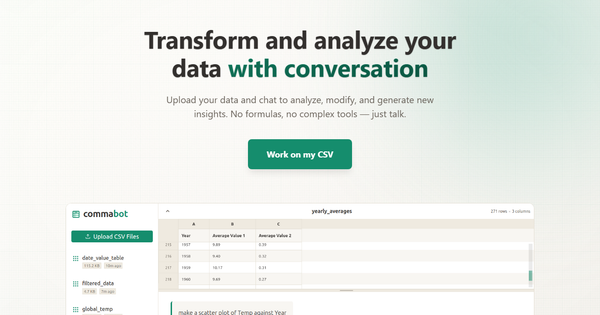
Commabot is an intelligent online CSV editor that combines a familiar spreadsheet interface with an AI-powered conversational assistant. Users upload CSV files to view, edit, analyze, and transform data through natural language commands rather than complex formulas or manual steps. It streamlines tasks like bulk editing, data cleaning, statistical analysis, trend forecasting, and format conversions, making it ideal for handling moderate-to-large datasets without traditional spreadsheet limitations.
Primary use cases include cleaning customer lists, generating sales reports, analyzing e-commerce data, extracting insights from unstructured text, and converting files between CSV, nested JSON, and XML formats for integration with other systems or applications. It targets a broad audience: data analysts, business professionals, finance and accounting teams, e-commerce sellers, researchers, students, content creators, and developers who regularly work with CSV files but lack advanced coding or data-tool expertise. Non-technical users especially benefit from its no-code, chat-based approach, while power users appreciate the time savings on repetitive tasks.
Key Features & Capabilities
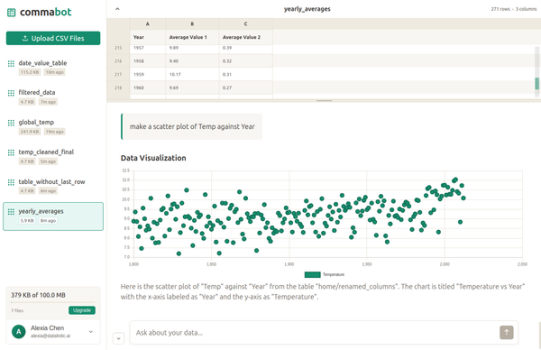
Core functionality revolves around an in-browser spreadsheet viewer where users can open, sort, filter, merge, and edit CSV data directly. The standout AI assistant interprets plain-English queries (e.g., “remove duplicates by email,” “calculate total revenue per month,” or “forecast trends from sales column”) to perform bulk edits, generate summaries, charts, statistical analyses, pattern identification, and clustering. Additional capabilities include extracting structured data from unstructured text inputs and seamless conversion between CSV, nested JSON, and XML formats.
Differentiating features include conversational AI that learns from usage patterns for smarter suggestions over time, dark/light mode for customizable viewing, and automation of tedious processes without requiring Excel formulas or Python scripts. The interface supports large datasets within plan limits and offers cross-platform web access. Compared to competitors like ChatCSV, Rows, or Google Sheets add-ons, Commabot’s emphasis on natural-language bulk transformations and multi-format export (especially nested JSON) stands out for users needing quick, insight-driven workflows.
Limitations include file-size caps (even on paid plans), reliance on AI accuracy (outputs should always be verified), absence of offline mode or mobile app, and no advanced enterprise features like team collaboration permissions or SOC2 compliance details publicly listed. It also lacks deep integration with external databases or BI tools beyond basic export.
User Experience
Commabot boasts a low learning curve thanks to its intuitive spreadsheet layout combined with a side-panel AI chat—most users can start productively within minutes of uploading a file. The interface feels modern and responsive, with clean design, easy navigation, and dark mode reducing eye strain during long sessions. No steep technical knowledge is required, making it accessible for beginners while remaining efficient for experienced users.
Documentation is minimal; the site provides basic onboarding but no extensive public guides or video library as of research. Support is available via email, with community feedback indicating responsive but not 24/7 assistance. Overall UX receives positive notes in limited user ratings (average 4.5/5 from early reviews), praising clean UI and time savings, though one user noted occasional context misses by the AI on complex queries.
Performance & Reliability
The tool performs efficiently for standard and moderately large CSVs, with fast uploads, quick AI responses, and smooth real-time editing. Users report significant time reductions on repetitive tasks, and the AI’s pattern-learning capability improves suggestions over sessions. No widespread outages or major reliability complaints appear in public sources.
Known issues are minor: occasional AI misinterpretation on ambiguous or very complex requests (requiring follow-up clarification), and performance throttling on free-tier large files. Reliability is generally high for its intended moderate-dataset use, though users are advised to double-check AI-generated changes for critical work. As an emerging tool, long-term scalability feedback remains limited.
Pricing & Value
Commabot follows a freemium model. The free tier allows 1 MB file uploads and 100 MB workspace storage—sufficient for light personal use or testing. The Premium plan costs $17 per month, unlocking 25 MB file limits and 10 GB workspace, plus higher usage quotas and priority support. No enterprise tier is publicly detailed, and email support is included in both plans.
Value is strong for frequent CSV users: the AI automation often halves manual work time compared to traditional tools, and the low monthly cost undercuts full Excel alternatives or coding setups. Compared to similar freemium options like ChatCSV or Rows, Commabot delivers competitive conversational depth and format conversion at an accessible price point. It offers excellent ROI for individuals and small teams; heavier users may need to weigh file-size limits against alternatives.
Practical Tutorial
No comprehensive official video tutorials or step-by-step documentation were prominently linked on the site or blog as of March 2026, though basic onboarding appears after signup at https://commabot.com/. Below is a practical walkthrough for a common task—cleaning and analyzing a sample e-commerce sales CSV (columns: CustomerID, Email, OrderDate, Amount, Product)—based on documented usage flows.
- Create a free account and log in at https://commabot.com/.
- Click “Upload CSV” and select your file (or drag-and-drop). The data opens in the familiar spreadsheet view.
- Open the AI assistant chat panel (usually on the right). Type: “Remove duplicate emails and keep the most recent order.” The AI processes and updates the table automatically.
- Next command: “Add a new column Total with Amount * 1.08 for tax, then group by month from OrderDate and sum Total.” Watch as charts and summaries generate instantly.
- Ask: “Extract customer insights: top 5 spenders and forecast next month’s revenue.” The AI provides analysis and optional visualizations.
- For export: Type “Convert cleaned data to nested JSON by customer and download.”
- Save your workspace or download the final CSV/JSON/XML file.
This entire process typically takes under 10 minutes and works identically for real datasets like marketing leads or inventory lists. For variations, experiment with prompts like “Filter orders over $100 and export as XML.”
Final Verdict
Overall rating: 4.3/5. Commabot excels as an accessible, time-saving tool for moderate CSV workflows thanks to its conversational AI and clean interface. It should be used by data analysts, marketers, small-business owners, researchers, and non-technical professionals who want to avoid manual drudgery or learning complex software. Avoid it if you routinely handle massive datasets (>25 MB), require offline access, enterprise security certifications, or highly specialized statistical modeling—traditional tools like Python/pandas or full BI platforms will serve better.
One-sentence recommendation: Try Commabot today if you’re tired of wrestling with spreadsheets—its AI turns tedious CSV tasks into simple conversations that actually save hours.