ContentBot Review: The Ultimate AI Tool for Content Automation
Overview & Purpose

ContentBot is an AI-powered content automation platform designed to help users create polished, credible, and SEO-friendly content at scale with minimal manual effort. It generates full blog posts, marketing copy, ad creatives, product descriptions, emails, and more while incorporating features like intelligent internal linking to build authority and improve rankings. Primary use cases include drafting long-form blog articles, automating social media or email campaigns, producing bulk product descriptions for e-commerce, and streamlining content workflows for consistent output.
The target audience includes digital marketers, content marketers, copywriters, SEO specialists, bloggers, founders, and agencies who need to produce high volumes of content quickly without hiring full-time writers. It positions itself as a practical alternative to generic AI tools by emphasizing automation and human-like results rather than raw generation.
Key Features & Capabilities
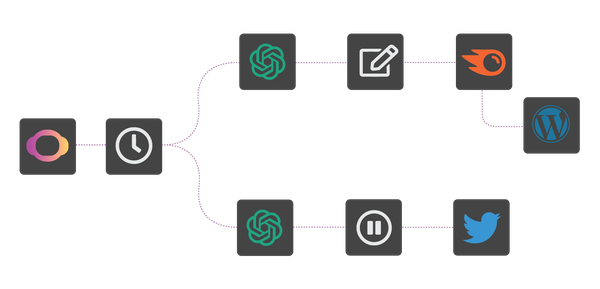
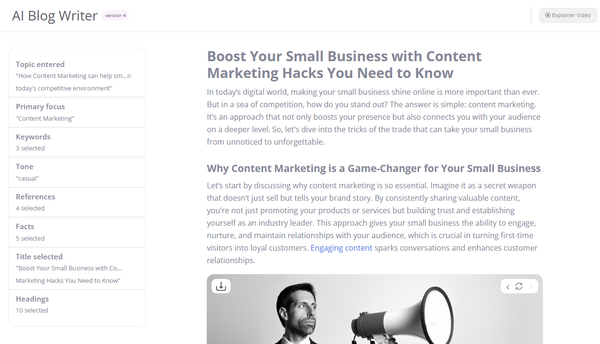
Core functionality revolves around the AI Blog Writer v4 (which creates complete posts with outlines, intros, expansions, and tone adjustments), a paraphrasing/humanizer tool that produces undetectable AI content, ad copy generators (Google/Facebook ads), and over 30 specialized templates for lists, pain-agitate-solution formats, product descriptions, sales emails, and more. Additional capabilities include a built-in plagiarism checker, AI Chat for quick queries, bulk Importer for processing CSV files or documents with variables, and AI Content Flows (a drag-and-drop workflow builder) for automating triggers like scheduled posts or tweet generation. The platform supports over 110 languages via Google Translate integration, retains full copyright for users, and offers a WordPress plugin plus Chrome extension for seamless publishing.
Standout features that differentiate it from competitors like Jasper or Rytr include the AI Content Flows for true automation (e.g., daily blog publishing from topic lists), the Humanizer for bypassing detectors such as ZeroGPT or Winston AI, and the Importer tool for handling hundreds of items at once with custom outputs. It also provides a uniqueness score for longer pieces (typically 95%+). Limitations include row caps on imports (50 rows on Premium, 500 on Premium+), reliance on Google Translate for non-English languages (which can feel mechanical), and the need for human oversight on niche or highly technical topics where output quality varies.
User Experience
ContentBot features a clean, intuitive web interface that most users describe as easy to navigate even for beginners, with a low initial learning curve for basic tools like the Blog Writer. The drag-and-drop Flows builder, however, has a steeper learning curve that can take 2–4 hours to master for complex automations. Overall design is praised for its simplicity and speed.
Documentation includes a basic training video and guides on the official site, along with YouTube walkthroughs and a supportive Facebook community. Support is fast on lower plans and priority on Premium/Premium+, though some users report inconsistent responses on refund requests. The WordPress plugin works well for most but can encounter connection issues with certain security plugins.
Performance & Reliability
Generation is fast—most outputs appear in seconds to minutes, with bulk imports completing efficiently. The platform uses GPT-4 and other models for natural-sounding text, and the Humanizer reliably produces content that evades major detectors. Reliability is generally strong for routine tasks, with ongoing updates improving features like the Blog Writer.
Common complaints from users include occasional repetitive phrasing requiring editing (up to 25% of long-form content may need significant revisions), variable accuracy on specialized topics, and rare functionality glitches (e.g., workflow failures or WordPress sync problems). Trustpilot shows a 3.6/5 average from 107 reviews as of April 2026, with praise for time savings but criticism of refund policies and isolated cases of tools “not working at all.” G2 feedback highlights steady improvements and human-like quality when prompts are detailed.
Pricing & Value
ContentBot offers flexible, competitive pricing with no long-term contracts:
- Prepaid: $0.50 per 1,000 words (15k–5M words, one-time purchase) with 10k free words on first buy.
- Starter: $9/month for 50,000 words.
- Premium: $29/month for 150,000 words (3 Flows, 50-row imports, priority support).
- Premium+: $49/month for 400,000 words (unlimited Flows, 500-row imports).
All plans include unlimited seats, core tools, plagiarism checking, and community access; non-profits receive discounts upon request.
Value is strong for high-volume users or agencies, offering one of the lowest entry points in the AI writing space while delivering automation features absent in many pricier alternatives. Compared to ChatGPT Plus or Jasper, it provides better workflow tools and bulk capabilities at a fraction of the cost per word. Drawbacks include word caps that may require upgrading for heavy users and the extra editing time some content demands.
Practical Tutorial
ContentBot provides official resources including a Basic Training video and YouTube guides. Below is a step-by-step walkthrough for a common task—generating and publishing an SEO-optimized blog post using the AI Blog Writer (tested conceptually from public demos and user reports as of April 2026).
- Sign up or log in at contentbot.ai and select a plan (Starter works for testing).
- From the dashboard, navigate to AI Blog Writer (or search for the specific tool).
- Enter your topic/keywords (e.g., “best AI tools for marketers 2026”), select target length (e.g., 1,500 words), desired tone (professional, conversational), and language. Optionally enable SEO features like intelligent linking.
- Click Generate Outline first, review and edit it, then generate full sections one by one or all at once.
- Review the draft in the editor: check for flow, add personal insights, and run the built-in plagiarism checker.
- Use the Humanizer tool on the final draft to make it undetectable by AI detectors.
- Export as WordPress-ready format or use the WP plugin to publish directly. For automation, save the process as an AI Content Flow and schedule it to run weekly from a CSV topic list via the Importer.
Official basic training video is available here: https://contentbot.ai/documentation/docs/basic-training-video/. YouTube example: search “How to Use ContentBot AI for Marketing” for visual demos.
Final Verdict
Overall rating: 7.5/10 – A solid, affordable AI content platform with standout automation features, but not flawless due to the typical need for human editing and occasional reliability hiccups.
Who should use this tool: Budget-conscious marketers, bloggers, and small agencies that value time-saving workflows, bulk generation, and undetectable AI output over perfectly polished first drafts.
Who should avoid this tool: Teams requiring zero-editing, highly creative or hyper-specialized content, or those who prioritize flawless support and instant refunds without troubleshooting.
One-sentence recommendation: If you want cost-effective AI automation that turns topic lists into scheduled, humanized blog posts and marketing assets, ContentBot is worth trying—especially on the flexible Starter or Prepaid plan.