CopyCat Review: The Ultimate AI No-Code Browser Automation Tool
Overview & Purpose

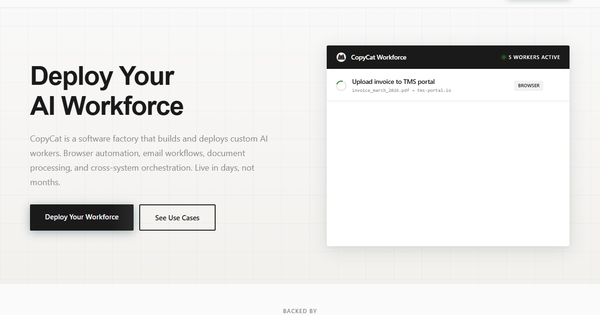
CopyCat is an AI-powered no-code browser automation platform that enables users to record actions in web browsers, combine them with natural language prompts, and build reliable, repeatable workflows. It turns repetitive tasks—such as data entry, form filling, portal navigation, invoice processing, or scraping—into automated processes that run on schedule or on demand in the cloud. Primary use cases include streamlining back-office operations, marketing data collection, logistics portal updates, and compliance reporting across any web-based system.
The tool targets business users, operations teams, marketers, IT professionals, and enterprises in regulated sectors like insurance, healthcare, logistics, and financial services. It appeals to anyone tired of manual web drudgery, from solo professionals saving hours weekly to large teams replacing parts of BPO or legacy RPA setups. A self-serve no-code editor serves SMBs and individuals, while an enterprise offering deploys fully managed custom AI agents with compliance features.
Key Features & Capabilities
Core functionality revolves around a hybrid approach: a Chrome extension for screen recording actions, a visual no-code editor for editing deterministic steps (clicks, types, scrolls via reliable selectors), and AI agentic prompts for intelligent decision-making or data extraction. Workflows support loops, conditions, integrations with tools like Google Sheets and Slack, scheduling, monitoring, and alerts. Full workflows can include document processing, multi-step portal navigation, and form submissions.
Standout features that differentiate CopyCat include its adaptive AI combined with reliable step-by-step execution—unlike brittle traditional RPA tools that break on UI changes—and rapid deployment (often days via pilot). It handles complex end-to-end processes beyond simple API zaps or basic macros, with enterprise extras like SOC 2 Type II, HIPAA compliance, audit trails, role-based access, and on-prem deployment options.
Limitations include a primary focus on browser-based tasks (less suited for desktop apps or heavy desktop RPA), potential challenges with CAPTCHA-heavy or highly dynamic anti-bot sites, and the absence of a prominent free tier for unlimited testing. Public documentation is still emerging as the tool is relatively new (YC W25), and advanced branching may require some trial-and-error.

User Experience
CopyCat boasts a low learning curve thanks to its intuitive visual editor and recording workflow—most users can build a basic automation in minutes without coding. The Chrome extension captures real actions seamlessly, while the web-based editor allows drag-and-drop editing, AI-assisted refinements, and instant testing. Interface quality is modern and clean, with clear step previews and debugging tools that feel accessible rather than overwhelming.
Documentation is functional but limited to in-app guides and demo videos; official support resources include chat/email for paid users and a growing knowledge base. Enterprise clients receive dedicated onboarding. Early feedback highlights smooth onboarding and quick wins, though some note the need for initial workflow testing on complex sites. Overall, it prioritizes speed and simplicity for non-technical users.
Performance & Reliability
Automations run efficiently in the cloud with fast execution for repetitive tasks—real-world examples report saving hundreds of hours monthly on data extraction or payment processing. The hybrid design (AI for intelligence + deterministic steps) improves reliability over pure LLM agents or traditional recorders, with good adaptation to minor UI shifts.
Known issues are typical for browser automation: occasional hiccups on sites with aggressive anti-bot measures, JavaScript-heavy dynamic pages, or during peak loads. Common complaints are minimal due to the tool's youth, but users advise thorough testing and monitoring for production use. Reliability shines in scheduled runs with built-in error alerts and retries.
Pricing & Value
CopyCat does not publish transparent self-serve tiers publicly; signup leads to a dashboard where usage (likely credit- or runtime-based) applies. Enterprise follows a paid 2-week pilot for one workflow, transitioning to custom monthly engagements scaled by agent count and complexity—no hidden fees. No free tier is advertised beyond possible limited trials.
Value is strong for teams with high-volume repetitive web tasks: ROI comes quickly through time savings (far cheaper than hiring or maintaining legacy RPA). Compared to alternatives like UiPath (more complex/expensive for enterprises), Axiom.ai (similar no-code but less AI-native), or Zapier (API-focused, weaker on deep browser interactions), CopyCat offers superior adaptability and full-workflow power at a fraction of BPO costs.
Practical Tutorial
Official tutorials are primarily in-app demos and short YouTube videos linked from the site or Product Hunt. Below is a realistic step-by-step walkthrough (created March 2026) for a common task: automating invoice data extraction from a vendor portal and logging it to Google Sheets. Requires Chrome extension and account signup at runcopycat.com.
- Install the CopyCat Chrome extension from the Chrome Web Store and log into your dashboard.
- Create a new automation in the editor and click “Record New Workflow.” Navigate to the vendor portal in your browser, log in manually, search for recent invoices, and open one—perform actions exactly as you would (click buttons, scroll, copy fields).
- Stop recording; CopyCat auto-generates a sequence of reliable steps (e.g., “Click login button,” “Type in search field”) in the visual editor.
- Enhance with AI: Insert an “AI Prompt” step after data loads, e.g., “Extract invoice number, date, amount, and vendor name from the page and structure as JSON.”
- Add integrations: Drag in a Google Sheets step to append the extracted data to a specific spreadsheet (connect via OAuth once).
- Add conditions or loops if needed (e.g., “If multiple invoices, repeat for each”).
- Test the full workflow end-to-end using the built-in runner—debug any failing steps with screenshots or logs.
- Save, schedule (e.g., daily at 9 AM), and enable Slack alerts for failures or completion. Monitor runs in the dashboard.
For variations or video guidance, search “CopyCat automation demo” on YouTube or check the in-app resources. Real examples on the site include expense report uploads or claims data entry.
Final Verdict
Overall rating: 4.5/5. CopyCat excels for anyone dealing with repetitive web-based tasks, delivering fast, reliable automations that save significant time and reduce errors—perfect for ops teams, marketers, and enterprises seeking quick ROI without coding or heavy IT involvement. It shines in regulated industries needing compliant, scalable agents.
Avoid it if you require fully open-source control, handle highly complex desktop or non-browser workflows, or need crystal-clear upfront pricing and extensive public support docs (still maturing as a 2025-launched tool).
One-sentence recommendation: CopyCat is an excellent choice for turning browser drudgery into efficient AI-powered workflows that actually work reliably.