CostGPT AI Review: Fast and Accurate Software Project Estimates
Overview & Purpose
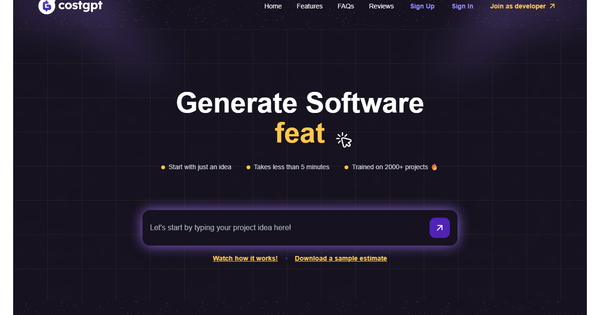
CostGPT AI is an AI-powered software project estimator that transforms a brief project description into a complete roadmap, including cost estimates, timelines, feature breakdowns, sitemaps, user stories, dependencies, and sprint-based milestones. Built by the Codebuddy team and trained on data from over 2,000 real projects, it delivers ballpark figures in under five minutes to replace lengthy manual planning or consultant back-and-forth.
Primary use cases include early-stage budgeting for new apps or SaaS products, creating client proposals, prioritizing features, and optimizing bids for digital agencies. It is ideal for anyone who needs a fast, data-backed foundation before diving into development.
Target audience: project managers, developers, freelance coders, digital agencies, startups, founders, and business owners—especially makers and non-technical stakeholders who want professional-grade estimates without hiring experts upfront.
Key Features & Capabilities
Core functionality revolves around a single text input (project idea or even a competitor URL) that instantly produces:
- Overall project cost estimate and timeline
- Detailed feature list with associated effort and cost
- Technical dependencies and prerequisites
- Sitemap/user-flow diagram outline
- Granular user stories
- Milestone/sprint breakdown
Standout features include one-click PDF export, recommended tech-stack suggestions, and the ability to generate professional-looking proposals ready for clients or investors. The tool’s training on thousands of past projects gives it an edge over generic calculators, and the Premium plan unlocks deeper analysis for complex scopes.
Differentiators from competitors (traditional spreadsheets or basic AI estimators): speed (under 5 minutes), one-time payment model instead of subscriptions, and surprisingly detailed sprint planning that feels like having an experienced PM on call.
Limitations and missing features: estimates are ballpark (typically within ~20 % margin) and accuracy heavily depends on input detail; highly specialized or cutting-edge tech stacks may need manual tweaking; no real-time collaboration, version history, or integration with project-management tools like Jira or Asana; does not automatically adjust for inflation or regional rate fluctuations. The free Basic plan caps depth, and advanced customization (e.g., team-size modeling) is absent.
User Experience
The interface is clean, minimal, and remarkably intuitive—no tutorials required. Users simply paste a description and click “Generate”; results appear in seconds with clear sections and downloadable PDF. Learning curve is essentially zero, making it accessible even to non-technical founders.
Interface quality earns consistent praise for simplicity and readability. On-site FAQs answer the most common questions (accuracy, training data, support), and a free 30-minute expert consultation is available via Calendly. Support resources include email ([email protected]) and a contact form; response times are not publicly benchmarked but users report helpful follow-ups.
Performance & Reliability
Generation consistently completes in under five minutes with no reported downtime. Accuracy is advertised above 80 % when trained on 2,000+ historical projects; independent tests and user feedback describe results as “close-to-accurate” and “surprisingly on target” for standard web/mobile apps.
Known issues are minor: output quality drops with vague inputs, and a few Product Hunt reviewers requested better AI fine-tuning for niche domains. No widespread complaints about crashes, data loss, or security surfaced across reviews. Overall sentiment on Product Hunt (4.7/5 from 10 reviews) and third-party sites remains strongly positive, with users highlighting time savings and actionable insights.
Pricing & Value
- Basic Plan: $0 (limited-time offer) — high-level overview including estimate, core features, dependencies, sitemap, user stories, and milestones.
- Premium Plan: $19 one-time (discounted from $49) — full comprehensive analysis with deeper breakdowns.
No recurring subscriptions or hidden fees. Enterprise inquiries are handled via contact form.
Value proposition is excellent: for the price of a single coffee, users avoid hours of manual estimation or $500+ consultant calls. Compared with alternatives (manual PM work, generic calculators, or enterprise tools costing hundreds monthly), CostGPT delivers outsized ROI for early-stage planning. The free tier alone provides enough to validate ideas quickly.
Practical Tutorial
No official video tutorial exists on the site beyond a short “Watch how it works” demo, but the process is straightforward. Here is a complete walkthrough for a common task—generating a plan for a “pet-owner social app with photo sharing, events, and chat.”
- Visit https://costgpt.ai/ and click “Start Now.”
- In the text box, enter a clear description: “A mobile-first social platform for pet owners featuring photo/video sharing, local meetup events, in-app chat, profile creation with pet details, and basic marketplace for pet products. Target iOS/Android, modern tech stack preferred.”
- (Optional) Add specifics like “budget-conscious startup, 2–3 person dev team, 3-month MVP timeline.”
- Choose Basic (free) or Premium ($19).
- Click Generate—results appear in <5 minutes.
- Review sections: scroll through cost summary, feature table (with effort hours), sitemap outline, user stories, and milestone timeline.
- Download the PDF for sharing or import into your proposal.
- Book the free 30-minute expert call (Cal.com link on site) to refine numbers.
Sample output PDF available here: https://costgpt.ai/assets/sample-pdf.pdf (replace the description with your own for real-time results). The entire process takes 7–10 minutes end-to-end and produces client-ready documentation.
Final Verdict
4.5 / 5 (strong for speed and accessibility; docked slightly for input-dependent accuracy and limited advanced features).
Who should use it: Project managers, developers, agencies, and founders who need fast, professional software estimates to kickstart planning, budgeting, or client pitches—especially those on tight timelines or budgets.
Who should avoid it: Teams requiring pixel-perfect precision for highly regulated or bleeding-edge projects, or organizations needing ongoing collaboration tools and real-time updates.
One-sentence recommendation: CostGPT AI is the quickest, most affordable way to turn a software idea into a credible project plan—start with the free tier and you’ll wonder how you ever estimated without it.
Research conducted as of March 11, 2026; all prices, features, and ratings reflect data available at that time.