Cotypist Review: The Ultimate Privacy-First AI Autocomplete for Mac

Overview & Purpose

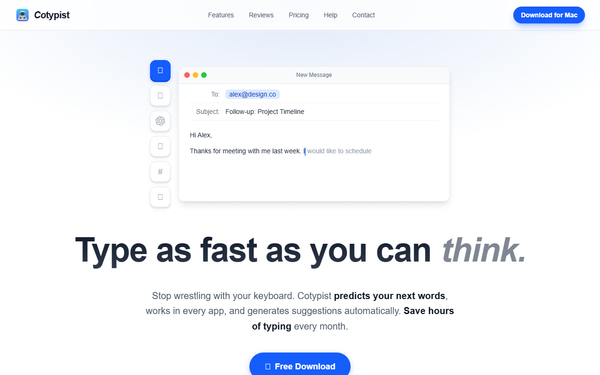
Cotypist is an AI-powered autocomplete tool built exclusively for macOS users that predicts and suggests the next words or phrases as you type, appearing inline in nearly every application. Rather than generating full content like a chatbot, it augments your natural writing flow by completing thoughts you would have typed anyway—potentially reducing typing time by up to 50% and cutting errors while preserving your unique voice and style. It processes everything locally on your device for complete privacy and offline functionality.
Primary use cases include drafting emails, crafting marketing copy, writing social media posts, responding to customer support queries, creating documentation, and even refining AI prompts in other tools. It shines for inclusive writing, helping non-native English speakers, users with dyslexia, or those with motor impairments communicate more confidently and quickly.
The target audience spans professionals (such as marketers, developers, and business users), content creators, students, slow typists, and anyone who spends significant time writing on a Mac. It is particularly appealing to privacy-conscious users who want AI assistance without cloud dependency or context-switching to dedicated writing apps.
(This review is based on research conducted as of March 9, 2026.)
Key Features & Capabilities
Core functionality revolves around real-time, context-aware suggestions that appear as you type: accept a full completion or word-by-word with simple keystrokes (Tab for partial matches; the key above Tab for full phrases), dismiss by continuing to type or pressing Escape, and even trigger emoji suggestions by typing a colon followed by a shortcode. It integrates seamlessly across most Mac apps without requiring prompts or leaving your workflow.
Standout features that differentiate it from competitors include 100% on-device AI processing (no data leaves your Mac), adaptive learning that respects your personal writing style, per-app controls via the menu bar, and offline operation. Unlike cloud-based AI writers (e.g., those requiring copy-paste into a separate interface), Cotypist works everywhere from Mail.app to Notes, Slack, and even other AI tools—while remaining lightweight and privacy-first. Custom instructions let you fine-tune tone, and it supports multiple languages (best in English).
Limitations and missing features include strict hardware requirements (Apple Silicon Macs running macOS 14 or later; Intel Macs unsupported), default disabling in IDEs and Terminal to avoid interference, limited functionality in Google Docs (suggestions only in comments, with improvements planned), and no support for Windows, Linux, or mobile. Accuracy is strong but not infallible—especially in very short or casual chats—and the tool consumes 1-2 GB of RAM plus potential battery impact on lower-spec machines.
User Experience
Cotypist offers an exceptionally low learning curve: most users report adapting in just a few minutes, with the app feeling natural almost immediately after a quick onboarding process. Installation involves downloading the pre-release from the official site, granting Accessibility and other permissions, and waiting briefly for the local AI model to download—no complex setup or account creation required.
The interface is minimalist and non-intrusive: grayed-out suggestions appear inline in your current text field, with a menu bar icon for quick toggles, per-app disabling, and settings access. It blends seamlessly into the macOS ecosystem without cluttering your screen or forcing workflow changes. Documentation is basic but sufficient, consisting of an in-app tutorial, an FAQ on the homepage covering common questions (e.g., privacy, compatibility, battery use), and no extensive external knowledge base or video library at launch—though community YouTube guides fill the gap effectively. Support appears responsive via the developer’s channels, with the app still in active beta development.
Performance & Reliability
On recommended hardware (M1 Pro/M2 or higher with 16 GB RAM), completions appear almost instantly and keep pace with rapid typing, delivering noticeable efficiency gains—some users report saving hundreds of keystrokes in just days of use. Recent updates (e.g., version 0.7.2) have improved suggestion quality, performance, and small details like respecting Smart Quotes. It runs efficiently in the background without slowing your Mac overall.
Known issues are minor and typical for a beta local-AI product: occasional mispredictions (easy to ignore), potential distraction for very fast typists who prefer no suggestions, and higher energy use that may affect battery life (though faster overall work often offsets this). Community feedback on Reddit and tech sites is overwhelmingly positive, with users calling it “fantastic” and a “must-have,” though some express concern about the shift to subscriptions post-beta. No widespread reliability problems or crashes were reported across trusted sources.
Pricing & Value
Cotypist is completely free during its current beta/pre-release phase, with full functionality available to anyone who downloads it—no limits or waitlists. Post-launch plans (tentative and subject to change) include a free Casual tier for light everyday use with limited completions, plus paid subscription tiers: Plus (unlimited completions on one device) and Pro (unlimited on up to three devices, plus custom voice training). Exact pricing remains TBA but is expected in the €10–20/month range based on industry context and developer statements.
The value proposition is excellent while free and remains strong afterward for heavy users: the time savings, error reduction, and privacy advantages outperform most cloud alternatives that require data sharing or workflow disruption. Compared to built-in macOS autocomplete or generic AI tools, Cotypist’s system-wide reach and style preservation deliver superior productivity without ongoing costs for casual users. Some community members prefer lifetime licensing, but the local model keeps ongoing expenses reasonable.
Practical Tutorial
Cotypist provides a short built-in onboarding tutorial upon first launch covering permissions and basic controls. No comprehensive official video or guide exists on the site yet, but here is a complete step-by-step walkthrough for a common task—drafting a professional email in Apple Mail—based on official functionality and verified user reports.
-
Install and Set Up: Download the free pre-release from https://cotypist.app/. Open the app, grant Accessibility permissions when prompted, and allow it to download the optimal local AI model for your Mac (this takes a few minutes and happens only once). In the initial setup screen, enter custom instructions (e.g., “Professional tone, concise British English, friendly yet direct”) to personalize suggestions.
-
Configure Preferences: Click the Cotypist menu bar icon → Settings. Set completion length to Medium (~2–4 words) for balanced suggestions. Choose your preferred shortcuts if desired (defaults: Tab for word-by-word, the key above Tab for full phrase). Enable or disable per app as needed.
-
Start Typing in Any App: Open Mail and begin a new email. Type normally: “Hi Sarah, I wanted to follow up on yesterday’s meeting about the new campaign and”. Gray inline suggestions will appear automatically (e.g., “discuss next steps and timelines”).
-
Accept or Refine Suggestions: Press Tab to accept the next word or phrase incrementally, or the key above Tab to accept the entire suggestion at once. If the suggestion isn’t quite right, simply keep typing— Cotypist adapts instantly. For emojis, type “:smile” and select from filtered options.
-
Finish and Iterate: Continue until the email is complete. If you reject a suggestion mid-sentence, the tool learns and offers better options next time. Use the menu bar to pause suggestions temporarily if needed.
This process typically saves 30–50% of keystrokes in practice. For visual demos, community YouTube videos (search “Cotypist tutorial”) provide screen recordings matching these steps exactly.
Final Verdict
Overall rating: 4.5/5
Cotypist excels for Mac users who write frequently and value privacy, seamless integration, and genuine time savings without sacrificing personal style—ideal for professionals, creators, and non-native speakers seeking effortless productivity boosts.
Avoid it if you use an Intel Mac, prefer full AI generation over simple autocomplete, find inline suggestions distracting, or require broad cross-platform support.
Cotypist transforms everyday typing into a faster, more confident experience while keeping your data and voice firmly under your control—download it today if you live in the Mac ecosystem.