Coursepro Ai Review: Automate Your Entire Course Creation Workflow
Overview & Purpose
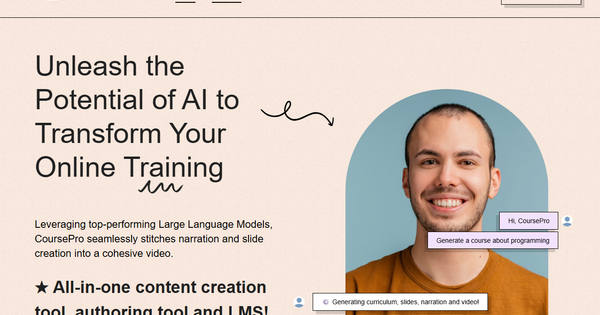
CoursePro.ai is an all-in-one AI-powered platform that automates the entire process of creating, authoring, hosting, and selling online courses. It uses advanced large language models (powered by ChatGPT-4 and similar) to generate complete curricula, lecture text, presentation slides, voice narration, subtitles, and fully stitched video tutorials from a single prompt. The integrated learning management system (LMS) handles course delivery, student tracking, gamification, and e-commerce features such as payments, coupons, order bumps, upsells, affiliates, and bulk enrollments. Primary use cases include rapid development of educational content for online academies, corporate training programs, professional development courses, and monetized digital products that can be exported or hosted on a custom school page. It also supports translation into over 60 languages for text and speech, plus automated quiz generation.
The target audience includes educators and online teachers, course creators and solopreneurs, businesses focused on employee or client training, and content creators in any niche who want to produce high-quality learning materials without extensive manual effort or technical expertise. It is particularly suited for those transitioning from traditional tools or seeking to scale course offerings quickly.
Research conducted as of March 2026.
Key Features & Capabilities
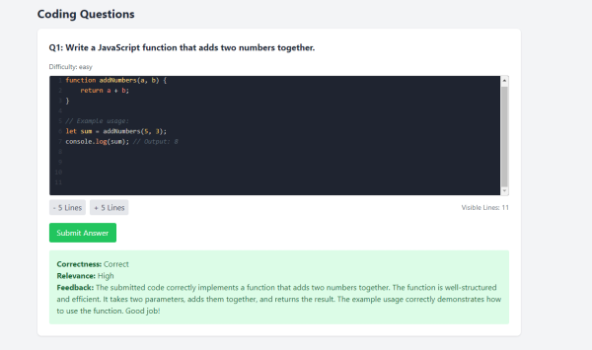
Core functionality revolves around end-to-end AI automation: users input a topic prompt, and the system generates a full course outline, editable lecture content, professional slides, natural-sounding voiceovers, subtitles, and downloadable videos ready for sale or export. Additional tools include a multiple-choice question generator (up to 80 questions per session with customizable difficulty and LMS-compatible exports), an interactive mindmap creator for visual learning aids, and full LMS administration with reporting, custom roles, and gamified achievements.
Standout features that differentiate it from competitors (such as Teachable, Thinkific, or basic AI writers like Jasper) include the seamless one-click video production that “stitches narration and slide creation into a cohesive video,” multilingual voice and text translation, zero-transaction-fee options on higher plans, and the true all-in-one integration of authoring, video studio, quiz engine, and selling platform—eliminating the need for multiple tools like Canva, Descript, or separate LMS platforms. The ability to export resources to any platform and the business dashboard for enterprise training further set it apart.
Limitations include credit-based generation caps (e.g., 1,200–12,000 GenAI credits per month depending on plan, with extra purchases available), potential need for human editing to add personal touch or correct occasional AI hallucinations, no free tier (though some review aggregators note a 14-day trial), and 5% transaction fees on the entry-level plan. Advanced customization beyond prompt editing is limited compared to fully manual platforms, and video quality depends on the underlying AI models rather than professional studio production.
User Experience
The platform boasts a clean, intuitive interface designed for educators of all technical skill levels, with a simplified workflow that focuses on content rather than complex menus. Users report (via site testimonials and aggregated reviews) a gentle learning curve—most can generate a basic course in minutes after a quick onboarding. The dashboard centers on prompt-based creation, real-time editing, and one-click publishing, making navigation straightforward.
Interface quality is modern and responsive, though it relies more on functional design than flashy visuals (no heavy animations noted). Documentation is adequate but basic: an in-app FAQ covers common questions about credit usage, AI output quality, and data privacy, supplemented by a small blog with posts on features like the mindmap tool. Support resources include email/ticket assistance (described as reliable) and a YouTube introductory demo, but no extensive video academy or community forum was evident. Overall, it prioritizes speed over deep hand-holding, which suits experienced creators but may feel light for absolute beginners.
Performance & Reliability
Generation speed is a major strength: the platform claims (and testimonials confirm) 10x faster course creation, with full narrated videos produced in minutes rather than hours or days. Efficiency scales with plan credits; higher tiers support unlimited authors and courses without performance degradation. Export and hosting functions are reliable, with videos downloadable in playable formats and LMS tracking working smoothly for student progress.
Known issues are minimal based on available data. No widespread complaints surfaced in 2025–2026 searches for bugs, downtime, or major outages. The primary user-reported limitation is variable AI output quality (standard for generative tools), occasionally requiring revisions for tone or accuracy. Credit exhaustion on lower plans can interrupt workflows, and video stitching occasionally needs manual subtitle tweaks. Reliability is high for the price point, with positive feedback on uptime and consistent results across sessions.
Pricing & Value
CoursePro.ai operates on a subscription model with three tiers and no free plan (a 14-day trial is referenced in some third-party listings).
- Basic: $39/month (or equivalent weekly/quarterly/annual options) – 1,200 GenAI credits, 5 published courses, 5% transaction fee, coupons, and 1 membership tier.
- Pro: $119/month – 3,000 credits, 50 courses, 0% transaction fee, unlimited membership tiers, upsells, removable branding, and 1 admin seat.
- Business: $249/month – 12,000 credits, unlimited courses/authors, custom roles, business dashboard, bulk enrollment, and gamification.
Extra credits can be purchased as needed. All sales are final.
Value is strong for users who generate multiple courses monthly, as the time savings and built-in selling tools can quickly offset costs compared to hiring freelancers or juggling separate platforms (e.g., Teachable + Descript + Canva). Lower-tier users may find credit limits restrictive, while businesses benefit from enterprise features at a competitive price versus dedicated corporate LMS solutions. Compared to alternatives, it delivers superior AI automation at a lower entry point than premium all-in-one platforms like Kajabi, though it lacks some advanced marketing automations.
Practical Tutorial
An official introductory demo video is available on YouTube (https://www.youtube.com/watch?v=Tryoam9cwMQ). Below is a step-by-step walkthrough for a common task—generating and publishing a complete narrated video course on “Introduction to Database Management” (based directly on the platform’s documented workflow).
- Log in or sign up at coursepro.ai and navigate to the dashboard. Click “Create New Course” and select format: “Narrated Video.”
- Enter a prompt: “Create a beginner-friendly course on Introduction to Database Management covering SQL basics, normalization, and real-world examples. Target audience: college students.”
- Generate the course outline (AI produces a structured curriculum in seconds—edit sections as needed).
- Click “Generate Lecture Content” to create full text scripts for each module using integrated ChatGPT-4 models.
- Select “Generate Slides” to auto-create presentation visuals from the text.
- Choose “Generate Voiceover” and pick a voice/style (or translate to another language).
- Enable “AI Subtitle Generation” to produce .srt files automatically.
- Hit “Generate Video” to stitch slides, narration, and subtitles into a downloadable MP4 (process takes minutes).
- Use the built-in Multiple Choice Question Generator: input course material, select difficulty, generate up to 80 questions, and export in XML for LMS import.
- Publish to your custom school page, set pricing/coupons, and enable sales features. Export resources if hosting elsewhere.
The entire process typically takes under 30 minutes for a short course, with full editing controls at every step. For advanced engagement, add a mindmap via the dedicated tool in the content library.
Final Verdict
Overall rating: 4.2/5 (solid for speed and integration; slightly docked for credit limits and sparse independent long-term reviews).
Educators, solopreneurs, and businesses needing to rapidly produce and monetize professional courses should use this tool—its all-in-one AI pipeline and LMS deliver unmatched efficiency and time savings.
Avoid it if you require completely free access, highly customized branding beyond basic options, or prefer manual creative control over AI outputs (or if your volume is too low to justify credits).
CoursePro.ai is a powerful time-saver for anyone ready to 10x their course creation workflow with AI—highly recommended for efficient, scalable education businesses.