Cradl AI Review: Automate Document Workflows with No-Code AI
Overview & Purpose

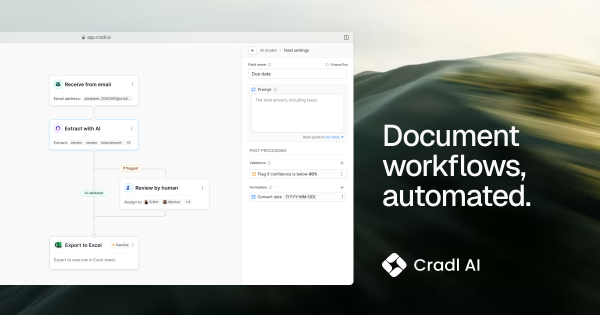
Cradl AI is a no-code platform that enables users to build and deploy AI agents for automating document workflows. It automatically extracts structured data from PDFs, images, scanned documents, handwritten notes, or born-digital files in over 150 languages, then validates, reviews, and exports the results with human-level accuracy. Primary use cases include processing invoices, receipts, contracts, payslips, ID cards, and any unstructured documents—transforming manual data entry into scalable, automated pipelines. Organizations use it to reduce processing time, minimize errors, improve data quality, and integrate seamlessly with existing tools like spreadsheets, databases, or automation platforms.
The target audience is primarily non-technical “citizen developers,” operations teams, finance departments, HR professionals, and businesses of all sizes (from startups to Fortune 500 companies like Equinor) that handle high volumes of documents but lack coding or machine-learning expertise. It is explicitly designed for internal workflows rather than open-source self-hosting or heavy developer customization.
Key Features & Capabilities
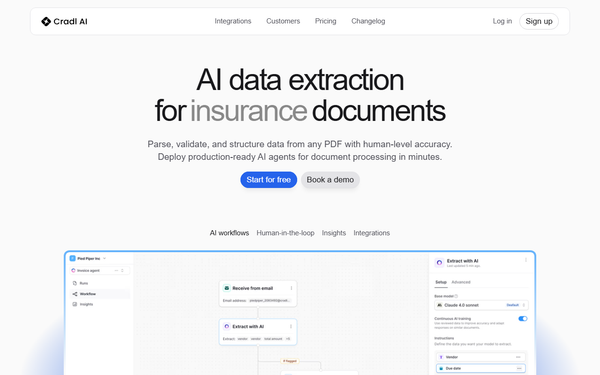
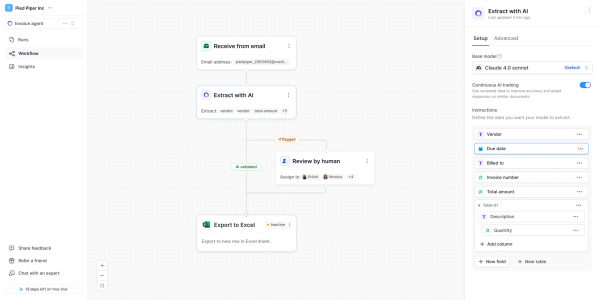
Core functionality revolves around a complete AI agent pipeline: Extract (pull any fields from any layout using state-of-the-art LLMs and OCR), Validate (built-in guardrails, confidence scores, custom business rules, and anti-hallucination checks), Review (intuitive human-in-the-loop interface for corrections), and Export (REST API, prebuilt integrations, or direct to tools like Google Sheets, Excel, Zapier, Power Automate, or n8n). Agents are self-learning—they improve automatically from every human correction. Additional capabilities include full observability dashboards, enterprise-grade security (GDPR-compliant, SSO, audit logs), multilingual support, and triggers for automatic processing.
Standout features that differentiate Cradl AI include its end-to-end agent approach (not just extraction), zero-hallucination grounding in source documents, rapid deployment (idea to production in minutes or a day), and true no-code model building with templates that anyone can customize via a visual interface. It handles complex, variable layouts without retraining from scratch.
Limitations include volume-based pricing caps (pages or predictions per month), the need for initial human review on low-confidence predictions or new document types, and no open-source or self-hosting option. Accuracy for highly exotic scripts or extremely poor-quality scans may require more corrections initially, and public independent benchmarks are limited.
User Experience
Cradl AI offers an exceptionally low learning curve. Users can go from account creation to a working agent in minutes by selecting a template, importing a sample document, and reviewing predictions in a clean, visual interface. The review screen highlights uncertain fields, shows source highlights, and lets reviewers correct data with immediate model feedback—making it feel more like collaborative software than technical configuration.
The interface is modern, intuitive, and focused on speed, with clear navigation between workflows, runs, and insights. Documentation at docs.cradl.ai is comprehensive, well-structured, and beginner-friendly, featuring quickstarts, core-concept guides, and integration examples. Support includes email ([email protected]), live options on paid plans, and an active YouTube channel with short tutorials. Overall, it excels for non-technical users while offering enough flexibility (webhooks, custom code) for power users.
Performance & Reliability
Agents deploy in minutes and process documents quickly (often seconds per page). Self-learning and confidence-based routing drive accuracy toward human levels over time, with users reporting significant reductions in manual work (e.g., Equinor moved from idea to production in under a day while improving data quality). Observability tools help monitor and trace pipelines, and guardrails minimize hallucinations.
Known issues are minimal in public feedback. No widespread complaints about downtime or major failures appear in reviews as of March 2026; the main feedback is that low-confidence items still require occasional human touch (by design). Reliability is enhanced by human-in-the-loop and cross-validation features rather than pure automation. Processing speed and consistency are consistently praised in demos and case examples.
Pricing & Value
As of March 2026, Cradl AI offers tiered subscription pricing focused on pages processed per month:
- Free / entry tier: Limited to approximately 1,000 predictions or pages per month with basic model training (confirmed across multiple review aggregators).
- Individual: Up to 500 pages/month, 2 agents, 1 user (suitable for solos or small teams; pricing typically in the low tens of dollars monthly based on historical listings).
- Team (most popular): $250 per month (billed annually with ~28% discount), up to 5,000 pages/month, 5 agents, multi-user support.
- Enterprise: Custom pricing, unlimited or high-volume pages, advanced security, dedicated support, and SLA.
Value is strong compared to alternatives (e.g., Rossum, Nanonets, or manual OCR tools) because of the no-code speed, built-in human review, and self-improving agents that reduce long-term costs. Small teams can start free and scale without heavy upfront investment; enterprises gain compliance and observability that justify the price. Overages and exact page definitions are available on the pricing page.
Practical Tutorial
Cradl AI provides an official quickstart and video tutorials. Below is a real-world walkthrough for a common task—automating invoice data extraction (based on official quickstart at https://docs.cradl.ai/quickstart and the “How to Automate Invoice Data Extraction with AI in 2026” blog post).
-
Sign up and create an agent – Go to cradl.ai, create a free account, and choose the “Invoice” template (or Custom). Define your intent (e.g., export to Google Sheets).
-
Customize the model – In the Workflows section, open the “Extract with AI” node. Add fields you need (Invoice Number, Date, Total Amount, VAT, Supplier Name, Line Items). Set validation rules (e.g., Total = Net + VAT; confidence threshold per field) and formatters (e.g., date standardization).
-
Import test documents – Upload sample invoices (PDF or image) via the Import button or use the auto-provided sample.
-
Review and train – Open any run in the Review interface. The AI highlights predictions with confidence scores. Correct any errors—each edit teaches the agent. Confirm when accurate; data can then be exported.
-
Add automation – Set up triggers (email, Zapier, API upload) and exports (Google Sheets, Excel, database, or custom webhook). Enable human review only for low-confidence items.
-
Go live and monitor – Activate the agent. Use the Insights dashboard to track accuracy, automation rate, and processing volume. The agent continues improving automatically.
For visual guidance, watch the official “Cradl AI in 3 minutes” YouTube video or the Zapier-specific tutorial. Full documentation and more examples are at docs.cradl.ai.
Final Verdict
Overall rating: 4.5/5. Cradl AI excels in simplicity, accuracy through human-in-the-loop + self-learning, and rapid ROI for document-heavy teams.
Who should use this tool: Finance, operations, or HR teams in any size organization that spend hours on manual data entry from invoices, contracts, or similar documents and want a no-code solution that actually improves over time without hiring ML specialists.
Who should avoid this tool: Developers seeking fully open-source/self-hosted solutions, organizations with extremely high page volumes outside enterprise plans, or teams needing pixel-perfect extraction from highly irregular or non-Latin-script documents without any human oversight.
One-sentence recommendation: If you want production-ready AI document automation that feels as simple as using a spreadsheet yet delivers enterprise reliability, start with Cradl AI today.