Creately Viz Review: The Ultimate AI-Powered Diagramming Tool
Overview & Purpose

Creately is a comprehensive visual collaboration and diagramming platform that combines infinite canvases, intelligent shapes, real-time teamwork, and data integration into a smart workspace. Creately VIZ, its standout AI-powered visual intelligence feature, enhances this by enabling users to generate diagrams from natural language prompts, apply expert strategic frameworks for insights, organize and transform ideas automatically, and view information from multiple perspectives. Primary use cases include creating flowcharts, mind maps, org charts, architecture diagrams, SWOT analyses, process maps, and more for project planning, brainstorming, software design, business process management, marketing campaigns, education, and operations.
It targets a wide audience: software developers and architects (for UML, ER diagrams, cloud infra), project and product managers (roadmaps, workflows), marketers and sales teams (campaign planning, buyer personas), business analysts, HR professionals, educators and students, and cross-functional teams seeking to bridge ideas to execution visually. With 10M+ users, it's positioned as an all-in-one alternative to tools like Lucidchart or Miro with built-in AI.
Key Features & Capabilities
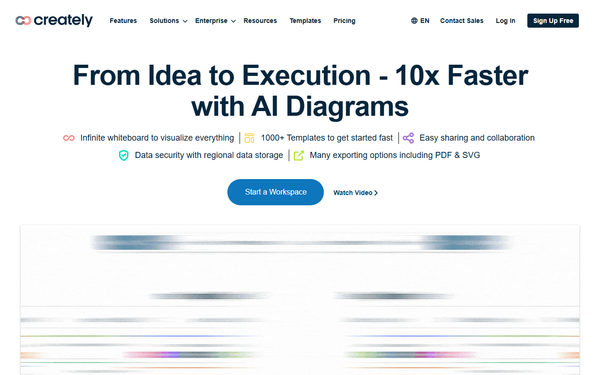
Core functionality revolves around drag-and-drop diagramming with thousands of shapes and templates, real-time multi-user editing on an infinite canvas, data linking from external sources (with 2-way sync in higher plans), custom databases, task management, and presentation tools.
Standout VIZ features include: prompt-to-diagram generation (e.g., "Create a flowchart for customer onboarding"), AI templates for frameworks like SWOT or Business Model Canvas that deliver contextual insights, auto-organization of sticky notes by theme/sentiment, diagram transformation (turn mind map into Kanban), idea expansion with suggestions/counterpoints, and Microsoft Teams integration for in-chat visual creation. This deep AI-visual integration differentiates it from basic diagramming tools by automating tedious tasks and providing strategic perspectives without expert knowledge.
Limitations include heavy reliance on paid tiers for full AI/advanced collaboration (real-time collab starts at Team level), restricted free plan (e.g., only 45 items per canvas), limited offline access (Enterprise only), and English-primary AI. Some enterprise-level data integrations and security (SSO, audit logs) are higher-tier only. It may not replace highly specialized tools for complex engineering CAD or advanced analytics.
User Experience
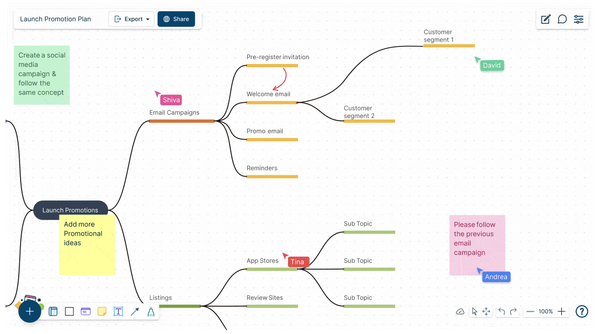
Creately boasts an intuitive interface with a shallow learning curve for core diagramming and whiteboarding—beginners can start creating professional visuals quickly using templates and drag-and-drop. The AI features via VIZ are accessible through simple prompts and contextual toolbars, making advanced visualization approachable. The clean, modern UI supports both structured diagramming and freeform brainstorming effectively on desktop browsers.
Documentation is robust with a detailed Help Center, video tutorials, guides on AI usage, and a template community. Support includes email/chat (higher plans) and in-app resources. Some users note a moderate curve for mastering data features or custom workflows.
Performance & Reliability
The platform performs efficiently for most team sizes and diagram complexities, with smooth real-time collaboration and quick AI generations. Loading and editing are generally fast thanks to cloud architecture.
Common complaints include occasional browser slowdowns with very large or data-heavy canvases, minor bugs in newer AI features or stability issues (as noted in some reviews), and less optimal mobile experience. Reliability is high for standard use, with enterprise-grade security certifications, but users with massive projects may experience lags compared to native apps. As of March 2026, ongoing updates address UX and performance.
Pricing & Value
Creately offers a usable Free plan with basic features and unlimited canvases (limited to ~45 items each). Paid plans start with Personal at around $8 per month (or lower annually), Team at ~$8 per user per month, Business at $149 per month for unlimited users, and custom Enterprise pricing. Higher tiers unlock full VIZ AI capabilities, advanced collaboration, higher storage (up to unlimited), exports (4K, SVG), databases, and integrations.
Value is strong due to affordability compared to competitors like Lucidchart or Miro (which can cost more for similar team features) while delivering unique AI visual intelligence and work management tools in one platform. The free tier allows testing, and paid plans provide good ROI for teams through time savings in diagramming and ideation. Annual billing offers discounts.
Practical Tutorial
Creating an AI-Generated SWOT Analysis for a Product Launch
Creately VIZ excels at quickly generating strategic visuals. Here's a step-by-step walkthrough for a common task (based on official guides at creately.com/help/ai/ and creately.com/guides/ai-diagrams/):
- Log into your Creately account and open or create a new workspace/canvas.
- Click the Plus (+) button in the bottom left and select the Templates icon (or use the AI section in the template panel).
- Browse to AI-enabled templates and choose a SWOT Analysis template (or similar strategic framework).
- In the prompt bar, enter a natural language description, e.g., "Conduct a comprehensive SWOT analysis for launching a new AI productivity app, including strengths like fast generation, weaknesses in data privacy concerns, opportunities in remote work trend, and threats from competitors like ChatGPT integrations."
- Hit Enter or Generate. VIZ will automatically create the SWOT diagram with populated quadrants and connected elements.
- Customize: Use the contextual Quick Tools > Creately AI to extend sections (e.g., "Add 3 more opportunities"), group items by priority, or transform into another view like a priority matrix.
- Collaborate: Invite team members for real-time edits, add notes/data links, or use AI to summarize insights or generate action items from the analysis.
- Export or present: Use high-res export (paid) or presentation mode.
This process can be completed in minutes versus hours manually. For more, see official AI guide: https://creately.com/help/ai/using-creately-ai/ or watch their VIZ video tutorials on creately.com/videos/.
You can adapt prompts for flowcharts (e.g., "Generate a flowchart outlining the steps involved in our customer onboarding process.") or other diagrams.
Final Verdict
Creately VIZ earns a solid 4.4 out of 5 stars. It shines for collaborative teams that value visual thinking augmented by practical AI, offering an accessible way to turn ideas into actionable diagrams and insights quickly.
Who should use it: Project managers, product teams, educators, and businesses seeking an affordable, feature-rich platform for diagramming, brainstorming, and process mapping with AI smarts—especially those already using or open to cloud collaboration tools.
Who should avoid it: Users needing robust offline capabilities, highly specialized technical diagramming (beyond standard UML/ER), or teams with very strict on-prem/security requirements without Enterprise budget. Also, those preferring desktop apps over browser.
One-sentence recommendation: Creately VIZ is an excellent AI-powered visual platform for teams wanting to accelerate collaboration and diagramming without breaking the bank—definitely worth a free trial for visual-first workflows.
(Research conducted March 2026 using official Creately documentation, help center, plans page, and aggregated user reviews from G2, Capterra, and TrustRadius; features and pricing evolve rapidly—always verify on the official site.)