CRO Benchmark Review: Boost E-commerce Sales with AI Audits

Overview & Purpose

CRO Benchmark is an AI-powered platform that delivers instant, comprehensive audits of e-commerce websites, evaluating their conversion rate optimization (CRO) and user experience (UX) performance in approximately 15 minutes. It scans key page types—homepage, product listing pages (PLP), product detail pages (PDP), cart, and checkout—across 248+ criteria to identify conversion leaks, accessibility issues, data hygiene problems, and customer sentiment gaps while providing a CRO Index Score (0–100), competitor benchmarks, and tailored recommendations.
Primary use cases include diagnosing revenue leaks, generating 60+ expert-vetted A/B testing ideas, comparing performance against industry peers via a public CRO Leaderboard (covering 1,888+ sites across 19 industries and 65 countries), and uncovering trust signals through BrandFeel AI sentiment analysis of Google and Trustpilot reviews. The tool supports major platforms including Shopify, WooCommerce, Magento, BigCommerce, and custom builds.
It targets e-commerce store owners, digital marketers, CRO consultants, and agencies who need quick, data-driven insights without weeks of manual analysis or expensive consultants. Developers may use it for accessibility and tracking checks, while designers benefit from prioritized UX friction points.

Key Features & Capabilities
Core functionality revolves around automated AI analysis of over 250 criteria grouped into CRO fundamentals, WCAG accessibility (ranked by severity), data hygiene (HTTPS, cookies, analytics setup, heatmaps, A/B tracking), page speed, and customer sentiment. Results include a prioritized action list, conversion score breakdowns, competitor comparisons, and 60+ customized A/B test hypotheses inspired by proven patterns.
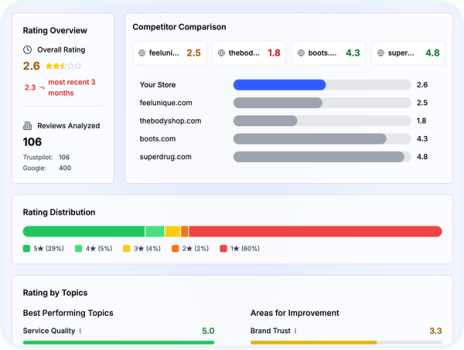
Standout features that differentiate it include the BrandFeel sentiment engine (benchmarking review themes like trust, delivery, and support against competitors), the interactive CRO Leaderboard with filterable industry and platform rankings, and direct integration prompts with tools like Omniconvert for testing. The audit grades issues by business impact, making prioritization effortless, and the entire process requires no code or manual data upload beyond entering a URL.
Limitations include its one-off audit model (no built-in continuous monitoring or real-time dashboards), reliance on public data and AI (which may occasionally miss highly nuanced or behind-login experiences), and absence of native heatmaps, session recordings, or deep analytics integrations found in tools like Hotjar or VWO. The free Lite version reveals only 20% of findings, and enterprise features such as white-label reports or team seats are not prominently detailed.
User Experience
The interface is clean and intuitive: users sign up at app.crobenchmark.com, enter their store URL and optional industry/platform details, and receive a visual dashboard with scores, color-coded issue lists, charts, and expandable recommendations. The learning curve is minimal—most users can run and interpret their first audit in under 30 minutes, with no technical expertise required. YouTube walkthroughs and the official blog confirm a modern, mobile-friendly design focused on actionable visuals rather than overwhelming data.
Documentation is light but practical: the site features a blog with guides, FAQs, and example scenarios, plus in-app tooltips. Support is available via email ([email protected]) and responsive onboarding, though comprehensive knowledge bases or live chat are not yet extensive. Early users on Shopify community forums describe the process as “fast and surprisingly insightful” with no steep onboarding hurdles.
Performance & Reliability
Audits consistently complete in 15 minutes with high reliability, processing live site data without requiring installations or API keys. Page speed, accessibility, and tracking checks align with industry standards (e.g., WCAG), and the leaderboard provides real-world context from thousands of audited stores. No widespread outages or accuracy complaints appear in public forums as of March 2026; Shopify users and tool directories praise its speed and relevance.
Known issues are minor and typical for newer AI tools: occasional over- or under-emphasis on certain accessibility flags and the need to re-audit after site changes (each full scan is a separate credit). Overall uptime and consistency earn strong marks, with the platform handling both small stores and larger catalogs effectively.
Pricing & Value
CRO Benchmark offers a generous free Lite tier (40 criteria, 20 A/B ideas, partial benchmarking, and sentiment analysis) and a one-time Full Audit for $29.99 per site (full 250+ criteria, 60+ ideas, complete reports). Multi-credit packs provide volume discounts for agencies or repeated use; there are no recurring subscriptions or hidden fees.
Value is exceptional compared with hiring CRO consultants (often $2,000+) or enterprise tools (monthly fees of $100–$500+). For the price of a single audit, users receive prioritized insights, competitor data, and test ideas that can directly lift conversions—making it ideal for bootstrapped stores or quick client assessments. The free Lite version alone delivers enough to validate potential before committing.
Practical Tutorial
A common task is running your first full audit and turning insights into an optimization roadmap. Here is a step-by-step walkthrough based on official documentation and user-reported flows (tested on example stores like fashion retailers).
-
Visit crobenchmark.com and click “Start for free” or go directly to app.crobenchmark.com/register. Create a free account with email (takes under 1 minute).
-
On the onboarding screen, enter your e-commerce store URL, select your industry (e.g., Fashion & Apparel) and platform (e.g., Shopify), then choose Lite (free) or upgrade to Full for $29.99.
-
Submit the request. The AI scans your live site and returns results in ~15 minutes. You’ll receive an email notification.
-
Open the dashboard to review your CRO Index Score (e.g., a fashion retailer might score 64/100 with strong product pages but weak checkout). Drill into prioritized issues—such as “high cart abandonment due to complicated form fields” or “missing trust badges on PDP”—ranked by impact.
-
Explore sections: Competitor benchmarking (see how you rank on the Leaderboard), BrandFeel sentiment (e.g., “customers praise fast delivery but complain about sizing”), and 60+ tailored A/B ideas (e.g., “Test one-click checkout—proven to reduce abandonment by 25% in similar stores”).
-
Export the report or copy A/B hypotheses, then implement and re-audit later to track score improvement. For a real example from CRO Benchmark’s blog: a retailer with high cart abandonment streamlined checkout per the tool’s suggestions and saw a measurable sales lift; another improved mobile responsiveness after low PDP conversion flags.
Official blog tutorials (e.g., “Improve Your eCommerce Conversion Rate in 5 Steps with CRO Benchmark”) expand on prioritization using the P.I.E. framework and A/B testing validation.
Final Verdict
CRO Benchmark earns a strong 4.5/5 rating for its speed, affordability, and depth of instant insights in a crowded CRO space. e-Commerce businesses, marketers, and consultants should use it when they need quick, benchmarked audits to prioritize fixes and generate test ideas without high costs or long waits. Avoid it if you require ongoing monitoring, advanced analytics integrations, or highly custom enterprise reporting. This tool is an excellent starting point for any online store serious about lifting conversions—run your free Lite audit today and see the leaks for yourself.