Cubeone Ai Review: Create Professional AI Presentations in Minutes

Overview & Purpose
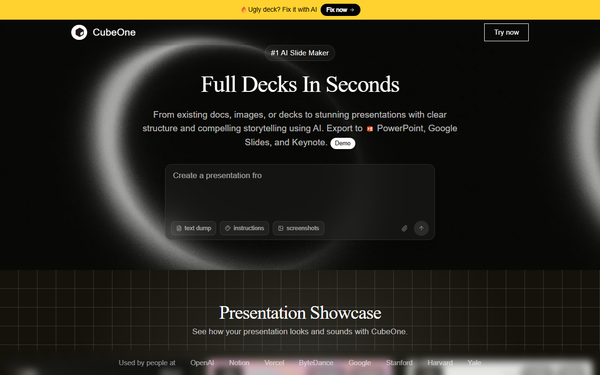
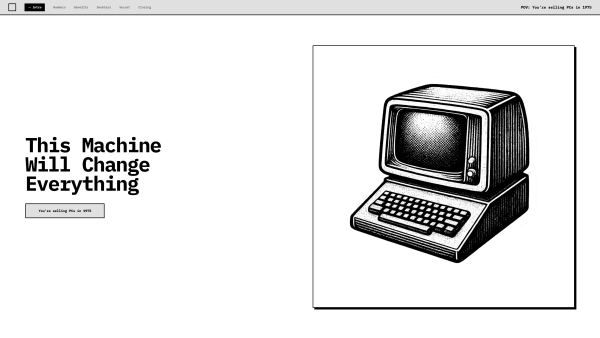
CubeOne AI is an innovative, AI-powered presentation platform that transforms raw ideas, text notes, documents, images, screenshots, or existing decks into fully polished, professional presentations in minutes. It operates primarily through a chat-based interface where users provide content or links, and the AI generates not just slides but a complete, self-running experience—including structured storytelling, a full script, visuals with auto-sourced copyright-free images, and AI voiceover narration. The tool emphasizes "Presentation 2.0": it makes users immediately stage-ready rather than requiring them to study or manually enhance generated slides. Primary use cases include creating pitch decks, investor updates, sales presentations, academic lectures, training materials, and async remote demos that can deliver themselves without a live presenter. It also excels at "fixing ugly PowerPoint" decks by redesigning them while preserving content. As of March 2026 research (drawing from the official site, blog, Product Hunt, and third-party directories), it targets tech-savvy professionals who need speed and quality without design expertise.
Target audience includes developers, product managers, engineers, startup founders, marketers, academics, and content creators at organizations like Google, OpenAI, Notion, Vercel, Stanford, Harvard, Yale, and ByteDance. It appeals particularly to frequent presenters in remote or hybrid work environments who dread slide design but value professional aesthetics and storytelling.
Key Features & Capabilities
Core functionality revolves around AI-driven generation from minimal input: users chat, paste notes, upload files (up to 25 MB), or provide links/screenshots, and the platform produces a complete deck with modern layouts, typography, visual hierarchy, and narrative flow. Standout features include automatic copyright-free image sourcing, branded template adherence (by uploading PowerPoint screenshots for exact replication of fonts, spacing, and structure), Quick Edit/Agent Edit for context-aware refinements, an audio narration kit for rehearsal or self-running delivery, Present mode with annotations and AI speaking assistance, and seamless exports to editable PPTX (PowerPoint, Google Slides, Keynote), PDF, or social images. Unique differentiators from competitors like Gamma, Tome, Beautiful.ai, or Plus AI are its emphasis on full readiness (story + script + voiceover), superior design "taste" that users say outperforms 99% of human designers, and self-narrating capability for no-presenter scenarios—ideal for automated demos or TikTok/Instagram content.
Limitations include a credit-based system (exact consumption per presentation undisclosed without login), potential need for minor manual tweaks on highly nuanced or data-heavy content (e.g., occasional AI hallucinations in numbers), a per-generation cap of around 20 slides in some modes, and less granular control for ultra-custom animations compared to traditional tools. No deep integrations with enterprise software beyond basic exports were noted.

User Experience
CubeOne offers an exceptionally low learning curve thanks to its intuitive chat/upload interface—users can generate a full deck in 5-10 minutes with no design skills required. The modern, clean interface focuses on input, generation, quick iteration via text commands or clicks, and instant preview with audio. Refinements feel conversational rather than technical. Documentation is practical and accessible through the official blog, which includes workflow guides and examples, while support is available via email ([email protected]) and a demo page. No extensive knowledge base or video academy was found, but user testimonials consistently praise the "magical" ease and time savings (e.g., 20 hours per week). Overall, the experience feels polished and efficient for its tech-savvy audience.

Performance & Reliability
Generation is impressively fast—full decks from rough ideas or messy files appear in 5-10 minutes, with exports completing instantly and no reported formatting loss in PPTX. The AI reliably applies professional design principles, auto-finds relevant visuals, and produces coherent storytelling/narration, as validated by high user satisfaction. Known issues are minimal: occasional waits during peak times, rare need for post-generation edits on complex data, and file size/slide limits that prevent massive decks in one go. Searches across Product Hunt, Reddit, and review sites revealed no widespread complaints or reliability problems as of March 2026; instead, users highlight consistent professional output and seamless self-running playback.
Pricing & Value
CubeOne follows a credit-based freemium model. A limited free tier exists for testing, with paid plans unlocking more monthly credits and features (exact tiers and costs are not publicly detailed on the website and require sign-up or contact for full transparency; third-party aggregators reference paid options starting around $20/month). Questions on the site about "how many presentations per month" and credit top-ups suggest scalable plans for heavy users, potentially including unlimited options. Value is strong compared to alternatives: it saves dozens of hours versus manual PowerPoint work or hiring designers (users report decks better than $5k outsourced work), while delivering superior self-running capabilities that basic slide generators lack. For frequent presenters, the time and quality gains far outweigh subscription costs; lighter users may stick to free credits.
Practical Tutorial
CubeOne provides official blog tutorials; the following step-by-step walkthrough for a common task—"Creating a Professional Presentation from a Rough Idea in 5 Minutes"—is adapted directly from their December 2025 guide (full details and example deck: https://www.getcube.one/blog/my-workflow-from-idea-to-presentation). This real workflow was used for an investor update example.
-
Brainstorm content conversationally: Open ChatGPT (or similar) and explain your topic aloud as if to a friend. Dump thoughts, structure, angles, and key data into notes. (Time: 2-3 minutes.)
-
Gather visual references: Browse Dribbble or Pinterest for style inspiration (e.g., "clean editorial" or "bold product-focused"). Save 2-3 images as mood references.
-
Set up in CubeOne: Log in at getcube.one, start a new project, and enable the built-in image search for automatic copyright-free visuals.
-
Input and generate: Paste your brainstorm notes, upload reference images and any data files (e.g., spreadsheets or reports), then hit "Create" (or refine via chat). Wait 5-10 minutes for the AI to build the full deck with design, layout, storytelling, and narration script.
-
Review with audio: Listen to the generated audio walkthrough/script at 2x speed (total ~10 minutes) to check flow and timing.
-
Edit quickly: Use Quick Edit for visuals/text or Agent Edit for context-aware content changes (e.g., "strengthen the conclusion"). Manually rearrange or tweak individual slides as needed.
-
Present or share: Enter Present mode (with optional AI narration or annotations), share via timed secure links for async review, or export to PPTX/PDF/images.
Example result: A polished investor deck from financial notes and screenshots, ready for live delivery or self-running (see official share example at https://share.getcube.one/lHWNWQpFtA). For branded company templates, follow their January 2026 guide: export template as images, upload to CubeOne, use the exact prompt "Use the attached slide screenshots as a strict company presentation template..." and generate.
Additional official resources: Demo at https://www.getcube.one/demo and template guide at https://www.getcube.one/blog/how-to-use-company-template-with-ai.
Final Verdict
Overall rating: 4.5 out of 5. CubeOne AI excels for busy professionals, startups, academics, and tech teams who frequently create presentations but lack time or design skills—its speed, storytelling depth, superior aesthetics, and self-running narration deliver exceptional efficiency and quality. Avoid it if you require unlimited free usage, ultra-complex custom animations beyond AI capabilities, or fully transparent upfront pricing without signing up. CubeOne AI is a must-try for anyone ready to stop building slides manually and start delivering stories effortlessly.