Curiso AI Review: The Ultimate Visual AI Workspace for Research
Overview & Purpose
Curiso.ai is an AI-powered workspace that blends an infinite canvas with node-based interactions and multi-model AI integration to help users visually organize thoughts, build knowledge networks, and explore ideas collaboratively with AI. The core concept revolves around connecting "nodes" (notes, chats, or media) on an unlimited workspace, where users can steer conversations across AI providers without repeating context, enabling deeper, more accurate interactions. Primary use cases include research synthesis, idea brainstorming, content outlining, academic note-taking, and creative project mapping—essentially turning scattered thoughts into structured, AI-augmented knowledge graphs.
It targets knowledge workers, researchers, writers, students, and creative professionals who prefer visual thinking over linear documents. Developers and advanced users benefit from local AI options and custom models, while privacy-focused individuals appreciate the emphasis on secure, local data handling. The tool exists in two forms: an open-source desktop application (v1, free for Windows, macOS, and Linux) and a premium web app (v2 at app.curiso.ai, mobile-compatible) with advanced features. As of March 2026, it stands out for its hybrid local/cloud approach in a market dominated by cloud-only tools like Notion AI or Miro.
Key Features & Capabilities
Core functionality centers on the infinite canvas where users create nodes for text, AI chats, images, or RAG documents. Chat nodes connect to multiple AI providers—including OpenAI, Anthropic, Groq, xAI, Deepseek, Google, OpenRouter, Alibaba Cloud, and local options like Ollama, LM Studio, or vLLM—allowing real-time model comparison and context sharing across the board. RAG support lets users upload local documents or websites for grounded responses via local embeddings and IndexedDB vector storage. Additional capabilities include vision model support (image uploads), inference parameter customization, model performance metrics (tokens/sec), multiple boards, pan/zoom/grid snapping, theme customization, and board sharing.
Standout differentiators include the node-guided conversation system that prevents context loss, seamless local-first privacy (encrypted API key storage, no data leaving your device for local inference), and open-source accessibility for the desktop version. RAG runs entirely locally, unlike many competitors requiring cloud uploads. Premium web features (v2) add enhanced sharing and multimedia nodes.
Limitations include no native mobile apps (web-only for v2), dependency on user-provided API keys or local setups for full functionality, and a Windows-specific CORS workaround needed for some local AI tools like Ollama. Advanced collaboration is basic (sharing boards but no real-time multiplayer), and there is no built-in version history or advanced export options in the open-source v1. Public documentation is minimal beyond the GitHub README.
User Experience
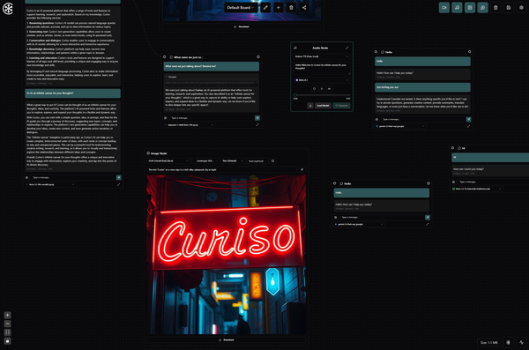
The interface feels intuitive for anyone familiar with tools like Miro or tldraw: drag to create nodes, connect them visually, and double-click to zoom or chat. Pan/zoom controls and grid snapping make large knowledge networks manageable, while the customizable theme keeps it visually appealing. Setup involves adding API keys or pointing to local servers, which is straightforward but requires technical comfort for local inference options.
The learning curve is moderate—beginners grasp the canvas quickly, but mastering node connections, RAG configuration, and multi-model steering takes practice. Documentation is limited to the GitHub repository (installation guides and feature lists) with no comprehensive in-app tutorials or video library; community support appears via GitHub issues and promotional channels like X (@curisoai). No dedicated helpdesk or extensive FAQ was found, which may frustrate non-technical users. Overall, the experience rewards visual thinkers but feels early-stage compared to polished SaaS alternatives.
Performance & Reliability
The desktop app (built with Tauri) runs lightweight and efficiently on local hardware, with responsive canvas performance even for large boards. AI responses depend on chosen models—local inference is private but hardware-limited, while cloud providers deliver speed via APIs. Web v2 inherits similar responsiveness with mobile compatibility.
No widespread reliability complaints surfaced in searches across Reddit, X, or review sites as of March 2026; the tool remains niche with limited user volume. Minor known issues include occasional Windows CORS errors with local Ollama (fixable via a simple command) and potential setup friction for custom models. Reliability is strong for core canvas and node functions, with local encryption adding peace of mind, though premium web features tie into the experimental CUR token ecosystem.
Pricing & Value
The open-source desktop v1 is completely free (bring your own API keys or use local models). The premium web v2 offers a 3-day free trial, then tiered subscriptions paid exclusively in CUR (Solana utility token): Bronze ($10/mo or $100/yr) for core infinite canvas, RAG, and sharing; Silver ($40/mo or $400/yr) adds backups and extras; Gold ($100/mo or $1000/yr) unlocks full multimedia and advanced capabilities. A portion of CUR payments is burned to support token value, with planned Pyth integration for stable USD pricing and staking rewards.
Value is excellent for the free desktop version, rivaling paid tools like Obsidian with AI plugins or Heptabase. Premium tiers provide web convenience and extras but introduce crypto volatility and wallet setup, which may deter users. Compared to alternatives (Notion AI at ~$10/user/mo or Miro AI), Curiso’s local privacy and multi-model node system deliver unique ROI for serious researchers—especially if you already hold or prefer CUR—but the token requirement reduces accessibility for casual users.
Practical Tutorial
No official video or step-by-step public tutorials exist as of March 2026 (searches primarily surface unrelated tools like Cursor AI). Below is a self-contained walkthrough for a common task—building a knowledge network for researching “AI Ethics in 2026”—using the free open-source desktop version (recommended starting point). This mirrors web v2 functionality.
-
Download and install: Go to the GitHub releases page (https://github.com/metaspartan/curiso/releases/latest), download the installer for your OS (Windows/macOS/Linux), and run it. Launch the app.
-
Configure AI providers: In settings, add API keys for cloud models (e.g., OpenAI, Anthropic) or connect to a local Ollama instance (run
ollama servefirst; Windows users: executeset OLLAMA_ORIGINS=*in Command Prompt). Test a quick chat node to verify. -
Create a new board: Click “New Board,” name it “AI Ethics Research 2026,” and enable grid snapping for neat organization.
-
Build the foundation: Double-click the canvas to add a Note node titled “Core Questions.” Add bullet points: privacy, bias, regulation. Use pan/zoom to expand the workspace.
-
Add AI chat nodes: Create a Chat node connected to the note. Select Groq (fast) and Anthropic (reasoning) in parallel. Prompt: “Summarize latest 2026 developments in AI ethics.” Link the output to the core note for context sharing.
-
Incorporate RAG: Upload 2–3 PDF articles or paste website URLs into a dedicated RAG node. Configure local embeddings (Transformers.js or OpenAI). Query the RAG node: “Extract key regulations from sources”—responses stay grounded and private.
-
Expand the network: Add a Vision node, upload an ethics diagram image, and connect a vision-enabled model (e.g., GPT-4o). Create comparison nodes with different models to debate outputs. Connect everything visually to form a web of insights.
-
Organize and export: Use theme customization, grid tools, and connectors to clean up. Export the board as JSON or screenshot for sharing. Save multiple boards for ongoing projects.
For advanced web features, sign up at https://app.curiso.ai after the trial. Experiment with model metrics to optimize speed. This process typically takes 10–15 minutes for a basic network and scales beautifully for complex research.
Final Verdict
Overall rating: 8/10. Curiso.ai excels as a privacy-first, visually intuitive AI workspace for users who think in networks rather than linear docs—ideal for researchers, writers, students, and knowledge workers seeking deeper AI collaboration without data leaks. Its open-source desktop foundation plus powerful node/RAG system offers exceptional value at the free tier.
Avoid it if you dislike crypto payments (for premium web access), prefer zero-setup SaaS with extensive support, or need real-time team collaboration—its niche status and sparse documentation may frustrate beginners or enterprise teams.
One-sentence recommendation: Try the free desktop version today if you want an infinite canvas that truly lets AI amplify your thinking without compromising privacy.