Cyanite AI Review: The Ultimate AI Tool for Music Tagging
Overview & Purpose

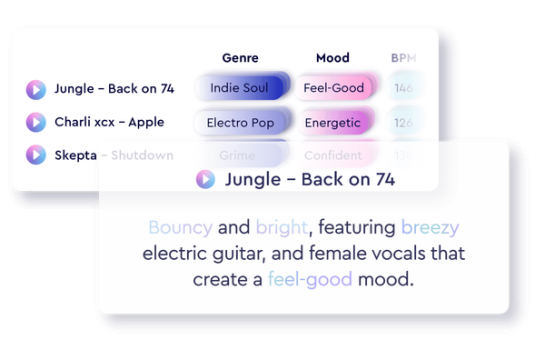
Cyanite.ai is an AI-powered music analysis platform that automatically tags audio tracks with detailed metadata and enables advanced search capabilities across music catalogs. Launched with in-house algorithms since 2019, it processes songs by analyzing spectrograms to categorize elements like genre, mood, instruments, tempo, BPM, key, voice presence, emotional dynamics, and more, while also generating natural-language auto-descriptions. Primary use cases include catalog management for large music libraries, sync licensing and music supervision (finding the right track for ads, films, or videos), personalized recommendations in music CMS platforms, playlist curation, and audio branding. It also supports artists and producers in marketing by quickly generating metadata for pitching tracks.
The target audience primarily consists of music industry professionals such as music libraries, publishers, sync licensing companies, production music supervisors, digital asset managers, labels, and developers building music recommendation engines or CMS integrations. It is less suited for casual consumers but includes self-service options for independent artists and producers.
Key Features & Capabilities
Core functionality revolves around three pillars: auto-tagging with over 1,500 genres/subgenres plus 100+ mood/instrument/character tags, similarity search (audio-based matching by sound, vibe, era, and emotional arc with filters for BPM, genre, key, etc.), and free-text search that interprets natural-language prompts into precise results. Additional capabilities include second-by-second emotional profiles and visualizations (graphs for energy dynamics, valence/arousal, instrument presence), auto-descriptions, playlist matching, and data export (CSV/JSON).
Standout features differentiating it from competitors include its purely in-house AI (no reliance on external LLMs like ChatGPT), EU-based GDPR-compliant servers for data security, advanced free-text prompting that goes beyond rigid keywords, and seamless integrations with major music CMS platforms (e.g., DISCO, Source Audio, Reprtoir). The platform also offers keyword/augmented tagging to clean up or supplement manual metadata errors, and it supports bulk processing at scale (1M+ tracks analyzed in under 12 hours).
Limitations include upload restrictions in the web app (primarily MP3s up to 15 minutes), inability for users to edit tags directly in the UI (requires support contact), and optimal similarity search performance requiring a catalog of at least 1,000 tracks. Free-text search improves with detailed prompts but may not always capture highly nuanced artistic intent. Compared to simpler tools, it has a steeper feature set without a fully mobile-native experience.
User Experience
The web app offers a straightforward onboarding for basic tasks like uploading and viewing tags, with a clean library interface that displays results quickly after analysis. However, the full suite (including advanced searches, filters, and visualizations) presents a moderate learning curve, particularly for users new to audio metadata workflows—reviews note it requires training time compared to more streamlined competitors.
Interface quality is professional and functional, with interactive graphs, swipeable detail views, and prompt-based search that feels intuitive once familiar. Documentation is solid: a comprehensive Getting Started PDF, full GraphQL API docs with query builder, FAQ, and blog resources with prompt guides and case studies. Support is email-based ([email protected] for technical issues, [email protected] for enterprise) and responsive for paying users, with a dedicated program for non-commercial innovators.
Performance & Reliability
Analysis is notably fast and efficient: individual tracks process in minutes, while large-scale catalog tagging handles millions of tracks rapidly. Official claims highlight real-world gains such as a 55% average reduction in search and curation time and up to 6x increase in licensing requests. Accuracy is advertised at up to 99% for core tags, with reliable second-by-second emotional profiling.
Known issues are minimal in public feedback; users praise consistency across catalogs, though AI can occasionally miss subtle cultural or contextual nuances (a common limitation in audio AI). No widespread complaints about downtime or data loss were found; GDPR compliance and copyright-safe processing add reliability for enterprise users. Similarity search performs best on sizable libraries, and results are consistent but benefit from custom metadata uploads for hybrid searches.
Pricing & Value
Cyanite.ai follows a freemium model. The web app provides 5 free track analyses per month. Artists and producers can upgrade via self-service subscriptions (e.g., 20 tracks/month or à la carte credits). API access starts at approximately $54/month for basic plans, with usage-based elements. Enterprise/business solutions are custom-priced based on catalog size, volume, and features (contact for a pricing calculator), often including bulk discounts or dedicated infrastructure.
Value is strong for professional users: the time savings and discovery improvements often outweigh costs for teams managing catalogs of thousands of tracks, especially versus manual tagging or less accurate alternatives. It offers better depth than some consumer-focused tools (e.g., vs. Harmix in precision and B2B integrations) but may feel premium-priced for very small users due to custom enterprise tiers.
Practical Tutorial
Cyanite offers official resources including a Getting Started Guide PDF and API documentation. Below is a step-by-step walkthrough for a common task—uploading a track, reviewing AI tags/descriptions, and running a similarity search—using the free web app (tested as of April 2026).
-
Register and Set Up: Go to https://app.cyanite.ai/register, create a free account, and verify your email. Log in to see the Library view.
-
Upload a Track: Drag and drop an MP3 file (or paste a YouTube link for import). Analysis begins automatically and typically completes in 1–5 minutes. Example: Upload a hypothetical upbeat pop track like “Summer Vibes” (120 BPM, female vocals, electronic synths).
-
Review Tags and Descriptions: In the Library, click the track to open the detail view. Scroll through auto-generated tags (e.g., Main Genre: Pop/Electronic; Mood: Energetic/Happy; Instruments: Synth, Drums; Tempo: 120 BPM; Valence: Positive). Read the auto-description: “Uplifting electronic pop with bright synth hooks, driving beat, and empowering female vocals evoking summer freedom.” View visualizations for emotional arc and energy dynamics.
-
Run Similarity Search: Next to the track, click “Similarity.” The AI finds matching tracks in your library (or Spotify previews). Apply filters (e.g., BPM 110–130, Genre: Pop). Results appear ranked by acoustic similarity—drag any to compare full tags.
-
Optional: Free-Text Search: Go to the Search tab and type a prompt like “upbeat summer pop track with female vocals and synth drops for a beach commercial.” Review matches and export if on a paid plan.
For API users, follow the integrations setup in the Getting Started Guide to automate via GraphQL. Full official guide: https://cyanite.ai/wp-content/uploads/2024/06/CyaniteGettingStartedGuide120624.pdf. Practice with your free 5 monthly credits before scaling.
Final Verdict
Overall rating: 4.5/5 – Excellent for its specialized depth and efficiency in music metadata and discovery, though held back slightly by pricing opacity and learning curve for non-enterprise users.
Music professionals managing catalogs, licensing teams, or building music tech platforms should use this tool for its accurate, scalable AI tagging and search that demonstrably saves time and boosts opportunities. Casual listeners, hobbyist producers with tiny libraries, or those needing ultra-simple interfaces should avoid it due to the professional focus and potential costs for heavy use.
Cyanite.ai stands out as a must-try AI engine for any music business serious about turning raw audio into actionable, searchable intelligence.