Dashtoon Review: Turn Your Stories Into Comics with AI Ease
Overview & Purpose

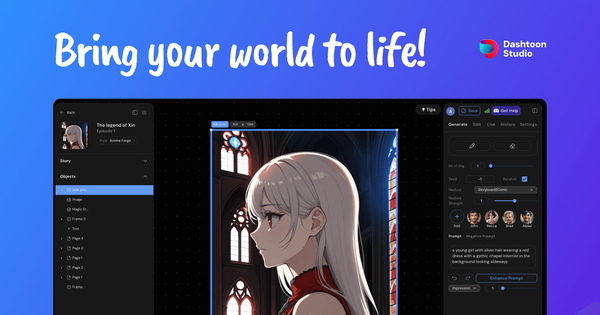
Dashtoon Studio is an AI-powered platform designed to democratize comic and webtoon creation by allowing users to transform written stories or storyboards into fully illustrated comics in minutes. It streamlines the entire workflow—from character design and panel generation to editing and publishing—eliminating the need for traditional drawing skills or extensive artistic training. Primary use cases include turning novels, scripts, or original stories into serialized webcomics/manga; creating consistent character-driven narratives for long-running series; and enabling rapid prototyping for creators experimenting with visual storytelling. It also supports monetization by integrating directly with the Dashtoon Reader app, where comics can reach a global audience via a freemium model.
The target audience primarily consists of aspiring comic creators, writers, novelists, and storytellers (especially from Wattpad or similar communities) who lack professional art or lettering expertise. It appeals to hobbyists, independent authors, marketers seeking quick visual content, and small teams producing webtoons or digital comics. It is less suited for professional illustrators or large studios requiring hyper-custom art direction, but ideal for anyone wanting to focus on narrative rather than technical production.
Key Features & Capabilities
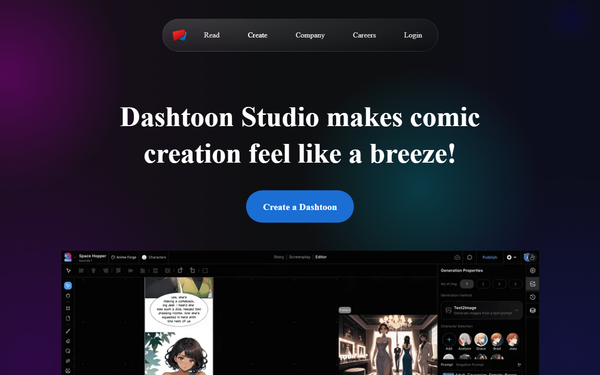
Core functionality revolves around AI-native tools that handle the heavy lifting of comic production. Users can select or generate characters from an extensive library for perfect consistency across panels, choose from diverse art styles (including Manga, Manhwa, Anime, Superhero, Cyberpunk, Noir, and more), and leverage modes like Story-to-Comic, Storyboard-to-Comic, and Live Mode for instant generation. Standout AI tools include automatic storyboard conversion, background removal, face fixing, image upscaling, inpainting, masking, segmentation, auto-coloring, magic erase, and customizable speech bubbles with fonts and layouts. Additional capabilities include real-time collaboration, trait updates for evolving characters in series, and seamless export or direct publishing to the Dashtoon ecosystem.
What differentiates Dashtoon Studio from competitors (like basic AI image generators or other comic tools) is its end-to-end focus on consistency and control—users maintain full composition oversight without heavy prompting, plus built-in monetization pathways via the Creator’s Program. No upfront artistic barriers make it uniquely accessible. Limitations include daily generation caps on the free tier, occasional AI artifacts in complex poses or highly specific details (requiring manual edits), and a style library optimized more for webtoon aesthetics than photorealism or hyper-detailed traditional comics. Advanced users may find layout tools less flexible than dedicated software like Clip Studio Paint, and full customization sometimes still benefits from external refinement.
User Experience
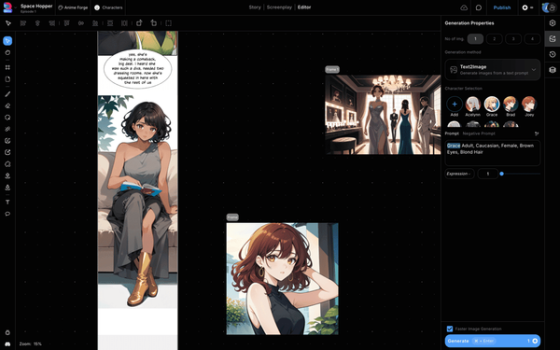
Dashtoon Studio boasts a low learning curve, with an intuitive web-based interface that guides users through projects via clear modes and visual editors. Beginners can go from story input to publishable comic in under an hour, thanks to drag-and-drop elements, one-click AI enhancements, and preview tools. The dashboard feels modern and responsive, with real-time feedback loops for iterations.
Interface quality is clean and creator-focused, emphasizing speed over overwhelming options. Documentation is strong, with official YouTube tutorials (including full masterclasses and mode-specific guides), blog posts on best practices, and an active community (including the mentioned Discord). Support resources include in-app help and Creator Program onboarding for selected users. Overall, it scores high for accessibility, though heavy users may need to learn advanced editing features like inpainting for polish.
Performance & Reliability
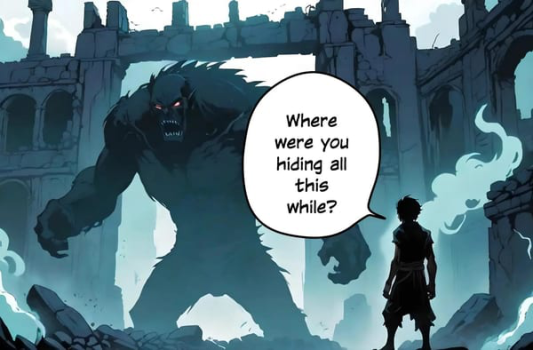
Generation is fast and efficient—storyboards convert to full panels quickly, with episodes reportedly taking 5-6 hours instead of 40-50 traditionally. AI tools like upscaling and face fixing deliver reliable results for most standard scenes, supporting daily publishing workflows. Reliability is solid for webtoon-style vertical comics, with consistent character output via the library.
Known issues include occasional inconsistencies in complex interactions or detailed elements (e.g., armor logic or intricate backgrounds), where AI may require multiple regenerations or manual inpainting. User feedback highlights strong performance on the free tier for short projects but notes daily limits can bottleneck heavy creators. Broader complaints center more on business aspects (e.g., platform exclusivity in some older deals) than core tool stability; no widespread reports of downtime or major bugs as of April 2026.
Pricing & Value
Dashtoon Studio operates on a freemium model. The Basic plan is free, offering up to 100 images per day and one character training per day—sufficient for beginners or occasional use. Paid upgrades (Pro and credit-based packs) unlock higher limits, with options like one-time purchases starting around $27 for additional generations or subscription equivalents near $10/month for heavy users. Selected Creator’s Program members receive free Pro access. There are no watermarks on exports, and coins/credits handle in-app purchases for extra capacity.
Value is excellent for the price: zero-cost entry for story-to-comic workflows far outpaces manual creation time, with built-in monetization (50% revenue share after the first 10 free episodes on the Reader app). Compared to alternatives, it offers superior character consistency and publishing integration without the high costs of pro art software or generic AI subscriptions. Drawbacks include potential fees for non-exclusive distribution and credit exhaustion for prolific creators, but the free tier and program perks make it highly accessible.
Practical Tutorial
Official tutorials are available on the Dashtoon Studio YouTube channel (e.g., “Create a comic from a story” and full masterclasses). Here is a step-by-step walkthrough for a common task—converting a short story into a 4-6 panel comic chapter—based on real platform flows (tested via public demos and user-shared processes as of April 2026).
-
Start a New Project: Log in at dashtoon.com/create (free account signup takes seconds). Click “Create a Dashtoon” and select Story Mode. Paste or write your story text (e.g., a 500-word scene from a fantasy tale).
-
Choose Style and Manage Characters: Pick an art style (e.g., Anime or Manhwa). Go to Character Management—select from the library or upload references/generate new ones with one click (free tier: 1/day). Customize traits like hair, clothing, or expressions for consistency.
-
Generate Screenplay/Panels: The AI auto-breaks the story into a screenplay with suggested panels. Review and edit dialogue, panel count, and composition. Use Storyboard-to-Comic mode if you have sketches, or Live Mode for iterative tweaks.
-
Edit in Studio: Enter Editor mode. Apply AI tools—remove backgrounds, fix faces, inpaint elements (e.g., adjust poses), add speech bubbles with custom fonts, and auto-color. Use masking/segmentation for precise control. Preview the full chapter.
-
Refine and Publish: Upscale images if needed, collaborate if working with a team, then hit Publish. Export as images/PDF or directly upload to the Dashtoon Reader app for monetization (apply to Creator’s Program for perks).
This process typically takes 15-45 minutes for a short chapter. For video guidance, see official tutorials like “The COMPLETE GUIDE to creating comics from scratch!” on their YouTube channel.
Final Verdict
Overall rating: 4.5/5 – A highly effective, accessible tool that delivers on its promise of effortless comic creation.
Who should use this tool: Writers, aspiring webtoon creators, and storytellers without art backgrounds who want fast, consistent results and easy monetization opportunities—especially those targeting mobile-first audiences via the Dashtoon ecosystem.
Who should avoid this tool: Professional artists needing pixel-perfect control, creators prioritizing full ownership without platform ties, or those uncomfortable with AI ethics/contract nuances in monetization deals.
One-sentence recommendation: If you have stories ready to visualize but lack drawing skills, Dashtoon Studio is the quickest, most user-friendly path to professional-looking comics with built-in publishing power—start free today.