Dashworks Review: The Ultimate AI Knowledge Assistant for Teams
Overview & Purpose

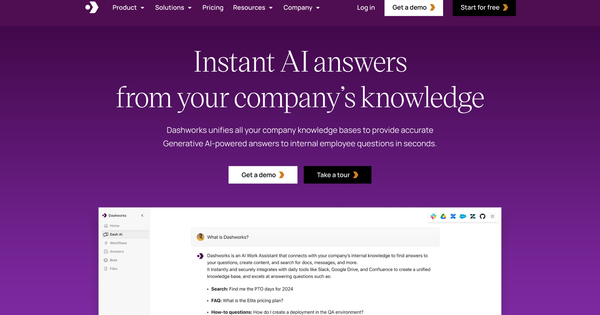
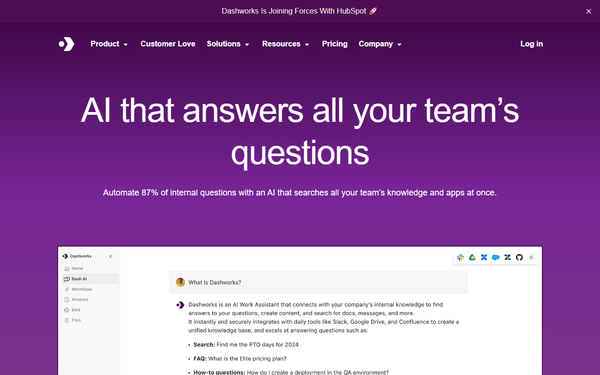
Dashworks was an AI Knowledge Assistant that unified organizational knowledge from apps, documents, communication channels, and knowledge bases to deliver instant, cited answers to team questions via natural language queries. It automated up to 87% of internal queries by searching across fragmented sources in real time, reducing repetitive question-answering, shortening onboarding and response times, and supporting faster decision-making in departments like sales, customer support, engineering, product, and HR. Primary use cases included resolving support tickets from historical data, accelerating sales cycles with product details, unblocking engineers on bugs or code references, and providing HR policy or project insights.
The target audience spanned cross-functional teams in hypergrowth startups through Fortune 500 companies, particularly those with siloed tools where quick, accurate information access boosted productivity without IT overhead.
Note on current status (research date: March 11, 2026): Dashworks was acquired by HubSpot in 2025 to enhance its Breeze AI platform for go-to-market teams. The standalone service sunset on July 16, 2025 (no new sign-ups after April 2025; logins disabled thereafter), with its technology integrated into HubSpot. The dashworks.ai site retains promotional content under a “joining forces” banner, but independent access is no longer available.
Key Features & Capabilities
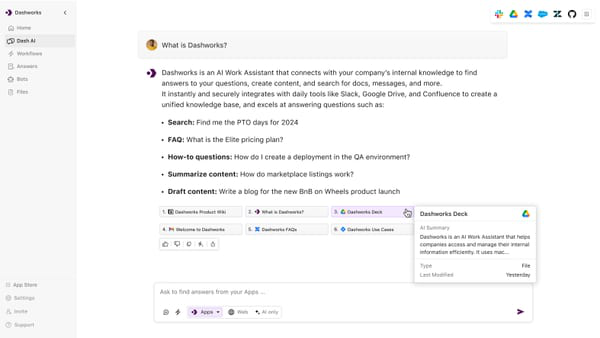
Core functionality centered on real-time omni-search across connected sources, generating trustworthy AI answers complete with source citations, permission-aware results, and up-to-date information pulled live via APIs (no traditional indexing or data duplication). Users accessed it via web app, Slackbot (auto-answering in channels/DMs), or browser extension/homepage.
Standout features that differentiated it included:
- Zero-data-retention architecture with instant ACL/permission syncing for enterprise-grade privacy.
- Custom AI bots and workflows (pre-built templates for onboarding, ticket resolution, or content drafting) with teachable instructions and multi-LLM choice (GPT-4o, Claude, Gemini Pro, Llama 3).
- Natural language understanding, source-of-truth detection (via relevance, authority, recency), multilingual support, and personalization by role/department/company lingo.
- Extensive integrations (50+), including Slack, Jira, Linear, Notion, Google Workspace, Salesforce, Zendesk, Gmail, GitBook, HRIS systems (BambooHR, Workday), Microsoft 365 tools, and public websites.
These features addressed legacy search pain points like sync delays and security risks from data copying. Limitations included dependency on source data quality (incomplete connections yielded weaker results), occasional need to refine complex or ambiguous queries, and lack of certain niche integrations without Enterprise requests. Generative features carried standard LLM caveats, and post-acquisition standalone development ceased.
User Experience
Setup was praised for speed (minutes versus days for competitors) and point-and-click integrations, creating a low learning curve once sources were connected—most users reported immediate value. The clean, conversational interface delivered succinct answers with clickable sources, making it intuitive for non-technical teams. Access via Slack and browser extension embedded it seamlessly into daily workflows.
Official documentation at support.dashworks.ai offered clear quick-start guides, instructions for customization, and in-app support chat. Paid plans included priority help; overall feedback highlighted responsive customer support. Minor complaints noted a short initial discovery period for advanced features like custom bots.

Performance & Reliability
Responses were consistently instant with zero-second delays thanks to live API access, outperforming indexed systems prone to staleness. Reliability was high for everyday queries, with strong accuracy when sources were properly connected—users frequently reported dramatic reductions in internal questions (e.g., from 20 to 5 daily per person). No major outages were widely reported pre-sunset.
Common user feedback from G2 and Capterra highlighted occasional incomplete results on highly nuanced or spreadsheet-heavy queries, requiring follow-up clarification, but overall satisfaction remained strong for speed and usefulness.
Pricing & Value
Pricing was per-seat with a 14-day free trial (no credit card required):
- Team Plan: $12 per seat/month ($10 annual) — unlimited usage, core integrations, Slackbot, workflows, browser extension, file uploads, shared topics (no seat minimum).
- Business Plan: $15 per seat/month ($12 annual) — everything in Team plus custom bots, LLM choice, org-wide integrations, AI customization, priority support (minimum 10 seats).
- Enterprise Plan: Custom pricing — adds SSO/SCIM, API access, analytics, HRIS integrations, dedicated support.
Value was compelling for mid-to-large teams: time savings on knowledge retrieval and onboarding often justified costs quickly, especially versus slower legacy tools. It offered strong ROI through privacy focus and unification, though smaller teams sometimes found it expensive compared to simpler alternatives. Post-sunset, value shifts to HubSpot users inheriting the underlying technology.
Practical Tutorial
Prior to sunset, official quick-start and support resources guided users. Here is a recreated step-by-step walkthrough for a common task—setting up the Slackbot and resolving a support query (e.g., “How do we handle customer refund requests?”)—based on documented features and integration flows.
-
Sign up and connect sources: Start a free trial at web.dashworks.ai/signup. In the dashboard, navigate to Integrations and authorize key apps (e.g., Zendesk or Intercom for tickets, Google Drive/Notion for policies, Slack for conversations). Approve permissions per app—setup typically took under 10 minutes with no indexing required.
-
Add the Slackbot: From Settings or the Slack section, generate the invite link. Add Dashworks to your Slack workspace and invite it to relevant channels (or use in DMs). Configure auto-answer rules or topics for proactive responses.
-
Ask and refine: In Slack, type a natural-language question such as “@Dashworks What is our refund policy for customers within 30 days, including steps and exceptions?” The bot replies instantly with a synthesized answer, bullet-point steps, citations to the exact policy doc or ticket examples, and a “source of truth” confidence note.
-
Create a custom bot (Business+): In the Bots section, select a template (e.g., Customer Success) or build one. Add instructions like “Prioritize the official Zendesk knowledge base and respond in a professional, empathetic tone per our brand guidelines.” Test with sample queries and share with the team.
-
Monitor and optimize: Use the dashboard analytics to review popular questions, identify knowledge gaps, and connect additional sources or upload files. For ongoing use, set shared topics or workflows (e.g., auto-draft replies).
This workflow typically reduced response times significantly; official YouTube guides and support.dashworks.ai provided video walkthroughs for advanced customization.
Final Verdict
Overall rating: 4.5 out of 5.
Dashworks delivered outstanding real-time, privacy-first knowledge access that transformed how teams handled internal questions—ideal for organizations with scattered data across modern SaaS stacks who valued speed, accuracy, and security. Pre-acquisition, sales, support, and engineering teams benefited most from its seamless integrations and custom bots.
It should be avoided now by anyone seeking a standalone solution, as access ended with the July 2025 sunset; teams needing similar functionality should evaluate HubSpot’s integrated Breeze AI capabilities instead.
One-sentence recommendation: Dashworks was a top-tier AI knowledge assistant whose innovative real-time search and security model made it highly recommended—until its successful integration into HubSpot’s ecosystem in 2025.