DeepDocs Review: Automate Your GitHub Documentation Workflow

Overview & Purpose
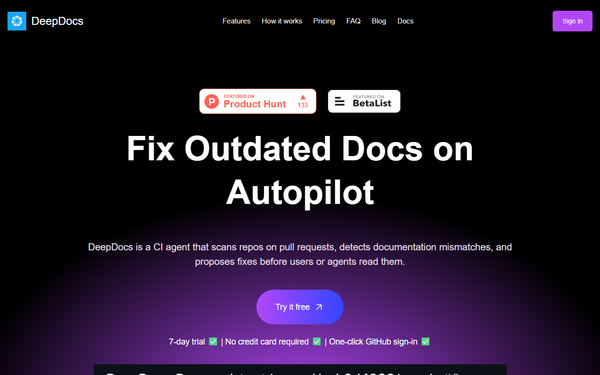
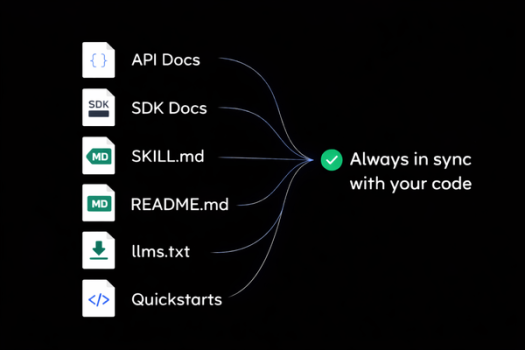
DeepDocs is an AI-powered GitHub app that functions as a continuous documentation agent. It automatically scans your entire repository on every commit, detects documentation drift caused by code changes, and opens pull requests with precise, intelligent updates to keep READMEs, API references, SDK guides, tutorials, and other markdown-based docs synchronized with your evolving codebase. The primary use cases include eliminating manual documentation maintenance in fast-moving projects, preventing stale docs in monorepos or separate documentation repositories, and supporting documentation generators without extra configuration.
The target audience is primarily software developers, engineering teams, open-source maintainers, and technical writers who rely on GitHub and struggle with the common pain of neglected or outdated documentation after code changes. It is not aimed at marketers, designers, or non-technical users.
Key Features & Capabilities
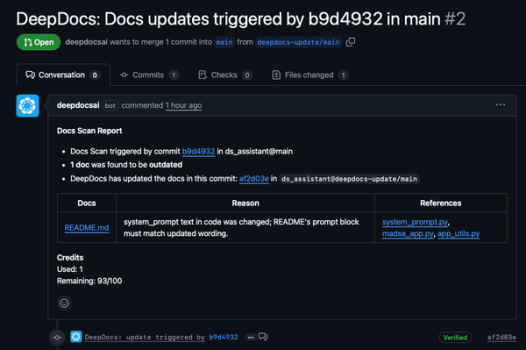
Core functionality revolves around “Continuous Documentation”—a CI/CD-style workflow where DeepDocs performs a “Deep Scan” of the full repository context on commits, identifies outdated sections across supported doc types, and proposes minimal edits in a separate branch while preserving original formatting, tone, structure, and style. It generates detailed human-readable reports explaining exactly which commits triggered changes and why. The tool works seamlessly with monorepos, separate docs repos, and popular generators including Docusaurus, Mintlify, Read the Docs, and MkDocs.
Standout features that differentiate it from competitors (such as manual AI prompting tools like Cursor/Claude, Swagger/OpenAPI generators, or basic doc writers) include full autonomous operation with no per-change prompting required, complete codebase context for accurate multi-file feature updates, and style-preserving partial edits rather than full rewrites. It integrates natively into GitHub workflows via pull requests, building trust through transparent logs.
Limitations include restriction to GitHub repositories only (GitLab support is planned but not yet available), a credit-based system where each scan consumes credits based on the number of documentation files processed by the LLM (varying from 0 to the total number analyzed), and the necessity for human review and merging of proposed PRs. No self-service data deletion exists beyond uninstallation, and very large repositories may require careful configuration to manage credit usage.
User Experience
Setup is straightforward for anyone familiar with GitHub Apps, resulting in a low learning curve. Users sign in at the DeepDocs dashboard, install the GitHub App (for all or selected repositories), and configure per-repo settings via a clean sidebar interface—no complex YAML required in the current version. The interface quality is minimal yet functional, relying heavily on familiar GitHub pull requests for final approval, with logs and reports provided both in the PR and dashboard.
Official documentation at docs.deepdocs.dev offers clear quickstart guidance and guides, though it is relatively concise. Support includes dedicated email (Pro plan) and GitHub issues; community resources remain limited due to the tool’s relatively recent maturation.

Performance & Reliability
Scans run efficiently on commits, delivering targeted PRs within typical GitHub workflow timelines. The intelligent editing approach minimizes unnecessary changes, and detailed reports enhance trust in the automation. No major performance bottlenecks or downtime have been widely reported.
Known issues are minimal; the earlier GitHub Marketplace listing notes deprecation (likely due to migration to the dedicated dashboard), but the service remains fully operational via deepdocs.dev and app.deepdocs.dev as of March 2026. Public complaints are virtually nonexistent—user feedback is sparse but overwhelmingly positive, centered on time savings and reduced context switching. Early-stage adoption (hundreds of installations) means long-term large-scale reliability data is still emerging, though testimonials highlight reliable operation for individual and small-team use.
Pricing & Value
A 7-day free trial requires no credit card. After the trial, the Pro plan costs $25 per seat per month (billed as $30 originally but discounted), providing 100 scan credits per seat. Credits are consumed only for LLM-processed documentation files during scans; you can sync and update unlimited files. Free/limited-credit options exist for very light personal use in some references, with extra seats purchasable for more credits. No partial refunds on cancellation.
Value is strong compared to alternatives: it outperforms manual processes or prompt-based AI agents by delivering set-and-forget automation at a modest per-developer cost, especially for teams where documentation maintenance otherwise consumes significant engineering time. It is more affordable and targeted than full-featured documentation platforms while offering superior integration for existing GitHub repos.
Practical Tutorial
Official documentation provides a complete quickstart at https://docs.deepdocs.dev/get-started/quickstart/. Below is a step-by-step walkthrough for a common task—setting up DeepDocs for a Python project and handling an API endpoint update in README.md and a docs/ folder (realistic example based on official guidance).
- Sign in at https://app.deepdocs.dev/ (or via GitHub).
- Install the DeepDocs GitHub App, granting access to your repository (choose “All repositories” or select specific ones). Repositories will appear in the dashboard sidebar.
- Click your target repository. In Repository Settings, select the main branch (e.g., main or master).
- Add Source Code Context: specify folders or files to monitor for changes (example:
./src/orapi.py). - Define target documentation paths (via dashboard or initial scan setup): e.g.,
README.mdand./docs/. - Save settings and trigger an initial Deep Scan (or wait for your next commit). DeepDocs analyzes the full repo context and, if drift is detected, creates a branch such as
deepdocs-update-main-<commit-sha>with precise edits and opens a PR. - Review the PR: examine the diff (only changed sections updated) and the attached report detailing triggering commits and rationale. Merge when satisfied.
Example scenario: You update a function signature in api.py. DeepDocs detects the mismatch in README.md and docs/api-reference.md, edits only the relevant paragraphs (preserving your Markdown style and tone), and submits a clean PR. No manual rewriting required. For advanced configuration details or credits monitoring, see https://docs.deepdocs.dev/guides/credits_usage.
Final Verdict
Overall rating: 4.5/5. DeepDocs excels for developers and engineering teams on GitHub who want to stop neglecting documentation and reclaim time for coding—its autonomous, context-aware updates and seamless PR workflow deliver genuine productivity gains with minimal overhead. Avoid it if your projects are hosted outside GitHub, you have extremely high-volume documentation requiring unlimited scans without credit management, or you prefer complete manual control over AI suggestions. One-sentence recommendation: Install DeepDocs today and let AI handle the documentation maintenance that every fast-moving codebase desperately needs.