DeepL Translate Review: Is This the Most Accurate AI Translator?
Overview & Purpose

DeepL Translate is an AI-powered neural machine translation service that provides highly accurate, context-aware translations using advanced deep learning models. It handles text, documents (preserving original formatting), images, PDFs, and speech input/output, making it suitable for a wide range of tasks. Primary use cases include localizing marketing content, translating business emails and contracts, handling multilingual customer support, creating website versions, and assisting with personal or academic documents. It excels in scenarios where natural, fluent output matters more than raw speed or exhaustive language coverage.
The target audience includes professionals such as translators, marketers, and content creators who need polished results; businesses and enterprises requiring secure, customizable workflows; developers integrating translation via API; and individuals or teams dealing with frequent cross-language communication. DeepL Pro extends the free service for professional and team use, emphasizing data privacy and advanced features. As of April 2026 research, DeepL has expanded to support over 100 languages (including all official EU languages, plus many from Africa, South Asia, and beyond), following a major rollout of 70+ new languages in late 2025.
Key Features & Capabilities
Core functionality centers on instant translation between supported languages with strong contextual understanding. Users can input text, upload files (Word, PDF, PowerPoint, etc.), scan images, or use voice input. Outputs include alternative translations for words or phrases, and the tool detects source language automatically.
Standout features differentiating DeepL from competitors like Google Translate include superior fluency and naturalness—particularly for European languages—thanks to its neural architecture trained on high-quality data. Pro users gain glossaries for consistent terminology (with smart context matching), formality toggles (formal/informal in applicable languages), style rules, and DeepL Write integration for post-translation refinement. Document translation preserves layout, fonts, and structure. Pro also adds maximum data security (translations not used for model training, with GDPR, ISO, SOC2, and HIPAA compliance), unlimited or high-volume usage, API access, integrations with CAT tools and Microsoft 365, and mobile/desktop apps. Voice translation supports conversational use.
Limitations include fewer languages than some rivals (over 100 vs. Google Translate's 200+), occasional struggles with highly specialized technical jargon or rare idioms in newer languages, and no robust offline mode. Free tier imposes character and file limits, and advanced customization requires Pro. Recent user feedback notes minor quality fluctuations in some non-core language pairs post-2025 expansions.

User Experience
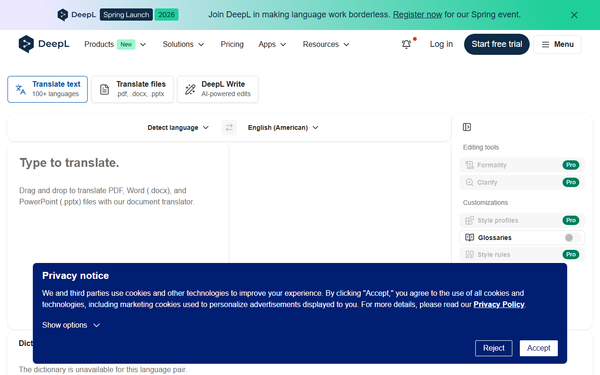
DeepL offers an exceptionally intuitive interface with a clean, minimalist web design that requires virtually no learning curve—even first-time users can start translating in seconds. The translator page features side-by-side text boxes, drag-and-drop document upload, language selectors, and quick-access options like formality or glossary application. Mobile apps (iOS/Android) and desktop versions (Windows/Mac) mirror this simplicity while enabling offline access for downloaded translations.
Documentation is comprehensive via the official support hub, with clear guides on glossaries, API usage, and file handling. Community resources and in-app tooltips provide additional help. Customer support receives mixed reviews: responsive for basic queries but slower for Pro billing or technical issues according to recent Trustpilot and G2 feedback. Overall interface quality scores high for speed and clarity, though some users report minor frustrations with UI whitespace or occasional app crashes/memory usage on desktop.
Performance & Reliability
DeepL performs exceptionally well in speed and efficiency, delivering near-instant results for text and most documents even on free tiers. Its neural models consistently rank higher than competitors in fluency and accuracy for supported language pairs, with blind tests and user benchmarks showing more natural output than Google Translate in European languages.
Known issues include occasional context misinterpretations in longer or culturally nuanced texts, and some 2025–2026 user reports of slight quality dips (more literal phrasing) amid rapid language expansions. App reliability draws complaints about freezing or high resource use, though web version remains stable. Outages are rare but noted in reviews. Overall, it earns strong reliability marks (4.7+ on major platforms) for professional workloads when languages align with its strengths.
Pricing & Value
DeepL offers a generous free tier with daily/monthly character limits, basic document translation, and core features—ideal for occasional personal use. DeepL Pro starts with Individual/Starter plans around $8.74–$10.49 per month (billed annually), unlocking unlimited text, higher document volumes, glossaries, full security, and apps. Team/Advanced plans scale to approximately $34+ per user/month with shared resources and admin tools. Enterprise/Business options are custom-priced for large-scale needs, including dedicated support and regional data centers. API has a free tier (500,000 characters/month) scaling to paid usage.
Value proposition shines for users prioritizing quality and privacy over maximum language breadth: Pro delivers professional-grade results at a reasonable cost compared to human translation services or less accurate free alternatives. It outperforms free tiers of competitors in nuance and security, making it cost-effective for businesses avoiding rework. Drawbacks include the paywall for unlimited features and less appeal for ultra-rare languages where Google Translate remains free and broader.
Practical Tutorial
Translating a Document with Glossary Customization (Recommended for DeepL Pro)
Here is a step-by-step walkthrough for a common professional task: translating a marketing PDF while maintaining brand consistency. This uses real examples and works on the web or app (Pro recommended for full glossary features).
-
Visit https://www.deepl.com/translator and sign in to your DeepL Pro account (free users have limits and fewer options).
-
Switch to the "Translate files" tab or simply drag and drop your document (e.g., a 5-page English PDF brochure about AI software).
-
Select the source language (auto-detect works well) and target language—e.g., English to German.
-
(Pro feature) Click "Customization" or "Glossary" in the sidebar. Create or select a glossary: For example, add term pairs like "neural network" → "neuronales Netzwerk" and "user experience" → "Benutzererfahrung" (with optional context sentences to guide usage). Save and apply it.
-
Optionally set style rules (e.g., formal tone) or enable DeepL Write for refinement.
-
Click "Translate." DeepL processes the file in seconds to minutes (depending on size), preserving layout, images, and formatting.
-
Review the output side-by-side. Click any translated segment for alternative suggestions or manual edits.
-
Download the translated document (e.g., as German PDF ready for use). For API users, the same workflow can be automated via SDKs.
Official guides for glossaries and advanced file handling are available at DeepL's support site. For voice conversations, switch to the Voice tab and speak directly. This process typically takes under 5 minutes and highlights Pro's customization edge.
Final Verdict
DeepL Translate earns a strong 4.7 out of 5 overall. It is the go-to tool for professionals, businesses, marketers, and developers who value natural, accurate translations in its core 100+ languages and require secure, customizable workflows—especially in European or major global pairs where fluency directly impacts results.
Avoid it if you need translation for extremely rare languages, unlimited free heavy usage, or real-time spoken conversations in unsupported pairs, where broader free alternatives like Google Translate may suffice.
Recommendation: Choose DeepL (especially Pro) whenever translation quality and professionalism matter more than sheer volume or cost—it's a premium investment that consistently delivers human-like results.