DevPlan Review: The Ultimate AI Tool for Product Development

Overview & Purpose

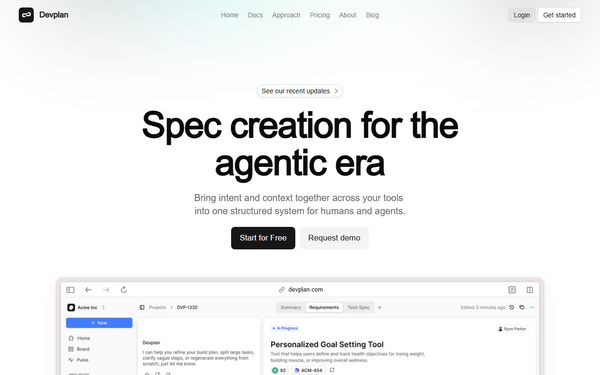
DevPlan is an AI-native product development platform that transforms product ideas and intent into structured, executable specifications for both human teams and AI coding agents. It builds a dynamic "product context graph" by securely connecting to code repositories, ticketing systems, and documentation, then uses AI agents to generate detailed PRDs (Product Requirements Documents), user stories, technical designs, acceptance criteria, and ready-to-use coding prompts. The primary use cases include streamlining the planning phase of software development, reducing ambiguity in AI-assisted coding workflows, enabling spec-driven execution, and maintaining context across the entire project lifecycle—from initial idea to code deployment.
The tool targets software developers, product managers, engineering teams, and founders who already incorporate AI coding assistants (such as Cursor or Claude) into their processes. It is particularly suited for modern tech teams focused on accelerating development velocity through structured planning rather than traditional task boards or resource-heavy project management. As of March 2026, DevPlan positions itself as the "missing link" between high-level ideas and reliable AI execution, helping teams avoid common pitfalls like context loss or vague prompts.
Key Features & Capabilities
Core functionality revolves around three pillars: a daily-updated product context graph that maps codebase architecture, historical decisions, and team conventions without storing source code; intelligent AI agent collaboration for requirements discovery, PRD generation, and breakdown into AI-scored user stories; and an execution engine with one-click sync to Jira/Linear plus a CLI for direct integration into IDEs.
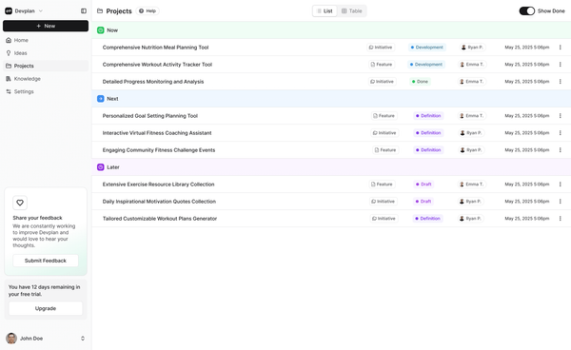
Standout features that differentiate it from competitors like manual prompt engineering tools or basic PM platforms (e.g., Linear alone or Miro for diagramming) include the context graph's ability to surface edge cases automatically, Agentic Scores that predict AI implementation success rates per story, context-rich prompts tailored to your exact tech stack, and seamless CLI automation for parallel feature execution in tools like Cursor. Security is emphasized—no source code is stored or used for training—and integrations cover GitHub, Linear, Jira, and web context sources. The platform also supports collaboration via built-in commenting, idea capture, and a Now/Next/Later roadmap.
Limitations include one-directional syncs to PM tools (changes in Jira/Linear do not update DevPlan), a focus on spec generation and AI execution rather than comprehensive task tracking, milestone Gantt charts, or deep resource allocation analytics. It lacks the broad performance pattern analysis or bottleneck prediction highlighted in some generic descriptions and assumes teams are already using AI coding IDEs; non-AI workflows may find it less impactful. As an emerging tool launched in beta around mid-2025, advanced enterprise features like custom analytics are still evolving.
User Experience
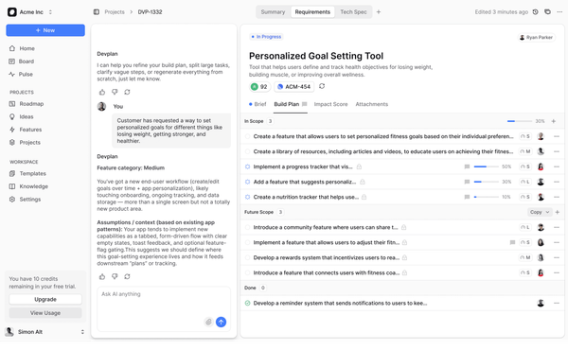
DevPlan offers a clean, modern web interface with a straightforward workflow: connect sources, input an idea, collaborate with agents via chat-like questions, review generated artifacts, and export/execute. The learning curve is moderate—minimal for developers familiar with AI tools like Cursor, but it may take a few projects for non-technical PMs to fully leverage agent interactions and CLI commands. Interface quality is intuitive, with clear sections for context graphs, build plans, and runs monitoring, though it lacks extensive visual dashboards or drag-and-drop elements seen in traditional PM tools.
Documentation is solid through the official docs site and practical blog posts, including step-by-step guides and a CLI cheat sheet. Support resources include in-app agent assistance, email (implied via trial signup), and community feedback channels like IndieHackers launch discussions. No dedicated knowledge base videos were prominently featured as of research, but the "Getting Started" flow and blog provide actionable onboarding.
Performance & Reliability
The platform performs efficiently for its core purpose, with agents generating complete PRDs and prompts in minutes and the context graph updating daily without noticeable lag. Users (primarily via company materials and early comparisons) report 8–10x faster planning and 2–3x overall execution speed compared to manual spec management, enabling scalable parallel AI coding. Reliability appears strong for context preservation and prompt accuracy, with built-in review agents catching issues before execution.
Known issues or common complaints are minimal due to the tool's relative newness and limited public reviews; no widespread reports of downtime, data loss, or major bugs surfaced in searches on G2, Reddit, or tech forums as of March 2026. Early adopters note occasional need for human course-correction on complex features, but the one-click regeneration feature mitigates this quickly. Overall, it feels production-ready for AI-focused teams, though independent long-term reliability data remains sparse.
Pricing & Value
DevPlan offers a generous 14-day free trial with no credit card required. Paid plans follow a simple subscription model, with the Builder tier starting around $24 per month (or lower when billed annually at approximately $10–19 per user in some reported structures), including core AI tools, unlimited users in base tiers, and AI credits. Enterprise options involve custom pricing for unlimited projects, advanced integrations, and dedicated support—contact sales for details. Exact tier breakdowns (e.g., project limits) are not fully public on the main site but emphasize "simple pricing" with all plans including regenerative development tools.
Value is high for teams already invested in AI coding workflows, delivering significant time savings and reduced errors versus piecing together Linear, GitHub, and manual prompts. Compared to alternatives like pure AI IDEs or general PM tools (e.g., Jira with plugins), it provides specialized context intelligence at a reasonable cost. The ROI shines in velocity gains, though teams without AI adoption or needing full-featured resource management may find better value elsewhere.
Practical Tutorial
Official tutorials are available on the DevPlan documentation site and blog. Below is a step-by-step walkthrough for a common task—turning a high-level feature idea into implementation-ready code—adapted from real examples in the core workflow and "Using Devplan in Practice" guide (as of March 2026). This mirrors processes used in production by the team behind the tool.
Step 1: Connect and Build Context
Sign up for the trial at devplan.com, connect your GitHub repo, Linear/Jira, and any docs. DevPlan automatically generates your product context graph (updated daily). Example: Link a Next.js + Prisma codebase.
Step 2: Input Your Idea
In the web app, create a new feature and submit your idea in any format—text description, mockup, Jira link, or customer feedback. Example: "Add remote MCP server support with Python SDK integration."
Step 3: Agent-Guided Discovery
The Planning Agent asks 3–5 targeted questions based on your codebase (e.g., "Which SDK version aligns with existing patterns?"). Answer in plain language; this surfaces edge cases early.
Step 4: Review PRD and Breakdown
Approve the auto-generated PRD (complete with user flows, risks, and architecture notes). DevPlan then breaks it into right-sized user stories with Agentic Scores (High/Medium/Low for AI readiness) and technical designs.
Step 5: Sync or Generate Prompts
One-click sync to Linear/Jira (one-way) or generate context-rich prompts per story. Example prompt includes exact file paths like /src/lib/validations.ts and your stack details.
Step 6: Execute with CLI (Recommended)
Copy the CLI command from the prompt popover, e.g., devplan clone -c [context-id] -p [project-id] -y -i cursor -f [feature-id]. Run it in terminal to auto-clone a scoped workspace, launch Cursor, and load the prompt. Type "Implement current feature" to let the AI code.
Step 7: Review, Polish, and Monitor
Test the output, make manual fixes if needed, and track progress in DevPlan's Runs view. For adjustments: Update the PRD, regenerate prompts in <2 minutes, and restart.
Step 8: Ship and Iterate
Merge via Git, archive the feature, or capture learnings for the context graph. Full process for a half-day feature typically takes minutes of human time after setup.
For official details and variations, see the Core Workflow at https://docs.devplan.com/core-workflow/ and the practical guide at https://www.devplan.com/blog/using-devplan-in-practice. Real example outcome: Teams report shipping 90% of code through this flow with reduced rework.
Final Verdict
Overall rating: 4.3/5. DevPlan excels for AI-savvy software development teams seeking to eliminate planning chaos and maximize AI coding tools through intelligent, context-aware specifications—ideal for startups, engineering orgs at Uber/Zillow alumni scale, or anyone scaling prompt-based workflows. It shines in velocity and clarity but should be avoided by teams relying on traditional non-AI project management, needing heavy resource allocation/bottleneck analytics, or uncomfortable with emerging tools and limited independent reviews.
One-sentence recommendation: If your team uses AI coding assistants and wants structured, context-preserving planning that actually accelerates delivery, start with DevPlan's free trial today.