Dorik Review: The Best AI No-Code Website Builder for Agencies
Overview & Purpose
Dorik is an AI-powered no-code website building platform that enables users to generate, customize, and publish professional websites in minutes without any coding knowledge. Users type a simple prompt to receive a complete site with AI-generated text, images, and layout, then refine it using a drag-and-drop editor. Primary use cases include landing pages, blogs, membership sites with paywalls and portals, portfolios, directories, job boards, shops powered by Airtable data, and white-label client websites for agencies. It supports data-driven dynamic interfaces and full CMS functionality.
The target audience encompasses beginners and non-technical users, freelancers, designers, marketers, content creators, small businesses, and especially web agencies that need branded client dashboards, billing, and collaboration tools. It appeals to anyone seeking fast, affordable professional results without technical barriers.
Key Features & Capabilities
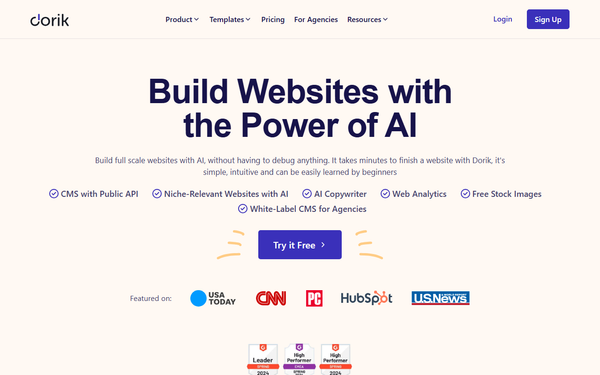
Core functionality centers on an intuitive drag-and-drop builder supported by 110+ professionally designed templates and 250+ pre-built UI blocks for rapid assembly. Built-in tools cover blogging, CMS collections with custom fields, forms, user analytics, and reliable hosting on AWS and DigitalOcean with a global CDN, free SSL, and unlimited storage and bandwidth on paid plans.
Standout features that differentiate Dorik include AI website and content generation (text and pixel-perfect images in any language, with easy regeneration), real-time Airtable integration for beautiful dynamic interfaces like grids, tables, and shops, white-label CMS complete with client billing, dedicated branded dashboards, and code export of clean HTML/CSS/JS files. Additional highlights are membership features with paywalls and portals, SEO tools (meta tags, sitemaps, robots.txt editing), payment integrations (Stripe, PayPal, Gumroad), Zapier and Mailchimp connections, team collaboration, password-protected pages, and custom domain support.
These elements position Dorik ahead of many competitors for agency workflows and no-code data handling. Limitations include basic native e-commerce (limited to payment buttons and subscriptions via integrations rather than full product catalogs or inventory management), smaller template library than platforms like Wix, and occasional need for heavy customization of AI outputs. It is not suited for highly complex web applications or enterprise-scale custom development.
User Experience
Dorik offers an exceptionally low learning curve, making it accessible even for complete beginners. The clean, modern interface features responsive previews, undo/redo, version history, and simple element editing via hover-and-click actions. Users consistently praise the smooth drag-and-drop workflow and mobile-first designs.
Documentation is comprehensive through the Dorik Helpdesk (help.dorik.com), with dedicated categories for Getting Started, Website Builder basics, CMS, AI features, Airtable elements, SEO, integrations, and common styles. Supplementary resources include official YouTube tutorial videos, a Facebook community group, and blog guides. Support consists of live chat (priority on higher plans), email, and a knowledge base; response times are generally quick, though phone support is unavailable. Overall feedback highlights high usability and fast onboarding.

Performance & Reliability
Published sites deliver fast load times, often scoring 90+ on Google PageSpeed Insights, thanks to optimized code, image handling, AWS/DigitalOcean hosting, and a global CDN. Unlimited storage and bandwidth on paid plans eliminate extra fees for traffic growth, and free SSL ensures security. A public status page monitors uptime, with no widespread reports of major downtime as of March 2026.
Common complaints are minor: occasional editor lag when working on complex pages with many elements, and rare glitches during heavy customization. These issues rarely affect live sites, which remain stable and reliable for typical use cases. Users describe published performance as lightweight and SEO-friendly compared to heavier alternatives.
Pricing & Value
Dorik provides a genuinely usable Free plan for building and publishing under a .dcms.site subdomain, including unlimited hosting/storage/bandwidth, templates, forms, Airtable integration, and basic elements (limited to 5 sites, 5 static pages per site, 20 blog posts, 2 CMS collections with 20 items each, and 2 collaborators). Paid plans unlock custom domains, higher limits, white-label features, and advanced tools.
The Personal plan starts at approximately $10.38 per month (billed every 2 years with discount code PERSONAL37; higher for monthly billing) and includes 1 custom domain, 25 pages, 200 blog posts, membership up to 3,000 members, code export, and basic white-label options. The Business plan costs about $20.75 per month (2-year billing) or $39 monthly and adds unlimited pages/blogs/CMS, 3 custom domains, 10 collaborators, membership up to 10,000, API access, priority support, and full white-label removal of branding. The Agency plan offers custom pricing for unlimited everything, advanced client tools, and enterprise branding.
Value is exceptional: unlimited resources, agency-specific features, and code export provide stronger ROI than comparable plans on Wix, Webflow, or Squarespace, especially for multi-site or client work. A 14-day refund policy adds flexibility.
Practical Tutorial
Dorik offers official step-by-step guides and video tutorials for common tasks. Below is a practical walkthrough for creating a basic business landing page (e.g., a coffee shop site), adapted from the official “How to Create a Website with Dorik with No-code (6 Easy Steps)” guide.
-
Define purpose and domain: Clarify your goal (e.g., showcase menu, hours, and contact form). Register a domain or use the free Dorik subdomain during setup.
-
Create and design the site: Sign up at dorik.com and access the dashboard. Click “Create New Site.” Use AI generation by typing a prompt such as “Modern landing page for my coffee shop with hero image, menu section, about, and contact form.” The AI instantly builds a full responsive site with text and images. Alternatively, select from 110+ templates.
-
Edit in the builder: Launch the drag-and-drop editor. Explore the top bar (preview, undo, device views) and left sidebar (pages, elements, global settings). Rearrange sections, add/replace 250+ UI blocks (e.g., hero, features grid, form), edit text or regenerate content with AI prompts, and customize colors/fonts/styles.
-
Enhance with features: In the dashboard, create custom CMS collections for dynamic content (e.g., menu items). Add forms, a payment button (Stripe integration), or Airtable elements for real-time updates. Enable membership or password protection if needed.
-
Test thoroughly: Use the preview mode to check responsiveness across devices. Verify all links, forms, and buttons work. Run Google PageSpeed Insights for performance and test in multiple browsers.
-
Publish and optimize: Connect a custom domain (paid plans), configure SEO meta tags/sitemap in site settings, then click Publish. View the live site via the dashboard arrow icon and share it. Post-launch, monitor analytics and iterate using version history.
For complete details and screenshots, refer to the official guide at https://dorik.com/blog/how-to-create-a-website-with-dorik or the Helpdesk at https://help.dorik.com. Many users complete similar projects in under 30 minutes.
Final Verdict
Overall rating: 4.5/5 (aggregated from G2 at 4.6/5 across 255 reviews and Capterra at 4.5/5).
Dorik is an outstanding choice for beginners, small businesses, freelancers, designers, marketers, and especially agencies that need fast, professional websites with white-label tools, AI assistance, and strong value. It shines when speed, simplicity, affordability, and client-friendly features matter most.
Avoid Dorik if you require advanced native e-commerce with inventory management, highly complex custom applications, or the broadest template ecosystem—platforms like Webflow or dedicated e-commerce solutions may suit better.
Dorik delivers effortless, high-quality websites with impressive AI and agency capabilities at a fraction of competitor costs—highly recommended for quick, professional launches.