Dreamhouse AI Review: Transform Your Space with AI Design
Overview & Purpose

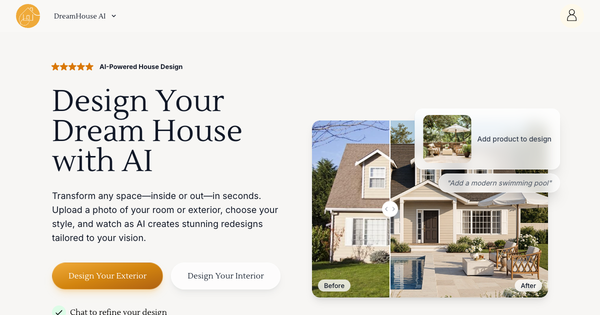
DreamHouse AI is an AI-powered interior and exterior design tool that enables users to redesign any room or outdoor space by uploading a photo and generating photorealistic transformations in seconds. It analyzes the uploaded image's layout, lighting, and architecture, then applies selected design styles, furniture, decor, and custom requests to create new visualizations while preserving the original structure.
Primary use cases include personal home makeovers for living rooms, bedrooms, kitchens, bathrooms, home offices, dining rooms, and nurseries; virtual staging of empty properties for real estate sales; and exterior improvements like facades, gardens, patios, pools, and curb appeal enhancements. It democratizes design by allowing instant visualization without hiring professionals, serving as both an inspiration generator and a practical planning aid.
The target audience spans homeowners and DIY enthusiasts seeking affordable design ideas, interior designers and contractors for client presentations, real estate agents for faster property staging, and anyone without formal design training. As of April 2026 research, it positions itself as a time- and cost-saving alternative to traditional consultations that can cost $500–$2,000 per room.
Key Features & Capabilities
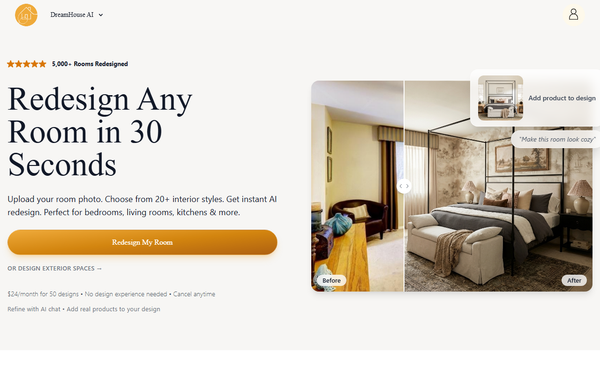
Core functionality revolves around photo-based redesigns: users upload an image, select from 20+ (or up to 35+ per some directories) trained styles including Modern, Minimalist, Scandinavian, Farmhouse, Art Deco, Bohemian, and more, then generate results in under 30 seconds. Standout capabilities include an interactive AI chat for natural-language refinements (e.g., "change wall color to navy blue" or "add more plants"), the ability to upload and integrate real product photos seamlessly, a "Find Similar Products" feature for shopping real-world matches, 4x image upscaling for print-ready high-resolution outputs, and before/after sliders that highlight added elements like furniture or decor.
It supports both interior and exterior modes, excels at virtual staging of unfurnished spaces, and includes inspiration galleries drawn from real user examples (e.g., Reddit transformations). These features differentiate it from many competitors by combining speed, conversational editing, and practical shopping integration rather than just static image generation.
Limitations include no native 3D modeling or walkthrough capabilities, reliance on high-quality input photos for best results, and occasional structural inconsistencies common to AI tools (e.g., minor layout shifts or unrealistic proportions). Advanced editing tools like precise object manipulation or multi-room batch processing are absent, and it is not available as a fully offline or multi-platform desktop app.
User Experience
The tool offers a low learning curve with an intuitive, visual-first interface: simple photo upload, dropdown style selection, optional text prompts, and one-click generation. The chat-based refinement and interactive sliders make iteration feel conversational and engaging rather than technical. Galleries and before/after examples provide immediate inspiration, contributing to a polished, modern UI that feels accessible even for non-tech users.
Documentation includes a built-in FAQ covering common questions on styles, generation times, and product features, plus a blog with practical articles (e.g., style guides and virtual staging tips). Support resources are adequate for a self-service tool but lack extensive video libraries or live chat beyond the in-app AI. Overall, users report it as user-friendly with quick onboarding, though some directory reviews note minor frustrations with credit limits interrupting workflows.
Performance & Reliability
Generation speed lives up to claims—most designs complete in under 30 seconds, with high-resolution outputs suitable for planning or presentations. The tool has processed thousands of designs, demonstrating scalability.
Known issues are typical of AI image tools: occasional artifacts, imperfect furniture placement, or style mismatches if prompts are vague. Independent user feedback is limited but generally positive regarding quality and realism; complaints center more on credit exhaustion than outright failures. No widespread reliability outages reported as of April 2026. Compared to competitors, it performs reliably for quick iterations but may require 2–3 refinements for perfection.
Pricing & Value
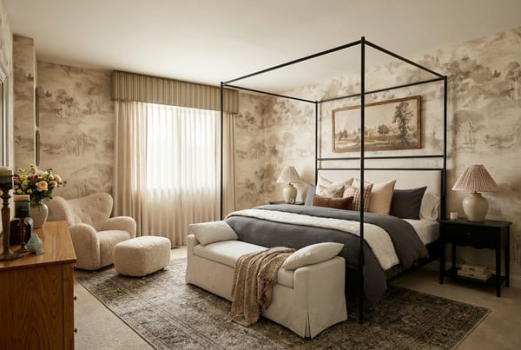
DreamHouse AI operates on a subscription model with a free trial offering limited designs (typically 10, no credit card required per directories). The Personal plan provides 50 AI generations per month for approximately $24, with higher tiers (200 or 400 generations) available for heavier users including AI chat refinement. All plans support interior/exterior designs and cancel anytime.
Value is strong for occasional users or real estate professionals, delivering professional-grade visuals far cheaper than hiring designers. It outperforms free alternatives in quality and refinement tools while remaining more affordable than full-service platforms. Heavy users benefit from higher tiers, though those needing unlimited generations or 3D features may find competitors like Planner 5D or REimagineHome better suited.
Practical Tutorial
A step-by-step walkthrough for a common task—redesigning a living room—is available directly on the site and demonstrated in official resources. Here is a practical example based on the platform’s process (as of April 2026):
- Visit https://dreamhouseai.com/ and click to start (no immediate sign-up required for trial).
- Upload a clear, well-lit photo of your living room, ensuring most of the space is visible (use the inspiration gallery for angle tips).
- Select your room type (e.g., Living Room) and choose a style such as "Scandinavian" or "Modern."
- Add optional custom requests via text (e.g., "cozy neutral tones with plants and a fireplace").
- Optionally upload photos of specific products (e.g., a sofa) to integrate them.
- Click "Generate Your Design"—wait under 30 seconds for the AI result.
- Use the AI chat to refine: type commands like "add more lighting" or "change curtains to linen." Compare before/after with the slider and tap to see added elements.
- Once satisfied, upscale to 4x resolution, use "Find Similar Products" for shopping links, and download or share the result.
For visual demos, official YouTube tutorials like "AI Interior Staging using Dreamhouse AI" provide screen recordings. The site blog also features style-specific guides (e.g., Japandi living rooms).
Final Verdict
Overall rating: 4.5/5. DreamHouse AI excels in speed, ease, and realistic results for photo-based redesigns, making professional-looking interior and exterior visualizations accessible to everyone.
It is ideal for homeowners, real estate agents, and casual designers who want quick inspiration or virtual staging without high costs or complexity. Avoid it if you require advanced 3D modeling, unlimited free generations, or pixel-perfect manual editing, as AI limitations and credit caps may frustrate power users.
One-sentence recommendation: If you need fast, high-quality AI room makeovers with conversational tweaks and real-product integration, DreamHouse AI is one of the strongest options available in 2026.