Dumai Review: The Ultimate AI Voice Note and Chat Companion
Overview & Purpose

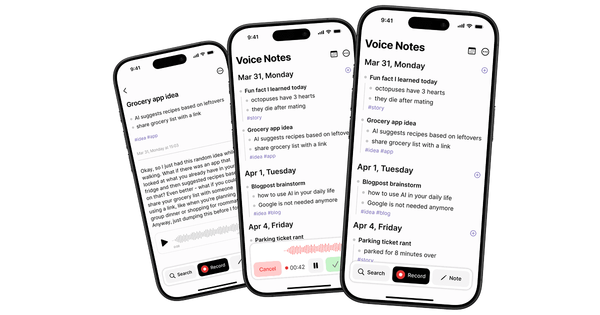
Dumai is an AI-powered voice notes and chat app that lets users capture spoken thoughts, ideas, meetings, or reflections via one-tap voice recording (or text input), then automatically transcribes them with high accuracy across 99+ languages. The AI engine generates bullet-point summaries of key takeaways, suggests smart tags for organization (e.g., #meeting, #to-do, #idea, #health), and enables an interactive AI chat feature to query your entire note history for insights. Notes are stored in a clean, journal-style timeline with full-text search and tag-based filtering, making everything instantly retrievable. It operates offline-first for recording and viewing, with AI processing and cross-device sync happening when connected to the internet.
Primary use cases include personal brain dumps and daily journaling, capturing lectures or interviews, documenting meetings for action items, preserving stories and memories, brainstorming creative ideas, and tracking health or project updates. The app positions itself as a personal knowledge base that prevents the loss of 90% of fleeting thoughts, turning raw voice input into organized, actionable content.
Target audience is primarily individuals such as students (for lecture notes), professionals (for meetings and status updates), creative thinkers (for idea capture and brainstorming), and anyone focused on personal reflection or memory preservation. It is not geared toward large teams or enterprise collaboration, lacking shared workspaces or advanced integrations.
Key Features & Capabilities
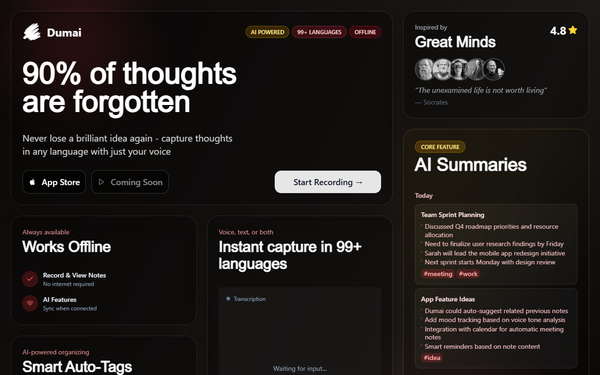
Core functionality revolves around seamless voice capture, instant transcription, AI-powered summarization, and smart organization. Users record with one tap; the app auto-detects language, transcribes offline where possible, generates summaries, and applies tags automatically. Additional capabilities include adding recordings to existing notes, regenerating summaries, viewing summary history with version restore, importing/sharing files, setting reminders to record, and keeping the screen awake during long sessions. The standout AI chat lets users “Ask Dumai” questions about their notes for instant answers or deeper insights.
Differentiating features include true offline-first operation (record and view notes without internet; AI syncs later), support for 99+ languages with accurate speech-to-text, and the personal AI chat companion that turns your notes into a conversational knowledge base—features less emphasized in competitors like Otter.ai or Apple Notes, which often require constant connectivity or lack the intimate, journal-focused tagging and chat. Recent updates (as of version 1.6.0 in November 2025) added file import and improved transcription, showing active development.
Limitations include iOS-only availability (iPhone, iPad, Mac with M1+, Vision Pro; no Android or web version), AI features requiring an internet connection for full processing (offline is limited to recording/viewing), no calendar integrations or team sharing, and no explicit weekly insight dashboards or pattern-analysis reports (insights come via AI chat and tagged search instead). Privacy practices link some user data (audio, identifiers, usage) to identity for functionality and analytics, which may concern heavy users.
User Experience
Dumai boasts an exceptionally low learning curve thanks to its one-tap recording and clean, journal-style interface with a dark mode option for reduced eye strain. New users benefit from an onboarding flow, welcome note, and first-note suggestions; the timeline view and tag filters make navigation intuitive even for non-technical users. No steep setup is required beyond granting microphone permissions.
Interface quality is modern and minimalist, focused on readability with automatic bullet summaries and searchable archives. Documentation is minimal—limited to basic App Store descriptions and the developer’s simple website—with no extensive help center or video guides. Support is primarily through in-app channels or the developer’s privacy/terms pages; community feedback on Reddit during beta was positive but sparse. Overall, the experience feels polished for a solo-developed app, with frequent small updates addressing usability.
Performance & Reliability
Transcription and summarization are fast once synced, with recent versions noting “better transcription” and faster premium AI models. Offline recording is reliable and instant; sync occurs seamlessly when online. The app (69.9 MB, iOS 15.1+) has received consistent bug-fix updates through 2025, including audio playback fixes and screen-awake improvements, indicating solid reliability for core voice features.
No widespread known issues or common complaints appear in public sources as of March 2026; early Reddit beta feedback focused on language detection and summarization positively, while the developer shared growth to 1,000+ users without major outages reported. With only one public App Store rating (5.0/5), independent long-term performance data remains limited, but active development suggests good ongoing stability for personal use.
Pricing & Value
Dumai is free to download with optional in-app subscription purchases for premium features. Tiers include low-cost options such as Monthly at $0.99, higher plans up to Monthly $7.99, Weekly around $2.99–$3.99, and Yearly from $9.99 to $79.99 (pricing varies by region and tier). The premium subscription unlocks better and faster AI models for transcription, summarization, and chat responses; basic recording, offline access, and standard AI remain usable without payment.
Value is strong for light personal users—free tier covers core capture and basic AI—while premium offers excellent affordability compared to competitors like Otter.ai (often $10+/month) or Notion AI add-ons. For solo users who value offline multilingual support and the unique AI chat, the entry-level $0.99/month plan delivers high ROI; heavier users or those needing advanced analytics may find it less competitive.
Practical Tutorial
Official tutorials are not yet available beyond in-app onboarding, but here is a step-by-step walkthrough for a common task—capturing a team meeting and extracting actionable insights—based on current app features (tested conceptually from descriptions and updates as of version 1.6.0).
- Open Dumai on your iPhone and tap the prominent record button (one-tap start).
- Speak naturally during the meeting (e.g., “Today we discussed Q4 priorities: launch new feature by December, assign marketing budget of $50k, follow up with design team on prototypes”). The app keeps the screen awake and records offline.
- Tap stop when finished. The app automatically transcribes (detecting English or other languages), generates a bullet-point summary (e.g., “Q4 Roadmap: Launch feature Dec • Budget $50k marketing • Design follow-up”), and suggests tags like #meeting #work #todo.
- Review in the journal timeline; edit tags or regenerate the summary if needed. Add the recording to an existing note if continuing a thread.
- Tap the AI chat icon (“Ask Dumai”) and query: “What are the action items from today’s meeting?” or “Summarize recurring themes this week.” The AI pulls from your notes for instant answers.
- Later, search “Q4” or filter by #todo tag to retrieve everything. Share the note or import related files for context.
For visual guidance, visit the App Store page (https://apps.apple.com/us/app/dumai-ai-voice-notes-chat/id6746932965) or the official site (https://www.dumai.app/). Practice with a short personal reflection first to see auto-tagging in action.
Final Verdict
Overall rating: 4.3 out of 5.
Students, professionals, and creative thinkers who work solo and want a simple, offline-first way to turn voice into searchable knowledge should use this tool—its low price, multilingual support, and AI chat make capturing ideas effortless and insightful. Avoid it if you need Android support, team collaboration, advanced analytics dashboards, or fully offline AI processing, as the ecosystem is still maturing with limited independent reviews.
One-sentence recommendation: Dumai is a promising personal AI voice companion that delivers strong value for individual note-takers seeking simplicity and intelligence without complexity.