Dume AI Review: The Ultimate AI Executive Assistant for Teams
Overview & Purpose
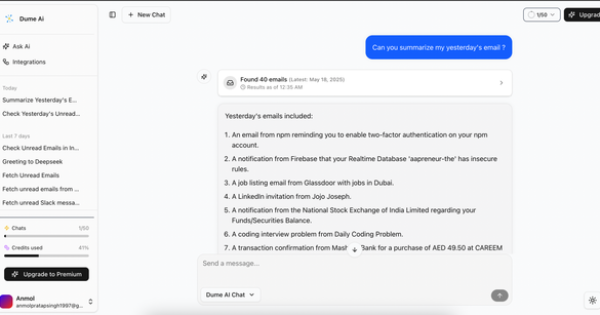
Dume.ai is an AI executive assistant that connects over 50 workplace tools—such as Gmail, Google Calendar, Notion, Jira, Slack, GitHub, Confluence, and Microsoft 365—into a single conversational interface. Rather than simply answering questions, it performs real actions: triaging emails, drafting responses, creating tasks in Jira or Notion, scheduling meetings, summarizing documents, and running automated workflows. Primary use cases include daily inbox management, project tracking, meeting preparation and follow-ups, content generation, and cross-app insights or reporting. It eliminates context-switching by giving users a unified “command center” powered by natural language.
The tool targets solopreneurs, founders, product managers, developers, and small teams who manage multiple platforms daily. It is especially valuable for knowledge workers in tech, operations, or marketing who want proactive automation without coding or managing separate subscriptions for different AI models.
Key Features & Capabilities
Core functionality revolves around a chat interface (accessible via web or WhatsApp) that retains long-term memory of preferences, past conversations, and decisions across all connected tools. Users can issue commands like “Plan my Monday” or “Summarize today’s meetings and create follow-up tasks,” and Dume executes them by pulling live data and updating apps in real time. Proactive features include automatic morning briefings, email triage with urgency labeling and draft replies, and no-code workflow automation using a visual builder with triggers, decision points, and conditional logic.
Standout differentiators include custom AI agents (e.g., Documentation Assistant or Support Analyst), unified cross-tool memory that remembers context like “I’m vegetarian” or recurring project rules, and built-in access to multiple frontier models (GPT-5, Gemini, Perplexity, Mistral) without extra subscriptions. Security is enterprise-grade with AES-256 encryption, OAuth authentication, zero data training, and full GDPR/CCPA compliance.
Limitations include a credit-based usage system that can restrict heavy automation on lower plans, an integration library that is solid but still growing (fewer than enterprise-scale tools like Zapier), occasional edge-case parsing issues in complex threads, and some advanced capabilities (such as AI voice calling) still marked “coming soon.” Workflow customization, while powerful, currently offers less flexibility than dedicated automation platforms for highly bespoke scenarios.
User Experience
Setup is straightforward—most users are up and running in under three minutes by signing up and connecting tools via secure OAuth. The chat-first interface feels intuitive and natural, with clean visuals and a drag-and-drop workflow editor. Learning curve is low for basic commands and pre-built templates but rises moderately when building custom agents or advanced workflows, requiring clear prompting.
Documentation at docs.dume.ai is comprehensive and well-structured, covering everything from chat basics to per-integration guides and Agent Studio tutorials. Support is responsive via email and in-app chat, with priority access on paid plans; users consistently praise the team’s quick updates and helpfulness. Mobile access through WhatsApp adds convenience for on-the-go task management.
Performance & Reliability
Response speed is generally fast for triage, briefings, and simple automations, with real-world claims of saving up to 2.6 hours per day on repetitive tasks. Reliability is strong for core features like email handling and calendar synchronization. Independent user feedback highlights consistent performance on everyday workflows such as GitHub PR reviews or Notion updates.
Known issues are typical of a maturing product launched in 2025: occasional connectivity glitches with certain apps (e.g., OneDrive or Excel actions failing in isolated tests), missed context in very long threads, or minor automation delays. These are not widespread, and the development team actively addresses feedback with rapid iterations. No major outages or systemic complaints appear in public reviews.
Pricing & Value
Dume.ai offers a clear tiered structure with a generous free plan:
- Free: $0 – 1,200 credits/year, 1 integration, 20 messages/day, basic models and features.
- GO: $9/month ($8 billed annually) – unlimited messages, all integrations, standard models.
- PRO: $18/month ($15 billed annually) – premium models, unlimited agents, webhooks, 2-way messaging, priority support.
- MAX: $40/month ($33 billed annually) – frontier models, unlimited workflows, custom builds by the team.
- Enterprise: Custom pricing with dedicated support and tailored agents.
Yearly billing includes extra credits and occasional launch bonuses (e.g., 2x credits). The value proposition is compelling: one subscription replaces multiple AI tool costs plus basic automation platforms, delivering deep integrations and memory-driven intelligence at a fraction of the combined expense. For solopreneurs and small teams, the time savings quickly justify the investment; it outperforms fragmented alternatives like separate ChatGPT Plus + Zapier setups for most productivity-focused users.
Practical Tutorial
Official documentation and public workflow templates make onboarding easy. Here is a complete step-by-step walkthrough for a common task—setting up automated Email Triage—based directly on the official getting-started guide (as of March 2026).
-
Create an account: Visit https://app.dume.ai/register, enter your email, complete OTP verification, and set a password. No credit card is required.
-
Connect your tools: From the dashboard, go to the Integrations page. Search for and connect Gmail (and optionally Google Calendar or Jira) using secure OAuth. Review the requested permissions and authorize.
-
Access public workflows: Navigate to the Workflows section and switch to the “Public Workflows” tab.
-
Clone the Email Triage template: Locate the “Email Triage” workflow, click Clone, and enable it. The visual editor will open showing triggers (new emails), decision nodes (urgency scoring), and actions (labeling, drafting replies).
-
Activate and test: Save and turn the workflow on. In the main chat, type “Triage my unread emails” or “Give me a morning briefing.” Dume will automatically sort messages (e.g., filing “Pepper Park Travel update” under Operations), highlight priorities, and draft responses you can approve or edit.
-
Extend the workflow: Add custom steps such as “Create Jira ticket for urgent items” or “Send summary to Slack.” For mobile use, message Dume on WhatsApp with the same commands.
Real-world example: After connecting Gmail and Jira, one command like “Summarize client emails from last week and turn action items into Jira tickets” processes dozens of messages and updates your project board in seconds. Additional ready-to-clone templates include Morning Digest and PRD to Jira Tickets. Full guides and video demos are available at https://docs.dume.ai/ and on the official YouTube channel.
Final Verdict
Overall rating: 4.3 out of 5.
Dume.ai is best suited for solopreneurs, small teams, product managers, and developers who want a single intelligent assistant that actually acts across their tools and remembers context—delivering meaningful time savings with minimal setup. It excels at unifying fragmented workflows and replacing several separate subscriptions.
Users should avoid it if they run large-scale enterprise environments requiring unlimited executions without credits, extremely complex legacy integrations, or zero tolerance for occasional early-stage glitches while the platform continues maturing.
Dume.ai delivers on its promise of an AI executive assistant that truly gets work done—definitely worth trying for anyone tired of jumping between apps all day.