Dynares Review: Automate Google Ads Campaigns and Landing Pages
Overview & Purpose
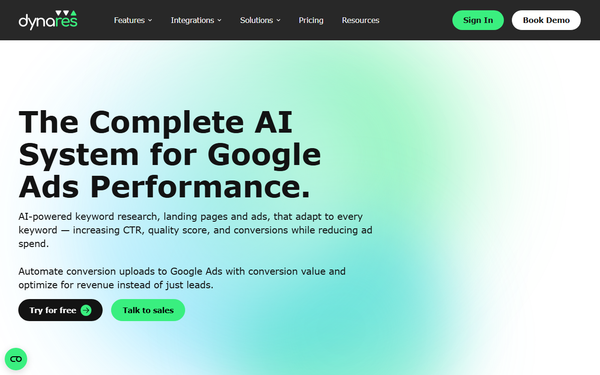
Dynares is an AI-powered platform designed as "The Complete AI System for Google Ads Performance." It automatically generates personalized landing pages, ads, forms, and full campaigns tailored to every keyword or intent group, pulling from brand guidelines and public data to match user search intent dynamically. The primary goal is to boost click-through rates (CTR), Quality Scores, conversions, and return on ad spend (ROAS) while slashing manual work and ad costs through real-time optimization and automated conversion uploads to Google Ads.
Core use cases include scaling Google Ads campaigns for high-volume keyword sets, creating hyper-relevant experiences without developers or spreadsheets, optimizing for revenue (not just leads), and streamlining PPC workflows for agencies or in-house teams. It targets PPC managers, solo marketers, growth teams, SaaS companies, agencies, and enterprise advertisers focused on search campaigns. As of March 2026 research, it is not positioned for social, display, or multi-channel marketing.
Key Features & Capabilities
Dynares delivers end-to-end automation for paid search:
- Keyword Research: Generates validated, clustered keyword lists in minutes with search volumes across languages.
- Template & Landing Page Builder: Creates reusable modular layouts; auto-generates thousands of keyword-specific pages in bulk from one approved template, with dynamic content adaptation.
- Ad Builder: Produces high-CTR headlines, descriptions, and ad groups per keyword, matched to landing pages and Google policies.
- Smart Form Builder: Builds lead-capture forms that qualify, score, and sync data in real time to CRMs.
- Campaign Generator & Conversion Uploads: Auto-builds ad groups and pushes conversion values back to Google Ads for smarter bidding.
- Optimization Tools: Real-time analytics, auto A/B testing (some elements marked "Coming Soon"), and performance feedback loops.
- Integrations: Native support for Google Ads, Google Tag Manager, and major CRMs; custom options available.
Standout differentiators include per-keyword personalization at true scale (no manual tweaks needed), a closed-loop system where performance data refines future generations, and focus on Quality Score/revenue optimization rather than generic content. This sets it apart from landing-page-only tools (e.g., Unbounce) or ad-copy generators by handling the full funnel with minimal overhead.
Limitations include strict Google Ads focus (no support for Meta, LinkedIn, etc.), pageview and landing-page caps per plan, some advanced analytics/A/B features still rolling out, and the need for final human review of AI-generated copy for brand accuracy. Free-tier restrictions are tight, and it lacks extensive third-party app marketplace integrations.

User Experience
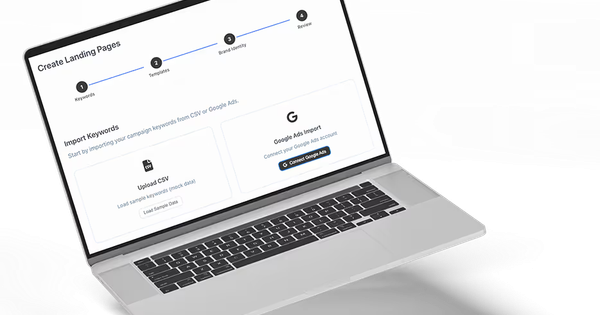
The platform emphasizes "no manual work required" and a low learning curve: users start by uploading brand guidelines and keywords, selecting or building a template, and letting AI handle generation and alignment. Signup is instant via https://dynares.app/register with no credit card for the free plan. The interface appears clean and builder-focused (modular templates, previews, dashboards), though detailed screenshots are limited on public pages.
Documentation consists of a resources/blog section with practical guides (e.g., Google Tag Manager setup, landing-page optimization best practices) rather than exhaustive API/docs. Support includes demo booking, email ([email protected]), and likely in-app help for paid users. No extensive community forums or video academy found as of March 2026. Overall, it feels accessible for marketers comfortable with Google Ads but may require a demo for teams new to AI automation.
Performance & Reliability
Page and ad generation is reported as fast—"thousands in minutes"—with dynamic templates adapting instantly to intent. Real-time analytics and conversion uploads enable continuous optimization, contributing to claimed metrics like 4× conversion rates and 7× ROAS in case studies. Reliability appears solid for core generation and Google Ads syncing, with no widespread outage reports or technical complaints in public searches.
Known issues are minimal: sparse independent feedback means unverified edge cases (e.g., very large keyword lists or niche industries). Some users may encounter the need to refine AI output manually, and pageview limits could throttle high-traffic campaigns on lower tiers. Self-reported testimonials highlight dramatic improvements in CPC ($0.18 average) and CPA ($0.23 average), but real-world results depend on ad account setup and traffic quality.
Pricing & Value
Pricing is usage-based (landing pages, pageviews, AI strength) with a generous free entry point:
- Free: €0 – 3 landing pages, 1 form/template, 1,000 pageviews, basic AI (limited features).
- Starter: €29/mo (€23 annual, ~20% off) – 30 pages, 5,000 pageviews, full ad/campaign tools.
- Pro (most popular): €243/mo (€194 annual) – 150 pages, 50,000 pageviews, custom domains, uploads, integrations.
- Business: €765/mo (€612 annual) – 500 pages, 500,000 pageviews, "Godly" AI.
- Custom/Enterprise: Tailored (API, volume pricing, workflows).
No per-user fees; scales with campaign size. Value is strong for teams spending heavily on Google Ads: the time saved on manual creation plus performance lifts can quickly offset costs versus hiring copywriters/designers or using fragmented tools. Compared to alternatives, it offers tighter Google integration and revenue focus than general AI ad platforms. Lower tiers suit freelancers; Pro+ fits agencies. Drawback: rapid scaling becomes expensive, and limited reviews make ROI harder to benchmark upfront.
Practical Tutorial
No official video walkthrough exists, but the platform's "HOW IT WORKS" flows (from features pages) and blog resources provide clear guidance. Here is a step-by-step tutorial for a common task—generating and launching 50 keyword-specific landing pages + matching ads for a Google Ads campaign (tested conceptually from site descriptions; actual interface may vary slightly).
-
Sign up and set up your account: Go to https://dynares.app/register, create a free account, and verify email. In the dashboard, upload your brand guidelines (logo, voice/tone, colors) and connect your Google Ads account via one-click integration.
-
Prepare keywords: Use the built-in Keyword Research tool (or upload a CSV from Google Keyword Planner). Example: For a SaaS CRM tool, upload terms like "best crm for small business," "crm software pricing," etc. The AI clusters them by intent automatically.
-
Create or select a template: Navigate to Template Builder. Choose a pre-built layout or design a modular one (header, hero, benefits, form). Approve it once—Dynares will reuse this structure for all pages.
-
Generate landing pages: Go to Landing Page Creator. Select your template, input the keyword list (or sync from Google Ads), and click "Generate." AI inserts dynamic elements (headlines, copy, keywords) tailored to each search intent. Process takes minutes for 50+ pages. Preview, edit any outliers, and publish to custom domains (paid plans).
-
Build matching ads: Switch to Ad Builder. Select the new landing pages; AI auto-generates headlines, descriptions, and ad groups with dynamic keyword insertion. Review previews (exact Google format), then export or push directly to your Google Ads account.
-
Add forms and tracking: In Form Builder, embed smart forms on pages. Configure scoring/sync to your CRM (e.g., HubSpot). Enable conversion uploads so lead data flows back to Google Ads for optimized bidding.
-
Launch, test, and monitor: Route Google Ads traffic to the new pages. Turn on auto A/B testing and real-time analytics. Review the dashboard for CTR, Quality Score, and conversions; the system auto-refines future generations based on performance.
For visual guidance, book a demo at https://dynares.ai/demo or check the official blog for related tutorials (e.g., Google Tag Manager integration). Example outcome: A campaign for "crm pricing" gets a dedicated page with exact pricing tables, boosting relevance and conversions instantly.
Final Verdict
Overall rating: 8.2/10 (strong automation and ROI potential offset by limited independent reviews and Google-only scope).
Who should use this tool: PPC managers, agencies, and growth teams running high-volume Google Ads campaigns who want to eliminate manual page/ad creation and achieve measurable lifts in CTR, Quality Score, and ROAS without adding headcount.
Who should avoid this tool: Marketers needing multi-channel support (social/display), those preferring fully manual control, or teams uncomfortable with AI-generated content requiring oversight—especially if operating on very tight budgets where pageview limits could constrain growth.
One-sentence recommendation: If Google Ads is your primary channel and you're tired of generic landing pages killing your Quality Scores, start a free Dynares trial today—it delivers the scale and personalization most platforms only promise.