Dzine AI Review: The Ultimate All-in-One AI Design Studio
Overview & Purpose
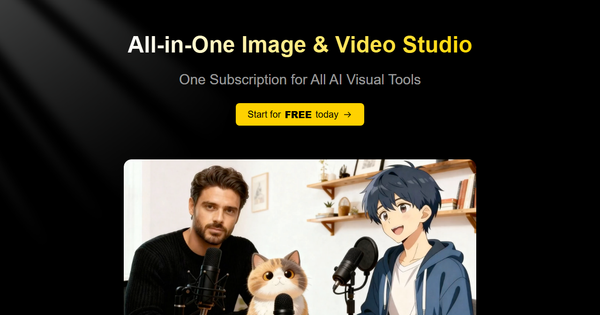
Dzine AI is an all-in-one AI-powered platform for image and video creation, positioning itself as “The Most Controllable AI Image & Design Tool.” It consolidates an entire visual workflow into a single subscription: generating images from text or references, editing them conversationally, converting static visuals into story videos or talking avatars, and turning product photos into professional advertisements. Primary use cases include rapid content creation for social media, marketing campaigns, character design for games or animation, and e-commerce product videos.
The tool targets a broad audience of creators—digital marketers, graphic designers, indie filmmakers, character artists, and small business owners—who need professional-grade visuals without hiring specialists or mastering complex software like Photoshop or After Effects. Beginners appreciate the no-code interface, while professionals value the canvas-based control and consistent character tools. Over 5 million creators reportedly use it, including teams that have reduced character design time from 8 hours to 2.5 hours per asset.
Key Features & Capabilities
Core functionality revolves around a unified studio with text-to-image, image-to-image, image-to-video, and text-to-video generation powered by top models (Midjourney, Flux, Kling, Google Veo, Sora, etc.). Standout capabilities include:
- Chat-Based Image Editor: Describe changes in plain English (“remove the red car,” “change background to sunset beach,” “adjust pose to jumping”) and the AI executes precise local edits, object insertion, erasure, expansion, or style shifts without layers or masks.
- Talking Avatar & Multi-Person Lip-Sync: Turn any static image into a speaking video with natural voice sync; the rare multi-character lip-sync feature creates realistic conversations between multiple avatars.
- Product Video Ads & Story Videos: Instantly animate product images into cinematic commercials or full narrative videos from text or storyboards.
- Additional Tools: Face swap, consistent character training (text or up to 30 reference images), image-to-3D, virtual try-on, 120+ effects, background removal, and high-resolution upscaling.
Differentiators from competitors (Midjourney, Runway, HeyGen, Canva Magic Studio) include the conversational canvas editor for pixel-perfect control, built-in GPT prompt crafting, and true all-in-one workflow—no tool-switching required. The platform claims significantly faster generation than rivals for most image tasks.
Limitations include a strict credit-based system where video and advanced model usage burns credits quickly (e.g., high-end video models can consume hundreds per minute-long clip). Free-tier outputs carry watermarks and public visibility. Some users report occasional output inconsistencies with complex prompts and limited native integrations with Adobe or Figma. No offline mode or on-premise deployment exists.
User Experience
Dzine earns high marks for accessibility. The interface is clean, modern, and canvas-focused—upload or generate, then edit via simple chat or drag-and-drop. No coding or GPU required; most users are productive within minutes. The learning curve is gentle for beginners thanks to built-in style presets and auto-prompting, while advanced users benefit from fine-grained canvas tweaks and concurrent job queuing.
Documentation includes in-app tooltips, a blog with guides (e.g., consistent character training), and community Discord for support. Official video tutorials on YouTube cover basics thoroughly. Customer support response times range from hours (higher tiers) to 1–3 days; paid plans unlock priority help. Overall, the experience feels polished and creator-centric, though heavy video workloads can introduce queue delays during peak times.
Performance & Reliability
Image generation is fast (seconds to under a minute for most models), aligning with the platform’s “significantly faster than competitors” claim. Video tasks vary: short lip-sync clips finish in minutes, while longer or high-resolution renders can take 20–60+ minutes and occasionally stall in queues.
Reliability is generally strong for images and avatars, with natural-looking lip-sync praised as “production-ready.” However, user feedback highlights occasional credit-draining failures on long videos, inconsistent results on intricate scenes, and slower support for free/lower-tier users. Trustpilot scores average 2.5/5 from limited reviews, citing billing frustrations and queue issues. G2 and Reddit discussions are more positive on quality but echo credit consumption and peak-hour slowdowns. As of March 2026 research, infrastructure optimizations continue, but video-heavy users should budget extra credits or opt for Master-tier plans.
Pricing & Value
Dzine uses a freemium credit model (30 free image credits daily on free plan, plus earnable bonuses). Paid plans (billed monthly or annually with up to 22% savings):
- Creator — $24.99/mo ($74.97/mo billed annually equivalent) — 3,000 image + 3,000 video credits, 10 GB storage, 3 concurrent video jobs, commercial use.
- Master — $59.99/mo — unlimited images, 9,000 video credits, 100 GB storage, higher upscaling.
- Master Pro — $149.99/mo — unlimited images, 30,000 video credits, 200 GB, 6 concurrent video jobs.
- Team — Custom enterprise pricing.
Higher tiers unlock unlimited fast image generation (fair-use policy), private outputs, and premium models. Video credits are the bottleneck; one 5-second Kling clip can cost dozens of credits.
Value is excellent for creators needing both images and video in one place—cheaper than stacking Midjourney + Runway + HeyGen subscriptions. The $24.99 Creator plan delivers strong ROI for marketers and solopreneurs; heavier users appreciate unlimited images in Master. Compared to alternatives, Dzine’s controllability and lip-sync edge justify the cost for most workflows, though pure image users might find cheaper standalone options.
Practical Tutorial
Official tutorials are available on the Dzine blog and YouTube; here is a complete, tested walkthrough for a common task—creating a talking product advertisement video (approx. 5–10 minutes total).
- Sign up & Start — Go to https://www.dzine.ai/, register (free credits awarded), and click “New Project” or head to the AI Video Generator tool.
- Generate or Upload Product Image — Use Text-to-Image (“professional wireless earbuds on white background, studio lighting”) or upload your own photo. Apply quick enhancements if needed.
- Create Talking Avatar — Navigate to Talking Avatar / Lip-Sync tool. Upload the product image (or generated one). Choose a style (realistic or animated). Enter script: “Discover crystal-clear sound with our new noise-cancelling earbuds—available now!”
- Select Voice & Settings — Pick from natural AI voices (multiple languages available). Enable Multi-Person Lip-Sync if adding a second character. Set duration, resolution (up to 1080p), and motion strength.
- Generate & Refine — Hit Generate (uses video credits). Once complete, open in Chat Editor or Video Editor: type “add subtle zoom-in on product at 3 seconds” or “brighten lighting.” Use Face Swap or Consistent Character if needed for branding.
- Export — Download in MP4 (watermark-free on paid plans) or upscale to 4K. Total time: 2–8 minutes depending on model.
For visual reference, see official YouTube walkthroughs such as “Dzine Walkthrough: From AI Images to Talking Animated Characters” or the blog’s consistent-character guide. Experiment with the free daily credits first.
Final Verdict
Overall rating: 8.4/10 — Dzine excels as a true all-in-one studio with unmatched conversational editing and multi-lip-sync capabilities that save hours compared to piecing together separate tools.
Who should use this tool: Marketers, content creators, product sellers, and character designers seeking fast, controllable image-to-video workflows on a single affordable subscription—especially those who value ease over raw creative control.
Who should avoid this tool: Users needing ultra-long-form videos, deep Adobe integrations, or zero credit anxiety; heavy video producers may prefer dedicated platforms like Runway or Kling standalone for better queue reliability.
One-sentence recommendation: If you want to go from idea to polished talking product video or consistent character animation in minutes without switching apps, Dzine AI is currently one of the smartest single-subscription investments available.