Easy Folders Review: Organize ChatGPT and Claude with Ease
Overview & Purpose

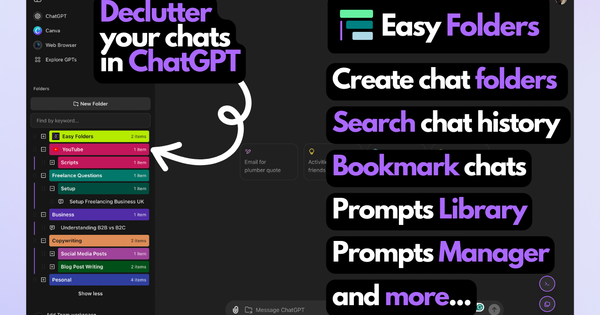
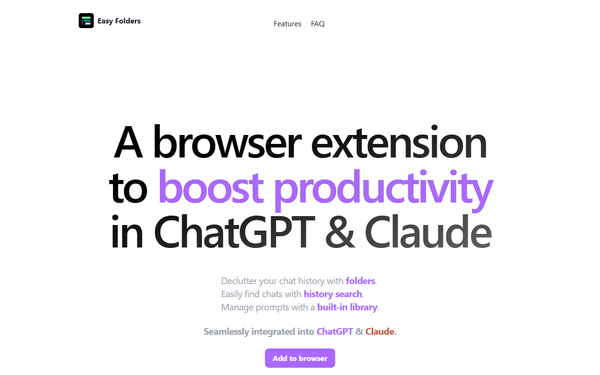
Easy Folders is a Chrome browser extension that integrates directly into ChatGPT and Claude interfaces to bring essential organization tools to AI chat workflows. It allows users to create folders and sub-folders for chat history, bookmark important conversations, perform blazing-fast searches across past chats, and manage a personal library of reusable prompts with support for variables and one-click application. Additional capabilities include organizing ChatGPT Projects and generated images, applying custom instruction profiles instantly, and bulk actions like deleting or backing up data.
Primary use cases include decluttering long chat lists for power users, grouping conversations by project or topic to streamline research or client work, quickly retrieving specific interactions without endless scrolling, and reusing proven prompts across sessions to save time. It shines for professionals juggling multiple AI-assisted tasks, such as content creation campaigns, coding projects, or client consultations.
The target audience encompasses ChatGPT and Claude power users, developers, marketers, designers, researchers, and busy professionals who handle dozens of conversations daily. It is especially valuable for anyone frustrated by the native lack of folder support in these AI platforms.
Key Features & Capabilities
Core functionality revolves around seamless sidebar integration: drag-and-drop chat organization into color-coded folders and sub-folders, instant history search, bookmarking for quick access, and a built-in prompts manager that supports variables, custom prompt folders, imports, and a curated library of handpicked templates (covering copywriting, marketing, SEO, coding, and more). Users can also apply one-click custom instruction profiles for rapid context switching and organize ChatGPT-specific Projects and images.
Standout features that differentiate it from competitors include multi-device cloud sync (for paid users), automatic folder creation for Custom GPTs, custom folder icons, shared folders, multi-account support, bulk delete/backup/import tools, and native support for both ChatGPT and Claude plus dark/light mode. The prompts library and variable support go beyond simple chat organization, turning it into a full productivity enhancer.
Limitations include a restricted free tier (typically 5 folders or fewer), with unlimited folders, advanced sync, and full prompts features locked behind paid upgrades. Public documentation is minimal (primarily in-app), export options are limited to backup/import rather than full chat exports, and it lacks advanced analytics or team collaboration tools found in some broader alternatives. No native mobile app exists.
User Experience
Installation is straightforward via the Chrome Web Store, with immediate integration—no complex setup required. The learning curve is minimal thanks to intuitive drag-and-drop mechanics, color-coding, and a clean sidebar panel that mirrors the native AI interfaces. Most users report becoming productive within minutes.
The interface quality is polished and non-intrusive: folders appear seamlessly in the chat sidebar, search is responsive, and prompts apply with keystrokes or clicks without disrupting workflow. Dark and light mode support ensures visual comfort.
Documentation is basic (no dedicated help center or video library beyond the site FAQ), with support primarily via email to [email protected]. Community resources are limited to user testimonials on the official site and scattered Reddit discussions.
Performance & Reliability
The extension performs efficiently with “blazing fast” local search and negligible impact on ChatGPT or Claude response times. Drag-and-drop operations and prompt application are instantaneous, and data remains stored locally for privacy (with optional cloud sync for paid users using only chat IDs).
Version 2.8 (updated March 10, 2026) remains stable for 10,000+ users. Known issues are rare; occasional mentions in comparisons note free-tier restrictions rather than bugs. No widespread complaints about crashes, slowdowns, or data loss appear in recent reviews—users consistently praise reliability for daily heavy use.
Pricing & Value
Easy Folders follows a freemium model: the free tier provides basic folder creation (limited to approximately 5 folders) and core search/bookmarking. Paid “Superuser” upgrades via in-app purchases unlock unlimited folders, sub-folders, cross-device sync, full prompts library access, and advanced utilities. Users frequently reference lifetime purchase options or annual subscriptions (exact pricing displayed in-app; past reports mention around $9/month or equivalent lifetime access).
Value is strong for heavy users: the combination of organization, prompt reuse, and multi-platform support saves significant time compared to manual scrolling or switching tools. Alternatives like free basic folder extensions or more feature-heavy competitors (e.g., ChatGPT Toolbox with its own lifetime tier) exist, but Easy Folders offers superior polish, Claude support, and Project integration at a reasonable premium. It delivers excellent ROI for professionals whose workflow depends on quick chat retrieval and prompt consistency.
Practical Tutorial
No comprehensive official video tutorials are published on the site, but the following step-by-step walkthrough covers a common task—organizing chats for a marketing professional managing multiple client campaigns while reusing a prompt template. (Based on official feature descriptions and user-reported flows as of March 2026.)
- Install the extension from the Chrome Web Store (search “Easy Folders” or visit https://chromewebstore.google.com/detail/chatgpt-folders-search-pr/gdocioajfidpnaejbgmbnkflgmppibfe) and add it to Chrome.
- Open ChatGPT (or Claude) in your browser—the Easy Folders panel appears automatically in the left sidebar.
- Create a folder structure: Click the “+” or “New Folder” button in the panel, name it “Client Campaigns,” choose a color (e.g., blue), and add a sub-folder “Q1 Social Media.” Repeat for other clients or topics.
- Organize existing chats: Scroll or search your chat history in the native list, then drag and drop conversations into the appropriate folder (e.g., drag a “Twitter Thread Ideas for BrandX” chat into the sub-folder). Bookmark high-priority chats by clicking the pin icon for instant top-of-list access.
- Use fast search: Type keywords (e.g., “BrandX campaign”) in the Easy Folders search bar—results appear instantly across all folders.
- Manage and reuse prompts: Click the Prompts icon in the sidebar to open the manager. Create a new prompt titled “Social Media Calendar Generator” with variables like {{client_name}} and {{goal}}. Save it in a “Marketing Prompts” folder. To reuse: Open any chat, click the prompt in your library, fill variables, and apply with one click—ChatGPT instantly receives the filled prompt.
- Bonus for projects: If using ChatGPT Projects, drag projects into dedicated folders or use the new Projects organizer to group related image generations.
- Backup for safety: Go to settings in the panel and export your folder structure and prompts for import on another device (requires paid sync for full multi-device access).
This workflow typically takes under 5 minutes to set up and transforms chaotic history into a tidy, searchable system. For updates, check the extension’s in-app changelog.
Final Verdict
Overall rating: 4.5/5 – A polished, reliable tool that fills a critical gap in native AI interfaces.
Who should use this tool: Power users, marketers, developers, and professionals managing multiple AI conversations who value folders, prompt reuse, and quick retrieval—especially those willing to invest in the paid tier for unlimited access and sync.
Who should avoid this tool: Casual users satisfied with the free tier’s limits or those seeking completely free advanced features, extensive export options, or team collaboration—simpler free alternatives may suffice.
One-sentence recommendation: If disorganized ChatGPT and Claude history is slowing you down, Easy Folders is a must-install productivity upgrade worth every penny of its premium tier.