Echonote Review: Turn Voice Memos Into Actionable Notes Fast
Overview & Purpose

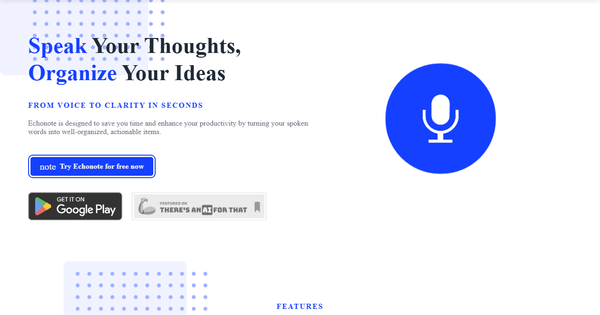
EchoNote is an AI-powered productivity tool that automatically transcribes voice recordings and converts them into well-organized, actionable text formats such as structured notes or to-do lists. Users simply record their thoughts, ideas, meetings, or tasks via the web app or mobile platforms (iOS and Android), and the AI handles transcription, cleanup (removing fillers), and formatting in the background. Primary use cases include capturing lecture notes for students, meeting summaries for professionals, brainstorming sessions for creatives, or generating custom content like blog posts and reports from spoken input. It targets students, professionals, and creatives who need hands-free, efficient ways to capture and organize ideas without manual typing or editing. The tool emphasizes time savings and seamless multi-device access to keep thoughts clear and tasks actionable.
Key Features & Capabilities
Core functionality revolves around one-tap voice recording followed by instant AI transcription and smart organization. Key capabilities include transforming raw audio into structured notes for clarity, actionable to-do lists for task management, and custom-styled outputs via user-defined prompts (e.g., turning a voice memo into a formatted report or email draft). Standout features that differentiate it from basic transcription apps like standard Whisper-based tools or meeting-focused alternatives include the custom prompt system for creative content generation and the ability to reuse the same recording across multiple formats without re-recording. Multi-platform support ensures notes sync across web, iOS, and Android, with data protected by industry-standard encryption. Additional free utilities on the site, such as MP3-to-text converters for short clips, extend its utility.
Limitations include a lack of advanced collaboration or real-time sharing features for team workflows, no public API or third-party integrations mentioned, and no explicit support for offline processing or highly specialized enterprise needs. Transcription accuracy, while generally reliable, can vary with audio quality, accents, or background noise—a common AI limitation not uniquely addressed here. No live transcription during recording or deep analytics (e.g., sentiment) are highlighted.
User Experience
EchoNote offers a straightforward, intuitive interface with a low learning curve, making it accessible even for non-technical users. The process is described as simple: record, let AI process, then tailor the output—requiring minimal setup beyond signing up for the free trial. The responsive design works well across devices, with clean layouts for viewing, editing, and exporting notes. Documentation is limited to an on-site FAQ covering basics like productivity benefits, data privacy, multi-device use, and trial details, plus responsive support via email. No extensive video tutorials, knowledge base, or community forums were found, which may leave advanced users seeking more guidance. Overall, the experience prioritizes speed and simplicity over customization depth in the UI itself.
Performance & Reliability
The AI processes recordings swiftly in the background, delivering formatted notes in seconds with claims of high accuracy for clear audio. Users report efficient organization and time savings, with positive notes on swift background handling and regular updates improving the tool. Reliability appears solid for personal use, supported by encryption for data trust. Known issues are minimal due to the tool's relatively low visibility; no widespread complaints about crashes, data loss, or major inaccuracies surfaced in available feedback. Sparse user bases mean limited real-world testing, but aggregators note consistent performance for note management. Common minor caveats for similar AI tools (e.g., occasional filler-word mishandling or noise sensitivity) apply but are not prominently reported here.
Pricing & Value
EchoNote follows a freemium model with a free trial allowing users to test core features without commitment. Full access requires paid subscriptions (monthly or yearly plans), which are non-refundable except in specific cases. Exact pricing details are not listed publicly on the homepage and are available upon request or post-signup; aggregator sources indicate affordable entry around $8–15 per month for premium tiers with unlimited or expanded limits. No enterprise options are detailed. Compared to alternatives like Otter.ai (higher cost for team features) or free basic transcribers (lacking formatting), EchoNote delivers strong value for solo users through its unique custom-prompt creativity and cross-platform ease—especially with the generous trial. It shines for individuals prioritizing quick organization over heavy collaboration.
Practical Tutorial
Official tutorials or in-depth guides are not available on the site (only the FAQ and basic steps overview), so here is a self-contained walkthrough for a common task: converting a voice recording of daily tasks into an organized to-do list. This is based directly on the tool’s described four-step process and can be replicated after signing up at echonote.xyz/signup.
-
Sign up and start recording: Create a free account via the homepage. On web or mobile app, tap the prominent record button (microphone icon) and speak freely—e.g., “Today I need to finish the Q3 report, schedule a client call for Wednesday, buy groceries after work, and review the new design mockups. Also, email the team about the deadline extension.”
-
Let AI process: Stop recording and allow the background AI to transcribe (typically seconds). The tool automatically generates a clean text version, removing “ums” and organizing initial thoughts.
-
Tailor with format or prompt: Select “To-Do List” from formatting options or use a custom prompt like “Convert this into a prioritized bulleted to-do list with deadlines where mentioned and action items.” The AI reformats instantly—output might appear as:
- Finish Q3 report (today)
- Schedule client call (Wednesday)
- Buy groceries (after work)
- Review design mockups
- Email team re: deadline extension
-
Review, edit, and export: Scan the note in the dashboard, make quick edits if needed, add tags or priorities, then export as text, PDF, or copy to clipboard. Syncs automatically across devices for later access.
This workflow typically takes under a minute end-to-end and demonstrates the tool’s strength in turning unstructured speech into immediately usable output. For variations (e.g., blog post), swap the prompt accordingly.
Final Verdict
EchoNote earns a 4 out of 5 rating for its elegant simplicity, innovative custom formatting, and genuine productivity boost in voice-to-actionable-text conversion. It is ideal for students, professionals, and creatives who capture ideas on the go and want quick organization without manual effort—especially solo users valuing cross-device convenience and creative prompt flexibility. Users should avoid it if they need robust team collaboration, detailed enterprise security audits, transparent upfront pricing, or a large ecosystem of integrations, as the tool remains early-stage with limited third-party validation. Research conducted as of March 11, 2026; with evolving AI tools, test the free trial to confirm fit. EchoNote stands out as an effortless AI sidekick that turns spoken thoughts into structured success—highly recommended for personal productivity seekers.