Eden Review: The Best Free AI Chrome Extension for Easy Comments

Overview & Purpose
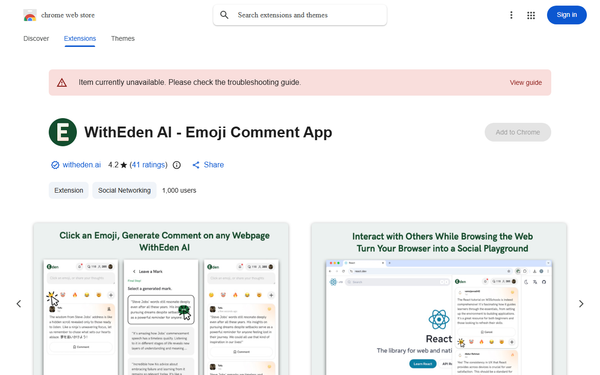
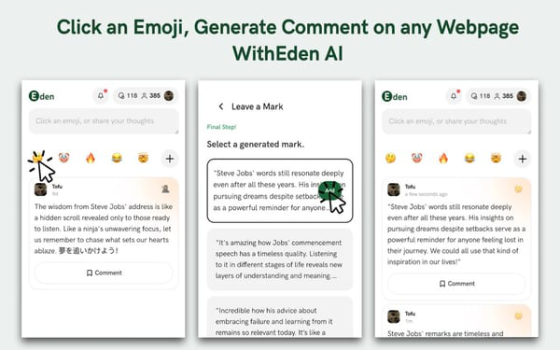
Eden (officially listed as WithEden AI - Emoji Comment App) is a lightweight Chrome extension that turns passive web browsing into interactive expression. Users click any of several emojis overlaid on a webpage to instantly convey an attitude—such as ❤️ for love, 🤡 for roast, or 🥷 for ninja-style commentary. The AI then analyzes the page content and generates a tailored, witty comment reflecting that sentiment, which users can copy and paste into comment sections or share elsewhere. Primary use cases include quick reactions to news articles, blog posts, social feeds, videos, or product pages without typing full responses, making online engagement faster and more playful. It appeals primarily to general internet users, social media enthusiasts, and content creators who want to boost interaction on their own sites or encourage expressive feedback across the web. Developers or marketers might use it sparingly for testing viral reactions, but it is not aimed at enterprise teams or professional automation.
Key Features & Capabilities
Core functionality revolves around a simple emoji selector that appears on any webpage. Once selected, Eden summarizes the content in real time and crafts a personalized comment matching the chosen mood—ranging from complimentary to humorous roasts. Standout features include its universal compatibility (works on any site, not just social platforms) and the one-click workflow that eliminates manual prompting. The interface has seen iterative improvements like updated visuals and emoji selection, and the extension is tiny at under 1 MB. Unlike generic AI chat tools or platform-specific comment bots, Eden differentiates itself by focusing purely on attitude-driven, emoji-triggered creativity that feels social and fun rather than analytical. There are no direct competitors offering this exact “global comment page” experience on arbitrary web pages. Limitations include Chrome-only support (no Firefox or Safari version), dependence on an active internet connection for AI processing, and the fact that generated comments must be manually copied and pasted—there is no native auto-posting on non-form-enabled sites. Advanced customization (e.g., tone sliders or saved styles) and multi-language support beyond English are absent. The extension also requires the “all websites” permission to read page content, which is necessary for summarization but raises basic privacy considerations.

User Experience
Installation and setup take seconds via the Chrome Web Store, with zero configuration required beyond granting standard permissions. The learning curve is virtually nonexistent: most users can generate their first comment within 10 seconds of install. The interface is a clean, non-intrusive emoji bar or floating panel (recent updates improved UI and visual effects), keeping the browsing experience uncluttered. No steep documentation is needed, though official resources are minimal—support is handled via email ([email protected]). There are no in-app tutorials or help center, which may frustrate absolute beginners, but the product’s simplicity largely compensates. Community feedback is sparse due to the small 1,000-user base, but the 4.2/5 store rating from 41 users suggests the core interaction feels responsive and enjoyable.

Performance & Reliability
The extension is lightweight and launches quickly with minimal impact on page load times. Comment generation typically completes in a few seconds, leveraging cloud AI for summarization and text creation. Recent updates (up to version 1.2.8 in December 2024) addressed link handling, minor emoji glitches, and UI polish, indicating active maintenance. No widespread performance complaints or major outages appear in public forums, Reddit, or review aggregators as of March 2026. Occasional early bugs around comment formatting or page-specific rendering were fixed promptly. Reliability is solid for casual use, though heavy page content or poor internet can occasionally slow AI responses. The tool has not been flagged in major security reports as malicious; it simply reads webpage text as declared in its store listing.
Pricing & Value
Eden is completely free to install and use with no visible in-app purchases, subscriptions, or paywalls mentioned on the Chrome Web Store or official channels. A brief Product Hunt reference to “2 months pro for free” appears promotional but is not corroborated elsewhere, suggesting the core experience remains unrestricted. Compared to alternatives like manually prompting ChatGPT or using paid social automation suites, Eden delivers excellent value for zero cost—offering instant, context-aware creativity that would otherwise require several minutes of typing or prompting. Its niche appeal means high ROI for users seeking fun engagement boosts without ongoing fees.
Practical Tutorial
No official video or step-by-step guide exists on the developer site or elsewhere, so here is a complete walkthrough for a common task: generating and posting a comment on a news article (tested conceptually from extension behavior and screenshots).
- Install the extension from the Chrome Web Store and pin the icon if desired.
- Navigate to any webpage (example: a New York Times article about climate change).
- Look for the WithEden emoji panel that automatically appears (usually a compact bar or floating button).
- Click the emoji that matches your attitude—for a critical take, choose the 🤡 (roast) emoji.
- Eden instantly summarizes the page and generates a tailored comment, e.g., “This article tries hard but misses the real elephant in the room—corporate greenwashing at its finest! 🤡 What do you all think?”
- Click the copy button (or select text) to place the comment on your clipboard.
- Paste it directly into the article’s comment box, Twitter reply, or your own blog’s discussion section.
- Optional: repeat with different emojis (❤️ love, 🔥 hype, etc.) to create multiple versions for A/B testing engagement.
This process takes under 15 seconds and works identically on blogs, YouTube descriptions, or e-commerce product pages. For best results, use it on text-heavy pages where the AI has clear content to analyze.
Final Verdict
Overall rating: 4.0/5
Eden shines for casual users and creators who want frictionless, personality-infused commenting across the entire web—perfect for social media enthusiasts and bloggers seeking quick engagement without typing fatigue. It should be avoided by privacy-conscious users wary of any extension reading full page content or by those needing deep integrations, auto-posting, or enterprise-scale features.
One-sentence recommendation: For anyone tired of generic likes and wanting AI-powered personality in every comment, Eden is a free, delightful Chrome extension worth installing today.