Eilla AI Review: The Ultimate All-in-One SEO Content Generator

Overview & Purpose
Eilla AI is an AI assistant designed to streamline content creation processes by generating SEO-optimized articles, blog posts, emails, ads, and reports while supporting output in up to 30 languages. It also produces realistic images or artwork in seconds to accompany content, helping users improve search engine rankings, drive website traffic, and reduce time spent on brainstorming, research, and text analysis. Primary use cases include creating high-quality marketing copy, long-form blog content, multilingual campaigns for global audiences, and visual assets for websites or social media. It further extends to business solutions that automate creative workflows, client documentation, and AI integration across all text-based operations. The Chrome Extension enables seamless in-browser writing and optimization directly on platforms like Google Docs or websites.
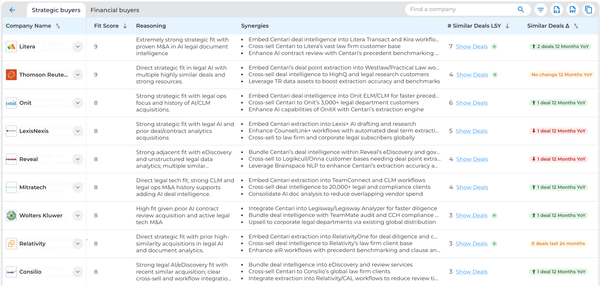
Target audience primarily includes digital marketers, content creators, bloggers, SEO specialists, small business owners, and agencies focused on scaling online presence without large teams. Freelancers and teams handling multilingual or visual-heavy projects also benefit significantly. Note that as of research conducted on April 12, 2026, the official website https://eilla.ai/ has pivoted toward an AI-native M&A advisory service for SMBs (leveraging AI for deal research, buyer sourcing, and documentation), though third-party directories and user reviews continue to highlight and rate its earlier content-generation capabilities.

Key Features & Capabilities
Core functionality centers on AI-driven text generation with built-in SEO optimization (keyword integration, readability scoring, meta suggestions), multilingual support for 30+ languages, and high-fidelity image creation from text prompts. Additional tools include text analysis for summarizing complex documents, brainstorming assistants, and plagiarism-checking features. The Chrome Extension stands out by allowing users to highlight text anywhere on the web and instantly rephrase, expand, or optimize it with AI commands.
Standout features differentiating Eilla from competitors (such as Jasper or Copy.ai) include its integrated realistic image generator for instant visuals, broad language coverage without quality drop-off, and the lightweight Chrome Extension for frictionless workflow integration. The business-oriented solution provides customizable AI agents for team documentation and creative processes, making it suitable for enterprise-scale text operations.
Limitations include occasional factual inaccuracies or "hallucinations" common to generative AI (requiring user verification), dependency on internet connectivity, and less advanced creative depth compared to specialized tools for highly nuanced storytelling. Image generation, while fast, may lack the fine control of dedicated platforms like Midjourney. No offline mode or advanced API access is prominently featured in reviews.

User Experience
Eilla earns consistently high marks for ease of use and a shallow learning curve, with users describing the interface as "intuitive" and "Google Docs-style." The dashboard and editor feel modern and responsive, allowing quick prompt-based generation or template selection without steep onboarding. The Chrome Extension further enhances accessibility by embedding AI directly into daily browsing and editing tools.
Interface quality is clean and professional, with real-time suggestions and one-click optimizations praised across reviews. Documentation appears limited to in-app guides and help prompts, with no extensive public knowledge base noted; however, customer support receives strong feedback for responsiveness (often resolving setup issues within an hour). Overall, the tool prioritizes speed and simplicity over complex customization.
Performance & Reliability
Generation speed is a major strength—users report near-instant text output and image creation in seconds, enabling efficient workflows even for long-form content. Efficiency gains include significant time savings on research, drafting, and SEO tasks, with content quality rated as "high" and "professional" by most reviewers.
Known issues are typical of AI tools: occasional grammatical quirks, factual errors requiring editing, or generic output if prompts lack specificity. No widespread outages or major reliability complaints surfaced in recent reviews, though some users noted a minor learning curve for optimal prompting. Performance remains stable for core tasks, with positive sentiment dominating G2, Capterra, and Trustpilot feedback (averaging 4.5–5.0 stars).
Pricing & Value
Eilla offers a free tier or trial (often with word/credit limits, e.g., several thousand words monthly) alongside paid subscription plans. Pricing details are somewhat opaque on the site but typically start around $29/month for basic access, scaling to Pro or Enterprise tiers for higher volume, team features, and priority support (contact vendor for custom quotes). No large upfront costs are required.
Value proposition is strong for cost-conscious users seeking an all-in-one SEO, multilingual, and image tool; reviewers highlight excellent return through time savings and output quality compared to hiring writers or using multiple specialized platforms. It competes favorably with mid-tier alternatives but may feel less premium than higher-priced options with deeper integrations. Business plans deliver additional ROI via workflow automation.
Practical Tutorial
While official video tutorials are not prominently linked on the current site, third-party directories and user reports describe straightforward workflows. Here is a step-by-step walkthrough for a common task—generating an SEO-optimized blog post with accompanying image (based on typical usage patterns as of 2026):
-
Sign up and access the tool: Visit https://eilla.ai/, create a free account, or log in. Install the Chrome Extension from the Chrome Web Store for bonus in-browser features.
-
Start a new project: Navigate to the AI Editor (Google Docs-style interface). Select "Blog Post" or "SEO Content" template.
-
Input your prompt: Enter a detailed prompt such as: "Write a 1500-word SEO-optimized blog post about 'best AI tools for marketers' targeting beginners. Include keywords: AI content tools, SEO optimization, image generation. Structure with H2 headings, bullet points, and a conclusion. Optimize for Google ranking." Choose English (or any of 30 supported languages).
-
Generate and refine text: Click Generate. Review the output for SEO scores (built-in analyzer highlights keyword density and readability). Use the Extension or in-editor commands (e.g., highlight a paragraph and type "/expand" or "/rephrase professionally") to iterate instantly.
-
Add visuals: Switch to the Image Generator tab or prompt inline: "Create a realistic image of a modern marketer using AI dashboard with vibrant colors." Generate and download the image (seconds).
-
Analyze and export: Run the built-in text analyzer for plagiarism/SEO checks. Export as HTML, Markdown, or copy directly to your CMS. For business use, save to team workspace for collaboration.
-
Publish and track: Implement on your site and monitor rankings (users report traffic boosts within weeks). For advanced business integration, upload client docs for AI-assisted rewriting.
This process typically takes under 10 minutes versus hours manually. For more, check community-shared prompts on review platforms.
Final Verdict
Overall rating: 4.6/5. Eilla AI excels as a versatile, time-saving content companion for marketers and creators needing fast SEO, multilingual, and visual output—ideal for solopreneurs, agencies, or teams scaling digital presence on a budget. Users seeking an intuitive all-in-one solution with strong value will appreciate its speed and Chrome integration.
Avoid it if you require highly creative or deeply technical writing (where human oversight remains superior) or prefer fully offline tools with zero subscription costs. Those needing only advanced M&A-specific AI may find the current advisory pivot more aligned but should confirm offerings directly.
One-sentence recommendation: Eilla AI is a solid, user-friendly choice for efficient SEO and multilingual content creation with image support, delivering strong ROI for busy marketers despite minor AI limitations.