Elementor AI Website Builder Review: Boost Your WordPress Workflow

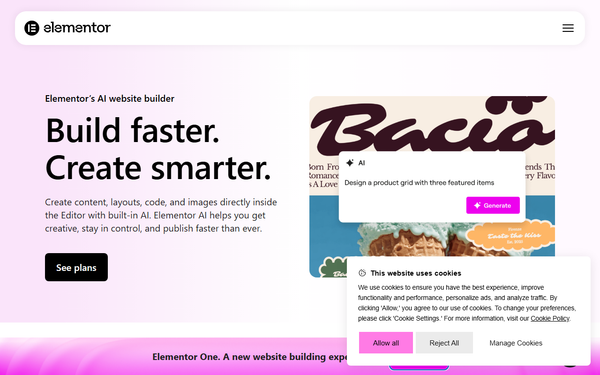
Elementor AI Website Builder is an AI-powered toolkit seamlessly integrated into the Elementor page builder for WordPress. It enables users to generate unique images, high-quality text, custom code snippets, and complete container layouts directly within the familiar Elementor editor interface.
Overview & Purpose

The tool transforms the traditional drag-and-drop workflow by allowing creators to describe needs in natural language prompts (e.g., “Add a pricing section with three columns”) and receive instantly editable, responsive results. Primary use cases include rapidly prototyping landing pages, refreshing existing sites, building eCommerce product sections with WooCommerce integration, generating brand-consistent visuals and copy, translating content into multiple languages, and adding custom hover effects or animations without manual coding.
It excels for anyone building professional WordPress sites who wants to accelerate ideation-to-launch while preserving full ownership and exportability of the site.
Target audience spans beginners and non-technical users (who benefit from zero-coding assistance), designers and content creators (for visual and textual creativity boosts), developers (for quick custom code), freelancers/agencies (for client turnaround speed), and marketers/business owners managing blogs, portfolios, or high-traffic sites. Research conducted as of March 11, 2026.
Key Features & Capabilities
Core functionality revolves around four main AI generators accessible via a simple icon in any compatible widget:
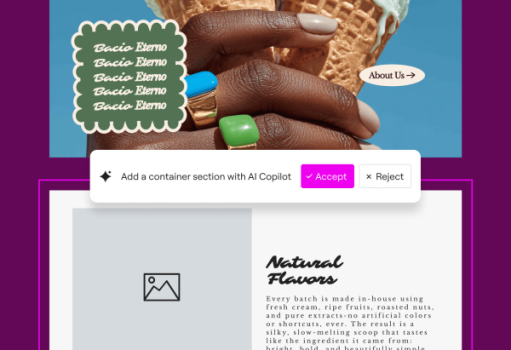
- AI Container Layouts: Prompt-based creation of full sections (e.g., hero, testimonials, pricing) with responsive containers and design variations.
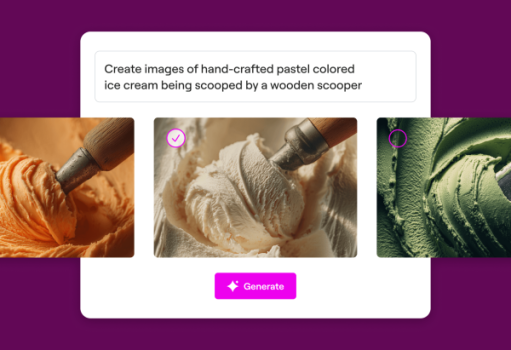
- AI Image Studio: Generates original images or refines uploads with variations, generative fill, background removal/replacement, image extension, resizing, and style adjustments—all optimized for web use.
- AI Code Assistant: Produces clean, context-aware HTML, CSS, or custom code tied directly to the selected element (e.g., “Add a smooth hover animation”).
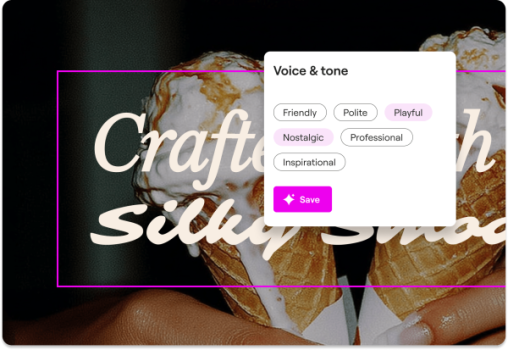
- AI Text Generator & Copilot: Creates purpose-aligned copy using site context; includes translation for top 25 languages and an AI Copilot for overall site structure planning.
Standout differentiators include native editor integration (no tab-switching or external tools), royalty-free outputs usable anywhere, context awareness from existing page elements or external web references, WooCommerce-specific enhancements (e.g., dynamic product hovers), and unlimited-site licensing under one subscription. Additional tools like image optimization, accessibility scanning/fixes, and email deliverability are credit-powered.
Compared to competitors like Divi AI, Elementor stands out for deeper WordPress openness, full site export freedom, and advanced image editing tailored to design best practices.
Limitations include a strict credit consumption system (1 credit for text/code prompts, 33 for images, 40 for containers), no credit rollover, requirement for Elementor 3.13+ (full features from 3.14), and individual-user licensing (clients need separate accounts). Outputs occasionally require manual refinement for complex designs, and advanced code/custom CSS still ties into Pro features.
User Experience
The learning curve is minimal for anyone already familiar with Elementor—simply click the AI icon in a widget, connect your account once, and type prompts. New users can be productive within minutes thanks to intuitive natural-language inputs and inline previews.
The interface feels native and polished, blending seamlessly with Elementor’s drag-and-drop panels without clutter. Prompt results appear directly editable, with options for variations or “regenerate.”
Documentation is excellent: official Help Center articles, quick video tutorials for each feature, and step-by-step guides cover prompting best practices, troubleshooting, and WooCommerce examples. Community resources and Elementor Academy supplement this well. Support via priority channels (for higher plans) receives mixed feedback—responsive for simple queries but sometimes slower for edge cases. Overall, the experience prioritizes speed and creativity over complexity.
Performance & Reliability
Generation is fast—most text/code outputs appear in seconds, layouts in under 10–15 seconds, and images slightly longer depending on complexity. Integration feels lightweight and does not noticeably slow the editor on standard hosting.
However, user reports highlight inconsistencies: occasional poor-quality or off-prompt results (especially complex layouts), credit drain on iterative prompting, and intermittent reliability issues (e.g., features temporarily non-functional). Reddit threads frequently mention frustration with output quality compared to hype, though many praise time savings on repetitive tasks. Tech publications note steady improvements through 2025–2026 updates, with fewer bugs in recent versions. No major downtime reported, but credit-based limits can feel restrictive for heavy users.
Pricing & Value
Elementor AI operates on a credit system and is available as a standalone subscription or bundled within Elementor One plans (which include full Editor Pro). As of March 2026:
- Standalone options include AI Starter (~$2.99/month or $35.88/year for 18,000 credits) and AI Power (~$8.25/month or $99/year for 50,000 credits).
- Elementor One plans (recommended for most users) bundle AI with Pro widgets, Theme Builder, and more, starting around $59–$99+ annually depending on tier, delivering 25,000 monthly shared credits plus extras like image optimization (valued ~$60/year) and accessibility tools.
A 1-month free trial is available, with 30-day money-back guarantee. Value shines for freelancers and agencies: one subscription covers unlimited sites, often paying for itself after 1–2 client projects through time saved. Compared to alternatives (e.g., hiring designers or using separate AI tools), it offers strong ROI for WordPress-centric workflows, though light users may find credits limiting versus truly unlimited competitors.
Practical Tutorial
Official resources include comprehensive video tutorials and a dedicated blog guide for building a full landing page with AI. Here is a practical, real-world walkthrough for a common task—generating and customizing a pricing section (tested conceptually from official examples and user tutorials):
- Log into WordPress, create/edit a page, and launch the Elementor editor.
- Drag a Section or Container widget onto the canvas (or start blank).
- Hover over the container and click the sparkling AI icon that appears in the editor toolbar or widget panel.
- In the AI prompt box, type: “Create a modern three-column pricing section for a SaaS product with feature lists, highlighted popular plan in the middle, and call-to-action buttons. Use clean typography and blue accents matching my brand.”
- Click Generate. Elementor AI builds responsive containers, placeholders, icons, and basic styling instantly.
- Edit text directly: Click any heading/paragraph, then use the AI Text Generator icon to refine (“Make the popular plan description more benefit-focused and persuasive”).
- For images: Select an image widget inside a column, click AI, and prompt “Generate a sleek dashboard screenshot icon in modern flat style.”
- Add polish: Select a button, click AI Code, and prompt “Add a subtle scale hover effect with smooth transition.”
- Use AI Context (if available) or reference another site/page for consistency.
- Preview on mobile, tweak styles manually if needed, then publish.
Results are fully editable and responsive. For visual walkthroughs, see Elementor’s official “Step-by-step guide to creating a landing page with AI” or their YouTube tutorial series.
Final Verdict
4.5 out of 5 — Elementor AI is a powerful productivity booster that genuinely accelerates professional WordPress site building while staying true to the platform’s open nature.
It is ideal for freelancers, agencies, designers, and businesses already in the Elementor ecosystem who value seamless integration, time savings, and brand control. Avoid it if you prefer unlimited AI generations without credit tracking, build primarily outside WordPress, or need pixel-perfect AI results with zero manual tweaks (consider dedicated AI-only builders instead).
Highly recommended for anyone serious about efficient, high-quality WordPress development in 2026.