Elephas Review: The Ultimate Private AI Assistant for Apple Users
Overview & Purpose

Elephas is a privacy-focused personal AI writing assistant and knowledge workspace designed specifically for Apple devices (Mac, iPhone, and iPad). It combines AI-powered writing tools—such as content generation, proofreading, rewriting in different tones, summarization, and drafting—with a "Super Brain" feature that turns your local documents, notes, PDFs, emails, and other files into a searchable, AI-chat-enabled personal knowledge base. Unlike general-purpose AI chatbots like ChatGPT, Elephas emphasizes data privacy by performing local indexing, automatically redacting sensitive personal information (PII) before any cloud processing, and offering options for fully offline or self-hosted models.
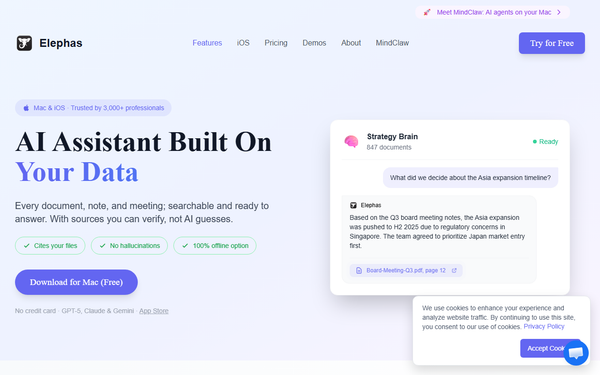
Primary use cases include drafting emails, blog posts, JIRA tickets, executive summaries, social media content, and professional documents; rewriting text for tone or clarity; generating ideas and outlines; and querying your personal knowledge base for grounded answers with citations (e.g., "What did we decide about the Asia expansion?"). It integrates seamlessly across apps via a system-wide keyboard shortcut called Super Command, eliminating the need to switch windows. On iOS, it includes a Smart AI Keyboard for inline writing assistance in apps like Mail, Messages, or WhatsApp.
The target audience is knowledge workers and professionals who handle sensitive or proprietary information—executives, consultants, lawyers, engineers, marketers, developers, researchers, and business owners. It appeals especially to Mac-centric users seeking a native, workflow-integrated alternative to browser-based AI tools. As of April 2026, it is trusted by over 3,000 professionals and maintains strong user ratings around 4.7/5 across review platforms.
Key Features & Capabilities
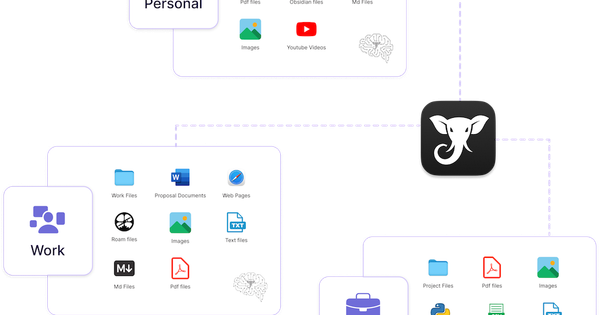
Core functionality revolves around three pillars: AI writing assistance, Super Brain knowledge management, and privacy controls. Users can highlight text anywhere on the Mac and invoke Super Command (a single keyboard shortcut) to summarize, rewrite, translate, expand, or proofread using customizable prompts or your own documents as context. The Super Brain lets you create project-specific "brains" by indexing local files (PDFs, Notes, Notion exports, Obsidian vaults, Word docs, Zoom transcripts, etc.), enabling semantic search and AI chat grounded in your data with source citations.
Standout features that differentiate Elephas include:
- Smart Redaction: Automatically detects and replaces PII (names, emails, locations, etc.) with placeholders before cloud AI processing, with Pro+ offering a full inspector for visibility.
- Local-first design: Indexing happens on-device; optional offline/local models or your own API keys (OpenAI, Claude, Gemini, etc.) keep data private.
- System-wide integration: Works in any app without context switching; iOS Smart Keyboard for on-the-go writing.
- Multi-model flexibility: Assign different AI providers per task (e.g., fast model for rewrites, high-quality for analysis).
- Integrations: Apple Notes, Notion, Obsidian, and folder syncing for automatic knowledge updates.
Limitations include token/credit usage caps even on higher plans (with a fair usage policy), occasional indexing delays for very large files (>100 MB), and no built-in image generation or advanced automation workflows (e.g., custom agents or canvas-based agents, which some users request). The Mac App Store version is sandboxed and lacks Super Command/full writing features—full functionality requires the direct website download. Some users note the AI output can occasionally feel less advanced than direct API access for highly specialized tasks.

User Experience
Elephas offers an intuitive, native Apple-style interface with minimal learning curve for Mac users familiar with shortcuts. Setup involves downloading the app, granting necessary permissions (accessibility for system-wide commands), and optionally creating Super Brains by dragging in folders or connecting apps. The Super Command popup is clean and fast, with preset actions and custom snippets.
Interface quality is polished and unobtrusive, blending seamlessly into macOS. Documentation is excellent, with a comprehensive knowledge base, troubleshooting guides, and an official YouTube playlist of video tutorials. Support is responsive, including priority options on Pro+ and direct access to the founder in community discussions. Users frequently praise the "Swiss Army knife" feel for daily workflows.
Performance & Reliability
The app performs efficiently thanks to local indexing and on-device processing where possible. Super Command responses are typically quick (seconds), and Super Brain queries provide accurate, cited answers without hallucination risks common in generic AI. Offline mode works well for basic tasks with local models.
Known issues include occasional Super Command glitches (requiring permission resets), slow indexing for large document sets, and token limits that can throttle heavy users even on Pro+ plans. Minor bugs have been reported historically, though recent reviews describe the app as stable and well-maintained. iOS performance has improved from earlier "limited" feedback, with smooth Smart Keyboard integration. No major outages or data breaches are noted in reviews; privacy features are a consistent strength.
Pricing & Value
Elephas offers a free version with limited credits (no credit card required) and three paid monthly plans (billed annually for savings in some listings):
- Standard ($9.99/mo): Basic AI chat/writing and document workflows.
- Professional ($19.99/mo): Higher limits, Super Brain, iOS app, integrations, and basic redaction visibility.
- Pro+ ($39.99/mo): Maximum limits, full redaction inspector, offline priority, 1-on-1 onboarding, and priority support.
Value is strong for privacy-conscious Mac users who need deep workflow integration and personal knowledge management—often described as superior to generic tools like NotebookLM or plain ChatGPT wrappers. Lifetime deals have appeared in promotions (e.g., Black Friday), but standard pricing is subscription-only. Compared to competitors (e.g., BoltAI or Enconvo), Elephas stands out for its redaction tech and Super Brain, though token limits and higher Pro+ cost may deter light users. Overall, reviewers rate value for money highly (4.7/5).
Practical Tutorial
Step-by-step: Creating a Super Brain and using it to draft professional content (common task)
- Download and install the full version from elephas.app (direct download for Super Command support).
- Open Elephas and create a new Super Brain via the dashboard: Name it (e.g., "Q2 Marketing Strategy") and select a focus topic.
- Add content: Drag in PDFs, export Notion/Obsidian files, or connect integrations (Apple Notes, folders). Elephas indexes everything locally—expect a few minutes for large sets. Password-protected or very large files may need preparation.
- In any app (e.g., Mail or Notes), highlight existing text or start fresh and press your Super Command shortcut (customizable, default often ⌘ + Shift + E).
- In the popup, select your Super Brain, choose an action like "Draft email" or "Write executive summary," and add instructions (e.g., "Draft a professional follow-up email based on our Q2 strategy docs, professional tone").
- Elephas generates the output using your private knowledge—review, copy, or insert directly. For iOS, tap the Smart Keyboard icon in any text field and repeat similar steps.
This workflow typically saves significant time on repetitive tasks like email replies or report writing. For visual walkthroughs, see the official setup video: https://www.youtube.com/watch?v=jFbyp86lpV4 and Super Brain demo playlist on the Elephas YouTube channel. Full guides are available at support.elephas.app.
Final Verdict
Overall rating: 4.7/5 (Excellent for its niche; minor deductions for token limits and occasional indexing quirks).
Who should use this tool: Mac, iPhone, or iPad users who work with sensitive documents and want a seamless, privacy-first AI assistant that integrates into existing apps without context switching—especially professionals, writers, and knowledge workers tired of generic cloud AI risks.
Who should avoid this tool: Windows/Android users, those needing unlimited tokens without fair usage policies, or anyone seeking advanced automation/canvas workflows (better served by dedicated agents or general-purpose tools). Light users may find the subscription overkill versus free AI alternatives.
One-sentence recommendation: If you live in the Apple ecosystem and value privacy while needing AI that truly understands your documents and workflows, Elephas is a game-changing investment worth every penny.