Epidemic Sound Soundmatch Review: The Ultimate AI Music Finder
Overview & Purpose
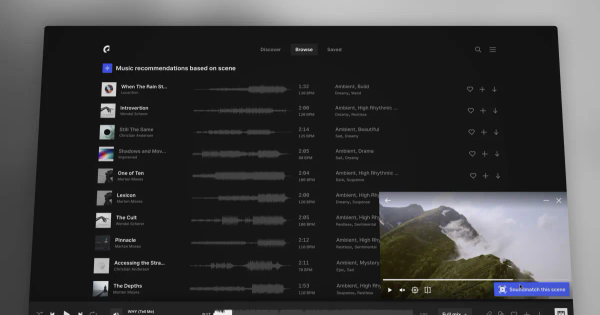
Epidemic Sound Soundmatch is an AI-powered music discovery tool that analyzes video content—whether a rough idea, edit, or final cut—to recommend tailored soundtracks from the platform's catalog of over 50,000 royalty-free tracks and 200,000+ sound effects. By processing visual frames, it generates semantic keywords and leverages insights from billions of daily YouTube views of Epidemic Sound music to suggest scene-specific matches in seconds. It pairs seamlessly with the companion AI tool Adapt (launched 2025 and updated in 2026), which lets users customize tracks by adjusting mood, tone, instrumentation, length, or structure via simple prompts or controls.
Primary use cases include soundtracking YouTube videos, social media reels, commercials, podcasts, corporate content, and independent films. The target audience encompasses video creators, YouTubers, social media marketers, filmmakers, content designers, and small agencies—anyone producing visual media who needs efficient, worry-free audio without manual searching or licensing headaches. As of March 2026 research, these tools form part of a broader AI suite (including chat-based Assistant and full video-to-soundtrack Studio) designed to accelerate creative workflows while maintaining fully licensed usage across platforms.
Key Features & Capabilities
Core functionality centers on video upload or in-player syncing: users mark a specific scene, and Soundmatch instantly delivers personalized track suggestions based on visual analysis and proprietary data matching. Standout features include its data-driven accuracy (powered by real-world performance metrics rather than generic AI), seamless integration with editing software via Adobe Premiere Pro and DaVinci Resolve plugins, and direct linkage to Adapt for on-the-fly modifications—such as removing instruments, extending sections, or shifting from upbeat to chill without losing licensing rights.
Differentiators from competitors like Artlist or Musicbed include ethical AI that enhances (rather than replaces) human-composed music, with expanded artist compensation bonuses; unlimited downloads and global publishing rights under subscription; and stem exports for further editing. All adapted tracks remain fully licensed, with artists paid per use.
Limitations include reliance on an active subscription (no standalone free access beyond a 30-day trial), credit-based usage for Adapt edits (monthly allotment plus optional top-ups), and suggestions that may occasionally require manual preview or tweaking since the AI prioritizes existing catalog matches over full generative creation. It cannot adapt external music files, and video upload limits apply in related tools like Studio (e.g., up to 4 minutes).
User Experience
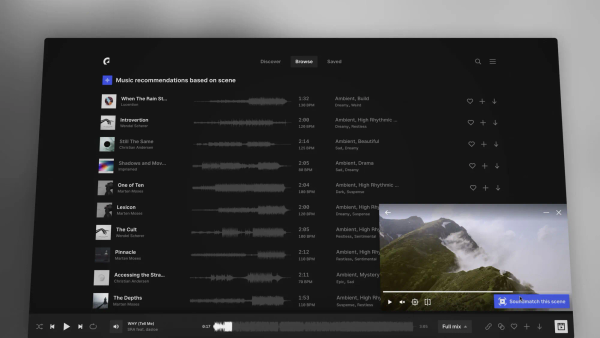
Soundmatch and Adapt feature an intuitive, low-learning-curve interface embedded directly in the Epidemic Sound web player, mobile apps (rated 4.7–4.8 on app stores), and NLE plugins. Creators simply click an icon or "Sync to video" button—no complex setup required—making it accessible even for beginners. The waveform-based Adapt workspace allows drag-and-drop or prompt-driven changes with real-time previews, keeping users in creative flow.
Documentation is robust, with official blog posts, step-by-step help articles, and video guides readily available. Customer support receives generally positive feedback for responsiveness, though some users note occasional delays on billing queries. Overall, 2025–2026 reviews highlight the tools as "time-saving" and "amazing" for efficiency, with Trustpilot averaging 4.8/5 across thousands of reviews praising the polished UI and reliability.
Performance & Reliability
Recommendations generate in seconds, with high accuracy for mood and scene alignment thanks to the platform's vast usage data. Adapt edits process quickly via refined AI (updated March 2026 for better prompt interpretation), delivering professional-quality results without artifacts. Integration across web, apps, and plugins ensures consistent performance, with stems and custom lengths exporting cleanly in WAV/MP3.
Known issues are minimal and mostly general to the platform: rare plugin glitches or licensing verification hiccups reported on Reddit and in older reviews, but 2026 user feedback (including dedicated YouTube roundups) describes the AI tools as stable and improved, with few Soundmatch- or Adapt-specific complaints. Reliability shines in high-volume use, backed by global licensing that prevents copyright strikes when channels are properly linked.
Pricing & Value
Epidemic Sound operates on a subscription model with no free tier for full AI tool access (beyond previews and the 30-day trial). Plans include Creator ($9.99/month billed annually at $119.88) for personal/social use with one monetized channel; Pro ($16.99/month) for freelancers and multi-channel commercial online content; Business ($29.99/month) for agencies; and custom Enterprise options. All include unlimited downloads, Adapt credits, plugins, and worry-free licensing.
Value is strong for regular creators: the time saved on searching and editing often outweighs the cost compared to manual libraries or competitors lacking integrated AI customization. Occasional users may find the subscription less economical, but the all-rights-included model (no PRO royalties or cue sheets) and artist-friendly approach deliver superior long-term ROI versus alternatives.
Practical Tutorial
A common task—finding and customizing music for a 30-second vlog transition scene (e.g., upbeat lifestyle footage)—takes under two minutes using Soundmatch followed by Adapt. Here's a step-by-step walkthrough based on official functionality (as of March 2026):
-
Log into your Epidemic Sound account at epidemicsound.com and navigate to the Music tab (or open the desktop app/player).
-
Click the Soundmatch icon in the search bar (or use "Sync to video" while previewing any track). Upload your video clip or play it directly from your device/files.
-
Place a marker on the specific scene segment (e.g., the transition moment). Hit "Soundmatch" to generate keyword-based recommendations instantly—preview the top 3–5 tracks for mood fit.
-
Select a strong match (e.g., an energetic acoustic track). Open it in the Adapt workspace via the dedicated button or tools menu.
-
In Adapt, use the waveform editor or text prompt field: enter something like "Make it more upbeat, add subtle piano layers, shorten to 28 seconds, remove vocals." Adjust stems individually if needed (drums, melody, etc.), preview changes live, and fine-tune length or structure.
-
Export the customized version (WAV or MP3 with stems optional). Download and drop into your editor—it's fully licensed for publishing.
For visual guidance, watch the official Soundmatch video tutorial (youtube.com/watch?v=Zfc0lVK1vck) or the Adapt how-to at epidemicsound.com/tools/adapt/tutorial/. Real example: Creators using this for real estate reels report perfect sync on first try, with Adapt handling exact timing adjustments.
Final Verdict
Overall rating: 4.7 out of 5. This tool excels for regular video creators who value speed, precision, and flexible customization while ensuring legal safety and artist support—ideal for YouTubers, marketers, and filmmakers producing frequent content. It shines through its data-backed recommendations and ethical AI editing that saves hours without compromising quality.
Avoid it if you're an occasional hobbyist (subscription cost may not justify sporadic use), prefer completely free or generative AI music from scratch, or need tools outside Epidemic Sound's catalog. One-sentence recommendation: For anyone serious about professional video soundtracking in 2026, Epidemic Sound Soundmatch paired with Adapt is an indispensable, time-saving powerhouse worth every penny of the subscription.