Excel Whisper Review: Private AI Data Analysis Made Easy
Overview & Purpose

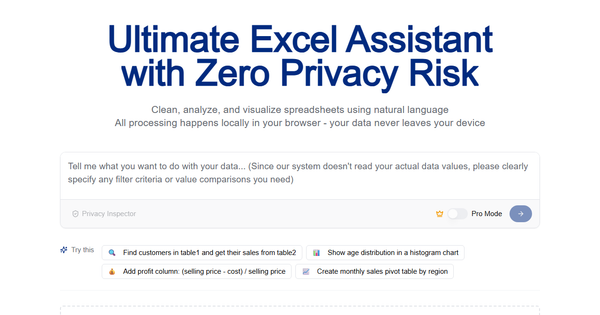
Excel Whisper is a browser-based AI tool designed for analyzing Excel and CSV spreadsheets using natural language queries, with a strong emphasis on data privacy through fully local processing. Users upload files, describe what they want in plain English, and the AI performs data cleaning, calculations, visualizations, joins across multiple files, and more—all without sending any data to external servers. Primary use cases include automating repetitive spreadsheet tasks like generating reports, creating charts, summarizing data with pivot tables, and handling data quality issues for faster insights.
While some descriptions position it as an advanced Excel mentor offering personalized guidance and helping users learn skills through examples, its core strength is practical execution of analysis tasks, which can indirectly aid skill development by demonstrating effective approaches.
Target audience includes professionals such as financial analysts, data scientists, HR managers, researchers, and small business owners who work with spreadsheets regularly. It's particularly appealing to those handling sensitive data where cloud-based tools pose privacy risks. Students and educators may also benefit for learning and teaching data analysis workflows.
Key Features & Capabilities
Core functionality revolves around natural language interaction with uploaded data: ask to clean datasets (remove duplicates, fill missing values), compute new columns with generated formulas (e.g., profit margins), create pivot tables, or generate visualizations like histograms and bar charts. It supports multi-file analysis for combining datasets.
Standout features include its privacy-first architecture—everything runs in-browser using local computation, with only column headers inspected for context—and seamless multi-file handling. Pro mode unlocks more complex operations and sophisticated charts. This differentiates it from cloud-dependent competitors like Microsoft Copilot for Excel or ChatGPT's data analysis, where data must be uploaded.
Limitations or missing features: Relies on device hardware, so very large files or complex datasets may strain performance or be unsupported. It excels at standard Excel tasks but doesn't provide advanced statistical modeling or business strategy insights. Free tier is quite restricted, and there's no native desktop integration or VBA support.
User Experience
The interface is straightforward and web-based: drag-and-drop file upload followed by a chat-like input for natural language commands. This results in a low learning curve—even Excel novices can quickly get results by describing needs rather than memorizing functions. The clean design focuses on functionality without clutter.
Documentation on the site includes use case examples and testimonials, but in-depth guides or video tutorials appear limited. Support is available via email for billing and likely queries. Overall, highly accessible for its target users.
Performance & Reliability
Processing is fast for files within limits due to local execution, avoiding upload/download delays. Response times are praised in site testimonials for efficiency. Since it's device-dependent, performance scales with browser and hardware capabilities—excellent for standard datasets but may slow or limit with massive files.
As a relatively specialized tool, widespread user complaints are scarce in public forums like Reddit as of March 2026 research. Potential issues include occasional AI inaccuracies in interpreting ambiguous queries (common to LLMs) or handling edge-case data formats. Reliability is bolstered by the privacy model, eliminating server-side risks.
Pricing & Value
Excel Whisper offers a freemium structure:
- Free: $0/month – 10 analyses, basic features, small file limits (2 files, 10MB, 10 columns).
- Standard: Mid-tier plan (pricing around $9.90–$20/month per site references) with higher limits (e.g., 200 analyses, 5 files up to 100MB).
- Pro: $19.90/month (discounted from $30) – extensive usage (hundreds of analyses), advanced Pro mode, larger multi-file support, and better performance options.
Value is strong for privacy-conscious users and those doing frequent analysis, as it saves significant time on manual work compared to traditional Excel. Cheaper and more private than many cloud AI alternatives for sensitive data. Heavy users will appreciate Pro for removing restrictions. Free tier is great for testing but insufficient for regular use.
Practical Tutorial
No official video tutorials were found on the site, but here's a step-by-step walkthrough for a common task: analyzing sales data from multiple sources and generating insights. (Based on site examples; test on https://excelwhisper.com/)
- Visit https://excelwhisper.com/ and drag-and-drop your sales_data.csv and customer_info.xlsx files (or use sample data).
- In the query box, type: "Join the customer table with sales data to match customers to their purchases."
- Next query: "Clean the combined data by removing duplicates and filling any missing values in the sales column with the average."
- Then: "Add a new column for profit margin using the formula (selling price - cost) / selling price."
- Follow with: "Create a pivot table showing monthly sales totals by region."
- Ask: "Generate a bar chart visualizing the top 5 products by sales and a histogram of customer age distribution."
- Review the results and visualizations in the interface.
- Click to export the cleaned data, pivot table, and charts as new Excel/CSV or image files.
This process can transform hours of manual work into minutes. For best results, use clear, specific queries and start with smaller test files on Free plan.
Final Verdict
Overall rating: 4.3/5 – A solid, innovative tool that excels in privacy and simplicity for everyday Excel analysis.
It should be used by professionals and teams dealing with sensitive spreadsheet data who want to boost productivity without learning every Excel function or risking data leaks. Students can use it to experiment and learn analysis techniques quickly.
Avoid it if you primarily work with extremely large datasets, require advanced statistical or machine learning capabilities, or prefer deeply integrated add-ins within desktop Excel. Also, if you don't mind cloud tools and need unlimited free usage, other options may suffice.
One-sentence recommendation: For anyone tired of wrestling with Excel formulas while prioritizing data security, Excel Whisper offers an impressively private and efficient AI co-pilot worth trying on the free plan today.